Hi @Acceso al wasabi con permisos ,
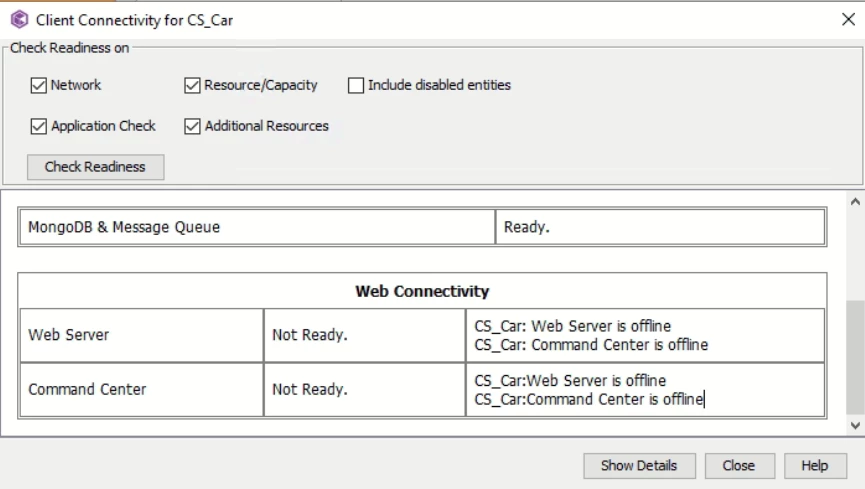
I assume you are referring to the Command Center / Web Server readiness check showing “Not Ready” on the CommServe after upgrading from SP32.122 to SP36.80.
If you can open the CommCell Console normally, it means the core CommServe services are running and the upgrade did not impact the console UI. However, the Readiness Check may still display “Not Ready” until all dependent Web components (WebServer, Command Center) report a healthy state, as the CommServe relies on them for full readiness validation.
Please confirm whether you are using a dedicated Web Server/Command Center or if it is hosted on the CommServe.
You can verify the configured Web Server endpoint from the following registry key:
HKEY_LOCAL_MACHINE\SOFTWARE\CommVault Systems\Galaxy\Instance001\WebConsole
Check the baseURL entry — does it point to the CommServe or to another host?
Test the baseURL in a browser. If it returns “WebService is running”, the WebServer is operational.
If the baseURL points to a dedicated Web Server, log in to that machine and verify the same.
Validate service and port status. Ensure Tomcat is listening on the required ports (typically 80/443) and IIS on 81 (default).
In IIS Manager, confirm that: Application Pools are running and Websites are correctly bound to their respective ports.
If the WebServer/Command Center is hosted on the CommServe -> Stop the Tomcat service -> Run an IISRESET from the command line -> Start the Tomcat service again.
Test the baseURL and Command Center to confirm accessibility.
Once the above checks are complete, re-run the Readiness Check for the CommServe client
Regards,
Dheeraj