




View the complete webinar on-demand.
Commvault Presenters
- Sam Curcuruto - Director, Product Marketing
- Dinesh Reddy - Director, Product Management
- Suzanne Klausner - Director, Global Enablement
Recap & Highlights
This webinar introduces the Commvault Cloud SaaS and 11.44 LTS platform release and explores how organizations are adapting to a world where data is more distributed, identities are more dynamic, and cyberattacks are moving faster than ever. Resilience is increasingly tied to an organization's ability to secure data, control identities, detect risk, and recover cleanly and confidently following disruption.
Platform Release 11.44 reinforces Commvault's commitment to helping organizations move beyond traditional backup toward a unified approach to cyber resilience—enabling teams to protect, detect, recover, and restore with greater confidence in the age of AI.
The session includes demos of new innovations around expanded Identity Resilience and Active Directory security capabilities and integration of Threat Scan and Cleanroom Recovery solutions.
Summary of Key Innovations across the Release
Data Protection
-
Expanded protection for cyber resilience for cloud, hybrid, SaaS, virtualization, Kubernetes, databases, and emerging AI workloads
-
New workload coverage for platforms including Databricks, Snowflake, Pinecone, Microsoft Power BI, Atlassian Jira, and Google Workspace enhancements
Identity Resilience
-
Active Directory Vulnerability Assessments
-
Real-time auditing with one-click rollback
-
Expanded identity protection with Okta support
Data & AI Security
-
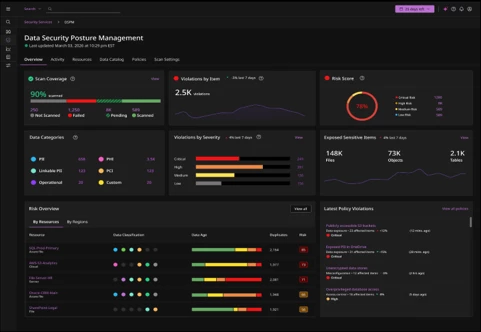
Discovery, classification, and governance of structured data across enterprise data sources
-
AI-aware data access governance powered by Satori
-
Improved visibility into sensitive data and access controls
Cyber Resilience
-
Synthetic Recovery to minimize rollback while recovering trusted data
-
Expanded Cleanroom Recovery with on-premises support and bring-your-own-storage
-
New Threat Hunting capabilities, including Hyper Threat Hunting, Deep Inspection, and enhanced threat intelligence
AI Acceleration
-
Data Activate discovers, governs, enriches, and prepares trusted enterprise data - including backup data- for AI and analytics use cases
-
AI Studio enables organizations to build, customize, and manage AI agents using natural language or prebuilt templates to automate resilience operations
-
MCP Server securely connects AI agents with enterprise systems and Commvault services using the Model Context Protocol
Continue Your Learning Journey
Explore these additional resources for a deeper dive into 11.44 and our wider platform capabilties:
-
SHIFT Nashville 2026 (registration open now)
FAQs
What is Resilience Operations (ResOps)?
-
ResOps is an operating model that turns resilience from a passive checklist into an active discipline by unifying the processes and technologies needed to continuously re-establish trust in data, identities, recoverability, and the ability to bring the business back.
What new identity resilience capabilities were introduced in 11.44?
-
The release introduces Active Directory vulnerability assessments that identify misconfigurations and exposures, real-time auditing that captures and alerts on changes in Active Directory, rollback capabilities that restore the environment to a known good state, and support for immutable backup and recovery of Okta users, groups, applications, and policies.
What is Synthetic Recovery?
-
Synthetic Recovery uses AI-enabled intelligence to restore data to a trusted clean state by automatically creating a composite clean point from previous backups. It identifies clean files from earlier backup versions and rebuilds a new trusted recovery point without manual scripting.
What is Hyper Threat Hunting?
-
Hyper Threat Hunting is a new Threat Scan capability that uses hash-based comparisons against customer-supplied indicators of compromise and indicators of attack to identify compromised data.
What is Deep Inspection?
-
Deep Inspection adds layered file-level analysis using malware signatures, machine learning, heuristic analysis, and AI-driven encryption detection.
What does Data Activate do?
-
Data Activate discovers relevant data, identifies sensitive information such as PII, prepares datasets in a controlled way, and makes them available in AI-ready formats. The process includes governance and enrichment to help reduce risk and maintain compliance.
What is AI Studio?
-
AI Studio allows organizations to build their own agents by describing what they want the agent to do or select from a library of prebuilt agents for common resilience use cases. Agents can be monitored, managed, and integrated with enterprise systems using the Commvault MCP Server.
What training and certification resources are available?
-
The Commvault Readiverse Academy provides technical training, product guidance, short videos, certifications, instructor-led courses, and Tech Talk webinars focused on Commvault products, cyber resilience, and workload protection. Certifications are available for for customers and partners. If you have additional training questions, contact your account owner or customer success manager, or drop us a note here.
Are the new capabilities available for both SaaS and on-premises customers?
-
Most of the capabilities announced are available for both SaaS and installed-software customers. See the documentation or check with your account owner for details.
Can organizations run multiple Cleanrooms between clouds?
-
Yes. Multiple Cleanrooms can run at the same time. Cleanrooms are configured to be air-gapped by default; communication between hyperscalers would require additional network configuration.
What is the recommended retention period for immutable backup copies?
-
Retention requirements depend on an organization's policies. Commvault shared a recommendation of at least 90 days to help cover the median dwell time for many ransomware families, though retention should be tailored to the organization's needs.
This FAQ summarizes questions and answers discussed during the webinar. For complete information, refer to the official Documentation.
If you have additional questions, feel free to ask here in the Community or reach out to your account owner.




