

News

Documentation Site Updates: Recent Changes

  • August 21, 2025
  • 14 replies
  • 410 views
Documentation Site Updates: What Changed After August
Amanda Powell
Vaulter
Forum|alt.badge.img+4

We’ve made some adjustments to the Commvault Documentation site to align the content more closely with the product itself. Nothing is going away, and there are no changes to the SaaS documentation other than a label update in the drop-down menu. We’ve heard a lot of feedback that the terms Essential and Expert are confusing, so we’ve simplified the naming to make it clearer where to find the content you need.

Here are more details on the changes you’ll see:


CommCell Console (Expert) Documentation

The Expert docs will be renamed to “CommCell Console.” The Documentation team will no longer make regular updates to the Expert documentation. Critical updates may still be applied as needed, but customers should expect new content and enhancements to be focused elsewhere. The Feedback tool will remain disabled.


Documentation Site Updates


As of August 2025:

  • The Expert site has been removed from the documentation site’s drop-down menu, but it remains accessible from the documentation landing page (under the new name)
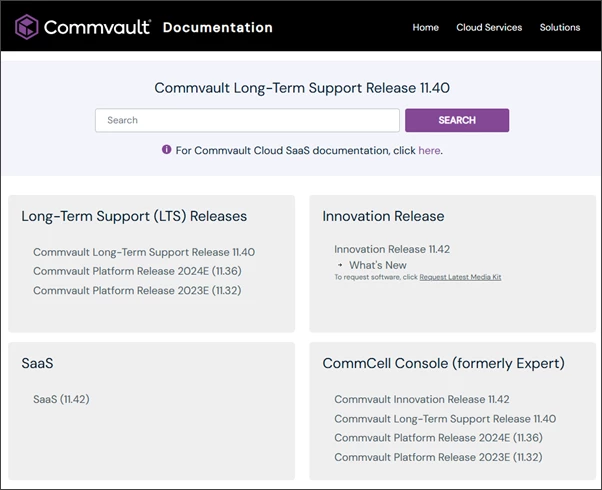
  • All existing inter-site links and bookmarks will continue to work through redirects—no action is needed on your part.
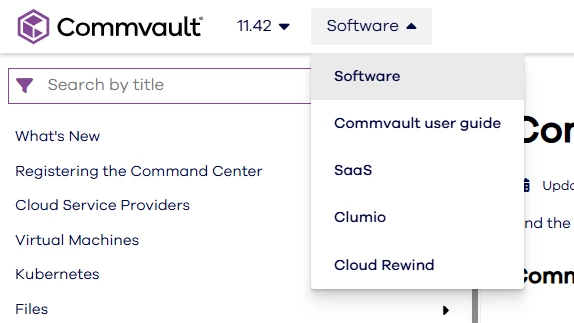
  • Drop-down menu names have been updated for clarity:
    • Essential → Software
    • Commvault Cloud → SaaS
    • Expert → CommCell Console
  • There will be no downtime for the documentation website during these updates.


Updated URLs


What This Means for You

Your existing bookmarks and links will still work, and critical Expert documentation will remain available where it’s needed. These updates are designed to make navigation simpler and to align the documentation site more closely with how our products are used today.


Thank you for your continued trust and feedback as we evolve the documentation experience.

14 replies

Erase4ndReuseMedia
Byte
Forum|alt.badge.img+14

The one-way switch from CommCell Console to Software isn’t a great user experience for the unloved legacy customers.


Forum|alt.badge.img+5
  • Byte
  • August 29, 2025

It seems like another push to move over to their SaaS product.

Unfortunately this has been the way all software vendors have been heading for the past few years and not unique to CV. Kill off the stand-alone and push toward SaaS with the lure of new features or cheaper pricing → customer moves to SaaS -→ then comes the downside, you cant use the software without always being under contract, features disappear and you cant hold your upgrade although you rely on that feature. etc..


Damian Andre
Vaulter
Forum|alt.badge.img+23
  • Vaulter
  • August 29, 2025

Hey folks,

Sharing my perspective on your comments.

 ​@Ponte_Vedra,

Software isn't going anywhere - one of the major benefits to Commvault is the choice - There are large swaths of organization that will never adopt SaaS, and Commault will continue to have software solutions to suit the mode that works best for your organization. There are of course, some workloads like M365 that very difficult to support in a software motion, and where SaaS becomes a more scalable and adaptable way to protect those workloads with ever changing cloud architectures and APIs.

There is a lot of work going on now to bridge the experience between the two deployment models. For example, the onboarding/getting started wizards in command center often differ between software and SaaS - and for many workloads, you might be surprised to hear that they are replacing the SaaS experience with how it functions in software today.

@Erase4ndReuseMedia 

CommCell Console is still available today and no EOL has been announced. There is very minimal additions and improvements (if any) being added, with the new workloads going into Command Center only. From a documentation perspective, this also means very little change is needed to the expert docs since it was (mostly) modeled around that user interface. I still have love for the old way, as many do, but I do appreciate the new way as well, with all the changes and enhancements brought forward over the last few years. There are some new and exciting changes and enhancements on the way for Command Center that I hope to showcase on the community (and, get our customers to weigh in on upcoming changes as well). Stay tuned for that!


Erase4ndReuseMedia
Byte
Forum|alt.badge.img+14

@Damian Andre - I genuinely appreciate your perspective, but from my perspective as a legacy customer - it just seems like death by a thousand cuts, to the point where alternatives are being considered.


Forum|alt.badge.img+9
  • Byte
  • September 2, 2025

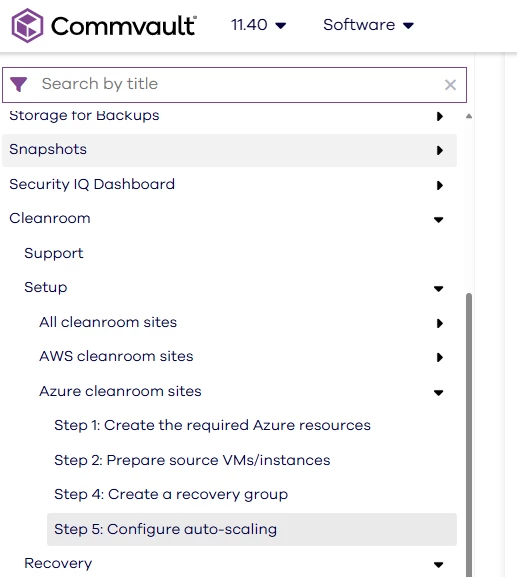
for me I would love to know what happened Step 3 ! It was there last week as I was preparing for a Cleanroom setup.

 https://documentation.commvault.com/11.40/software/configure_auto_scaling_for_your_azure_recovery_group.html


Onno van den Berg
Commvault Certified Expert
Forum|alt.badge.img+20
  • Commvault Certified Expert
  • September 2, 2025

@Erase4ndReuseMedia just to be clear on your feedback aren't you happy with the focus on Command Center? This topic focusses on the documentation and if you're feedback is more oriented on the product itself then we should open a separate topic on it and gather/collect information from customers that will, hopefully, be picked-up by engineering. 


Sougato Roy
Vaulter
Forum|alt.badge.img+9
  • Vaulter
  • September 2, 2025

for me I would love to know what happened Step 3 ! It was there last week as I was preparing for a Cleanroom setup.

 https://documentation.commvault.com/11.40/software/configure_auto_scaling_for_your_azure_recovery_group.html


Hi ​@atitagain,

Thanks for pointing that out in the article! I’ve informed the team so that we can figure out what went wrong and fix it. We'll give you an update as soon as possible.

Thank you!

Roy


Forum|alt.badge.img+5
  • Byte
  • September 2, 2025

There are some new and exciting changes and enhancements on the way for Command Center that I hope to showcase on the community (and, get our customers to weigh in on upcoming changes as well). Stay tuned for that!


I look forward to it - because the current Command Center Interface is difficult to use in a single screen environment(i.e laptop). Having a bunch of browser windows open, or constantly refreshing, endless scrolling in the job controller(may be unique to my situation since we have 100’s of tlog jobs that take a backup every 15min), etc - it makes it difficult to be ‘a single pane of glass view’. I find myself alt tabbing constantly to monitor what’s going on versus the Java view things are just there…

Command center is great when I need to update powerpoint slides for my c-suite.


Erase4ndReuseMedia
Byte
Forum|alt.badge.img+14

@Erase4ndReuseMedia just to be clear on your feedback aren't you happy with the focus on Command Center? This topic focusses on the documentation and if you're feedback is more oriented on the product itself then we should open a separate topic on it and gather/collect information from customers that will, hopefully, be picked-up by engineering. 

My feedback is on the changes to the Documentation site. Removing the option to quickly navigate between “Software” and “CommCell Console” is just one of the ‘cuts’ I later refer to.


Sougato Roy
Vaulter
Forum|alt.badge.img+9
  • Vaulter
  • September 3, 2025

for me I would love to know what happened Step 3 ! It was there last week as I was preparing for a Cleanroom setup.

 https://documentation.commvault.com/11.40/software/configure_auto_scaling_for_your_azure_recovery_group.html


Hi ​@atitagain,

Thanks for pointing that out in the article! I’ve informed the team so that we can figure out what went wrong and fix it. We'll give you an update as soon as possible.

Thank you!

Roy

Hi ​@atitagain,

The article page has been fixed.

Thanks!
 

Roy 


Forum|alt.badge.img+9
  • Byte
  • September 3, 2025

@Sougato Roy thanks for this 


Forum|alt.badge.img+15
  • Byte
  • October 29, 2025

OK ,it’s been a while.

Today I was looking for documentation about CommserveDR reconfiguration and Commserve LiveSync, but both docs.commvault.com or documentation.commvault.com sites are unreachable, connection times out. 

I tried to use the MA chatbot to see if he’d be aware of a current downtime or else.

It linked me to..

Documentation Links:

1st links to https://documentation.commvault.com/2023e/software/external_urls_for_commvault_features.html that’s down

2nd links to https://cloud.commvault.com/status (wow this looked like THE thing I wanted)

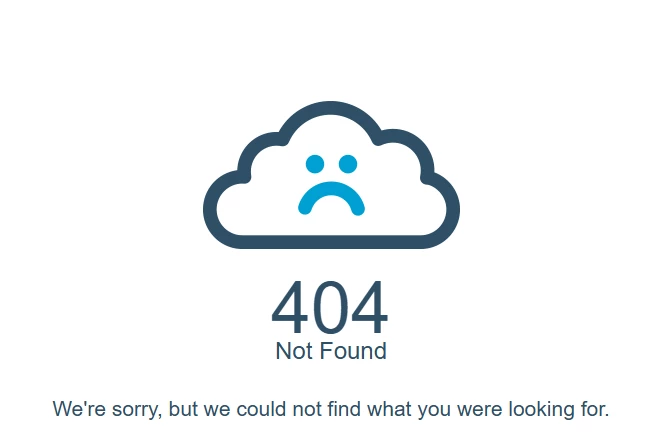
but lands to 404 (sob) 


Sad, isn’t it ?

So I wrote to the bot that the link were down. He replied the usual stuff to troubleshoot by connection (company key datacenter, yes), but at the end mentionned :

Contact Commvault Support

  • If you require urgent documentation or need to report the outage, contact Commvault Support directly via the Support Portal.

There is no alternative official status page for Commvault documentation access.

Would I reach out to MA to mention their doc site is down? Meh. I’d have to classify ticket with job ids and unrelevant stuff.

So, alone, helpless, it’s not an emergency, so I’ll forget this topic, as an old customer used to on-prem software deployed and not SAAS happy..


Jennifer Kelley
Vaulter
Forum|alt.badge.img+17

Hi ​@Laurent thank you for flagging. This is a temporary outage related to the global Microsoft Azure outage. See the broader advisory here. We are working on it and will update when possible - sorry for the disruption.


Damian Andre
Vaulter
Forum|alt.badge.img+23
  • Vaulter
  • October 29, 2025

It looks like the docs site is back up - which is more than I can say for microsoft.com at the moment 😶

This should be in the realm of what you are looking for: https://documentation.commvault.com/2023e/software/commserve_livesync_for_high_availability_disaster_recovery.html