


This is the third installment in our series of articles on the latest capabilities of HyperScale X. Catch up on the first two here: what’s new in HyperScale X in 2022E and the redesign and innovation of the HSX installer.
Today we are going to cover a few of key security features for HyperScale X, and how it provides a secure, immutable storage platform for protecting your business’s critical data.
HyperScale X as Immutable Storage
With the rising prevalence of ransomware, bad actors and new exploits, an immutable storage solution is a key facet in any data protection strategy. Having fast, reliable access to stored backup data can mean the difference between a quick, uneventful recovery of services, or a major impact on your business operations and revenue.
HyperScale X takes a multi-tiered approach to immutability, layering controls at each level in the software stack.
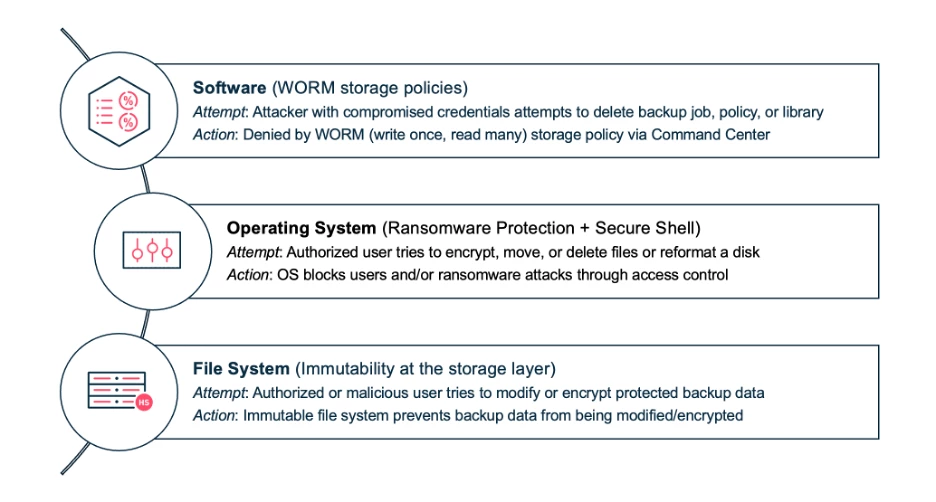
It starts at the policy layer within the Commvault Data Protection software. While not unique to HyperScale X, Retention Lock (previously known as WORM) provides the ability to lock storage policies from modification, ensuring retention cannot be reduced, or removed. Additionally, any clients or storage infrastructure associated with the policy cannot be removed or modified in a way that would prematurely age data. Finally, the Retention Lock setting cannot be disabled by anyone in the CommCell (including admin users) without an authorization code from Commvault. This code can be requested but must be authorized by an officer in your company before the policy can be unlocked. This provides a comprehensive approach to policy enforcement, mitigating the threat of common attack vectors such as social engineering or lateral movement with compromised credentials.
Retention lock is available on all supported versions of Commvault and can be enabled on storage pools and associated plans using the retention lock workflow. For instructions and additional information see Enabling Retention Lock Workflow.
Moving on to the next software layer, HyperScale X is powered by Commvault Distributed Storage. Built into the file system is an immutability feature to further secure your data. Through integration with the Data Protection and Scale out file system, we are able to prevent attackers from bypassing software controls and affecting stored data directly. Commvault Data Protection software stores data in a specific structured format, with data and metadata stored in specific file system structures. By intelligently applying rules on what types of operations can be performed on these files, we are able to prevent ransomware from encrypting files containing critical data required for restore operations. This all occurs at the file system, so regardless of the method of access, user or program accessing the data, or even if Commvault services are stopped, stored data cannot be modified.
HSX File System immutability is enabled by default for all HSX clusters, running HSX platform version 2.2106 or later.
Finally, to round out the immutable storage controls, is HSX Ransomware Protection. While we have controls within the file system to prevent encryption, how do we prevent attackers from bypassing the file system completely and attacking individual partitions or drives? Using kernel level controls, HSX can restrict which users and programs are able to access and modify key storage areas in the system, including the root user. These policies prevent any user or application from modifying the underlying storage devices and partitions that are leveraged by the distributed file system, except for key Commvault Data Protection and Distributed Storage services. Even if an attacker gains user credentials, they will be unable to delete or modify critical files or wipe, re-partition or unmount critical storage devices.
HSX Ransomware Protection is available for all Storage Pools running Feature Release 11.24 or later. See Enabling Ransomware Protection on HyperScale X Media Agents for enablement instructions.
By layering these features together, HSX provides a comprehensive immutable storage solution, blocking common attack vectors and ensuring your critical data is available when you need it.
Restricted Shell / Secure Root
If life has left you with trust issues, this next feature is for you! New with this release, we are expanding on our existing immutable storage features with a new zero-trust control. Restricted Shell takes security a step further by disabling the admin user (root) and limiting all other users to a restricted command set. This environment provides access to an extremely limited set of read-only commands, eliminating local admin access. Access to administrative shell is controlled via Commvault Command Center, protected by role based access controls (RBAC), multi-factor authentication, and SSO. By eliminating local admin access, the attack surface of HSX nodes is significantly reduced.
In addition to providing security, the restricted shell provides a new command line interface (CLI)to provide a convenient interface for gathering system information. New commands scoped to both individual nodes and the entire storage pool make it simple to gather information from all nodes in the cluster without needing to access each node individually.
Enabling Restricted Shell
Restricted shell requires the CommCell be updated to CPR2022E, including the Commserve and HyperScale X Nodes. After ensuring the pre-requisite releases are installed, enabling Restricted Shell is a two-step process. For detailed documentation see Restricting root access on HyperScale X.
- Log into one node within the cluster via SSH (Secure Shell) and run the command to configure restricted shell. This will prompt you for a new password for a non-admin user that will be set up for day-to-day operations. Once the password is provided the script will configure Restricted Shell on all nodes within the cluster automatically. This usually takes less than 30 seconds to complete.
- Once the ‘cvbackupadmin’ user has been created and configured, the root user can be disabled from Command Center. Navigate to the HyperScale X storage pool, then next to each node select “Disable Root User” from the action's menu. This will immediately disable the root user on that node. It can be re-enabled on a temporary basis for troubleshooting or recovery purposes from the same menu. Once root is disabled the cvbackupadmin account should be used for day-to-day maintenance and troubleshooting.
Shell Command Reference
When using the restricted shell with the cvbackupadmin user, you’ll only have access to a limited set of commands. The four main tools you’ll use are the following:
- osupdate – Will start the OSUpgrade process on the HyperScale X cluster.
- enable_ransomware_protection – Enables ransomware protection on the local node
- hs_node – command line utility for running commands on individual nodes.
- hs_cluster – command line utility for running commands on all nodes in the cluster
The hs_node and hs_cluster commands each have several actions that can be used to gather system information and perform basic operations. For example:
- df – prints the usage for each mounted volume on the node.
- Tail – continuously prints the contents of logs files as they update
- Firewall_list_open_ports – lists all open firewall ports configured on the node(s)
- Commvault start/stop/restart – control Commvault services including start, stop, restart
Each of these commands can be run in the scope of a single node or the entire cluster. For example to start Commvault services on all nodes in the cluster, simply run hs_cluster Commvault start. To just start services on the local node, run hs_node Commvault start. For commands like df that provide output information, running hs_cluster df will print the output for all nodes sequentially, labelling the output for each node. This makes capturing information or performing basic maintenance on the nodes much simpler by automating cluster wide actions. For complete command reference see Creating restricted user for HyperScale X.
OS (Operating System) Based Firewall
Also, new for CPR2022E an automated tool for configuring the OS based firewall on HSX. HSX is based on Red Hat Enterprise Linux which includes firewalld, that provides on onboard firewall without the need for external hardware. Using the onboard firewall provides many benefits, including:
- Protects against attacks from compromised systems within the same IP address subnet. Traditionally, network firewalls often serve as a gatekeeper but cannot protect from compromised systems within the same network as the target device.
- The onboard firewall can block unauthorized connections without impacting backup/restore performance, whereas external firewalls can become a bottleneck for both Commvault and other network services. This prevents existing firewalls from becoming a network bottleneck when data protection operations are running.
- Pre-configured specifically for HSX to simplify implementation. All inbound traffic is blocked by default, except for key Commvault service ports, speeding up implementation. Custom rules can be added as needed, for environments with complex networks.
To configure the OS based firewall on HSX, see the following documentation link Enabling Firewall on HyperScale X.
SEC17a-4(f)/FINRA?
Hyperscale X is also fully compliant with and capable of meeting the most stringent regulations required by the SEC, FINRA, and CTFC requirements. For customers with those and similar needs, Hyperscale is an ideal platform for meeting audit, immutability, and discovery requirements with an out-of-the-box solution with no special requirements or licensing.
I hope this has provided further insight into how HyperScale X provides a secure, immutable storage solution for your critical data. Stayed tuned for the next blog in this series covering the latest enhancements to our software upgrades and system monitoring tools.