Answer

Active Directory (Like On Premise but Hosted in Azure VM) Disaster Recovery / NO BOOT SELECTION

  • October 27, 2025
  • 4 replies
  • 50 views

JosserandM
Byte
Forum|alt.badge.img+5

Active Directory Restore process from microsoft require to use ISO to boot

But in AZURE, there is no capacity to boot on ISO

In Azure, you don’t have access to the console before the VM BOOT


Is someone find a solution on this ? or workaround ?

Best answer by Lukas3D

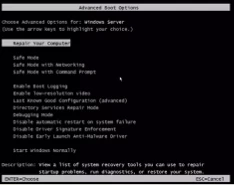
Maybee i m not clear, the VM Restore is ok, the point is to be able to access to F8, in Azure it is looks like not possible see capture or normal f8


I think you should contact MS support on that.  

4 replies

Forum|alt.badge.img+10

Hi ​@JosserandM ,

Good day!

You can try virtualize me in Azure 

https://documentation.commvault.com/2024e/commcell-console/getting_started_with_virtualize_me_feature_for_azure_or_azure_stack_hub.html

Or can go for Full VM backups and restore.

Regards,
Sureshkumar S


Lukas3D
Byte
Forum|alt.badge.img+11
  • Byte
  • October 28, 2025

Hi,

I’m not AD expert, but why would a simple full VM restore not work? In general users cannot boot from ISO in Azure. 


JosserandM
Byte
Forum|alt.badge.img+5
  • Author
  • Byte
  • October 28, 2025

Maybee i m not clear, the VM Restore is ok, the point is to be able to access to F8, in Azure it is looks like not possible see capture or normal f8


Lukas3D
Byte
Forum|alt.badge.img+11
  • Byte
  • Answer
  • October 29, 2025

Maybee i m not clear, the VM Restore is ok, the point is to be able to access to F8, in Azure it is looks like not possible see capture or normal f8


I think you should contact MS support on that.