Answer

Backup Teams User chats

  • May 28, 2025
  • 6 replies
  • 143 views

Forum|alt.badge.img+12

Hi,
we backup our TEAMS chats.
But under “Users”  nothing is backuped.



Is it possible to backup the user TEAMS chats?

Regards
Dennis


Best answer by Mike H

Hi Dennis, 


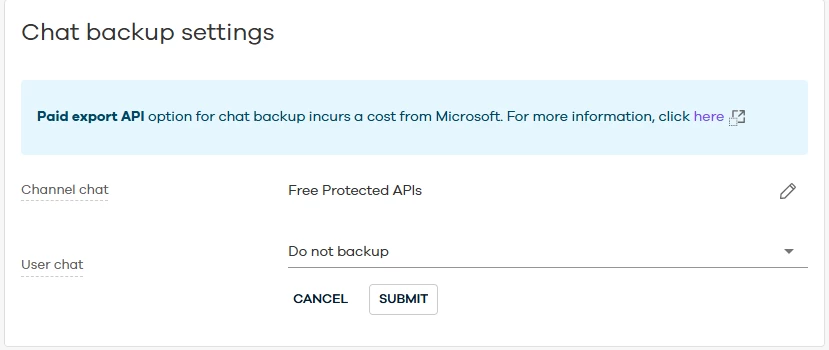
Backing up user chats have a few requirements.  First, this is only supported in 11.34 and higher.  Second, this requires us to use the Microsoft’s paid export APIs which will add some additional costs to your subscription.  Do you have those configured?

https://documentation.commvault.com/2024e/essential/configuring_personal_chat_and_channel_chat_backups.html


6 replies

Forum|alt.badge.img+7
  • Vaulter
  • Answer
  • May 28, 2025

Hi Dennis, 


Backing up user chats have a few requirements.  First, this is only supported in 11.34 and higher.  Second, this requires us to use the Microsoft’s paid export APIs which will add some additional costs to your subscription.  Do you have those configured?

https://documentation.commvault.com/2024e/essential/configuring_personal_chat_and_channel_chat_backups.html


Forum|alt.badge.img+12
  • Author
  • Byte
  • May 28, 2025

Thanks. OK no we don’t uses this.
 

Regards
Dennis


Nikos.Kyrm
Byte
Forum|alt.badge.img+15
  • Byte
  • September 15, 2025

Hello ​@Mike H and ​@Dennis ,

Teams personal chats are part of the Exchange Online mailbox. ​@Mike H According to the provided documentation, the paid API seems to be associated with the Teams app.

So, is it mandatory to configure the Teams app as well in order to back up Teams personal chats?


Please for your feedback.
Nikos


Forum|alt.badge.img+7
  • Vaulter
  • September 15, 2025

Hello ​@Mike H and ​@Dennis ,

Teams personal chats are part of the Exchange Online mailbox. ​@Mike H According to the provided documentation, the paid API seems to be associated with the Teams app.

So, is it mandatory to configure the Teams app as well in order to back up Teams personal chats?


Please for your feedback.
Nikos

Yes.  A few years ago MSFT allowed us to pull that data directly from the mailbox using EWS, they saw it as a security hole and something EWS should not have been able to access.  The only way to get User Chats is with the paid export APIs


Nikos.Kyrm
Byte
Forum|alt.badge.img+15
  • Byte
  • September 16, 2025

Hello ​@Mike H 

Thanks for your reply!

I understand that these days “The only way to get User Chats is with the paid export APIs”, but the configuration for these paid export APIs take place to Commvault Teams App or to Commvault Exchange Online App (as before)?

Nikos


Nikos.Kyrm
Byte
Forum|alt.badge.img+15
  • Byte
  • September 16, 2025

I just got a reply from a related case 250916-405.
 

Microsoft has recently made some changes, and 1:1 chats are no longer stored in Exchange Online mailboxes. Because of this, additional charges will apply if you decide to enable the Teams chat backup feature.

Please check the information below. 


That statement is no longer accurate due to changes made by Microsoft.

  • Previously: Teams 1:1 and group chats were journaled and stored in hidden folders within the respective users' Exchange Online mailboxes (e.g., Conversation History\Team Chat or TeamsMessagesData).

  • Currently: Teams chat messages are not backed up using the Exchange Online agent because Microsoft has changed how and where these messages are stored. They are no longer journaled through to users' mailboxes in a way that allows backup via Exchange Online.

Key Points:

  • Teams chat messages are now stored in a location that is not accessible via Exchange Online mailbox backup.

  • Protection and restore of Teams chat data must be handled through the Microsoft Teams app in Commvault, not through Exchange Online.

Reference:

  • Teams chat messages are not backed up using the Exchange Online agent anymore because of changes made by Microsoft.

  • Previously, team conversations were stored in the Office 365 Group Mailbox, in a hidden folder called Conversation History\Team Chat. Starting October 2020, they are stored in TeamsMessagesData.

Documentation Links: