




Question

1-touch QSDK communication error - network topology problem?

  • August 18, 2025
  • 7 replies
  • 99 views

Forum|alt.badge.img+6

Hi,

I’m trying to test 1-touch restore for Windows. When I’m trying to connect to Commserve, there is a “failed to setup a communication (QSDK) session” error:
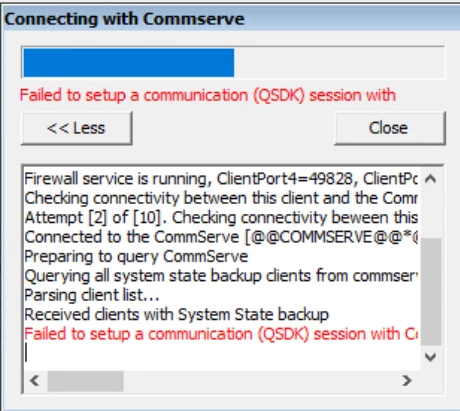
 

You can observe that the initial connection was succesful (“connected to comserve”). But then there is this QSDK problem. I checked the logs and there is info that it could be no direct tunnel or couldn’t bring any automatic tunnels to commserve.

I think it could be the problem with network routes / topologies on Commserve, but here is a question:


How can I setup network route or topology to client which not exist yet?


I mean when I start 1-touch wizard and configure network connection to Commserve, it is not a real client but just some host with random hostname so how Commserve could know what network settings apply to this client?

I can setup some topology to some group but what client should be there? With this initial step of 1-touch I didn’t enter any client information yet.


PS: I restarted the Commands Manager service and tried to play with groups, routes and pseudoclients and ONCE somehow I successfuly connected to Commserve and went to next step but cannot reproduce it.

PS 2: There is 8403/TCP opened bidirectionally between Commserve and this client.

7 replies

Forum|alt.badge.img
  • Vaulter
  • August 19, 2025

hey ​@mateusznitka , can’t say much from the error SS, can you please escalate it to Commvault.


Forum|alt.badge.img+6
  • Author
  • Byte
  • August 19, 2025

Hi ​@jogo, still the most important question is: how setup network route or topology for 1-touch temporary client?


Forum|alt.badge.img
  • Vaulter
  • August 19, 2025

There is no specific topology required for 1-touch temporary client. Similar topology as you have configured for other clients, if any, will work.


Forum|alt.badge.img+6
  • Author
  • Byte
  • August 19, 2025

But when I create a topology or network routes, I have to choose certain groups and then this settings apply to clients inside this groups. So 1-touch temporary client cannot be in any group because it doesn’t exsist in Commserve. So how can you set anything to this client? 

Additional question: What is the 8114/TCP port for? In my observations only 8403/TCP is used but documentation mentions this one too.


Forum|alt.badge.img
  • Vaulter
  • August 19, 2025

In this case, if CS initiated connection is there then, you need to create a gateway client from Manage → server → add gateway and give hostname as IP and client name as <sourceclientname>_Recovery, and then add this client in the required server grps. and in ISO you can select “CommServe will reach this machine….” and give port 443 there. 
For other topologies like gateway no need to create client, you can simply give the gateway hostname in the iso instead of CS hostname and on the next screen select required server groups.

Additional question: What is the 8114/TCP port for? In my observations only 8403/TCP is used but documentation mentions this one too.

Can you please share the link for this one?


Forum|alt.badge.img+6
  • Author
  • Byte
  • August 19, 2025

Can you please share the link for this one?

https://documentation.commvault.com/2024e/essential/port_requirements_for_commvault.html 


I did conect to Commserve somehow few times, but in most cases it gives me QSDK error. I don’t know why sometimes it let me in and sometimes not. For example I have an error, I changed whatever - for example DNS address to second one - but this first one was good too - and it let me in. Then set previous DNS again and it was ok too. Strange.


Forum|alt.badge.img
  • Vaulter
  • August 19, 2025

We don’t need port 8114 for windows onetouch anymore, thanks for bringing it to our notice, we will update the Doc.


I did conect to Commserve somehow few times, but in most cases it gives me QSDK error. I don’t know why sometimes it let me in and sometimes not. For example I have an error, I changed whatever - for example DNS address to second one - but this first one was good too - and it let me in. Then set previous DNS again and it was ok too. Strange.


Please escalate this to commvault.

