


Answer

1 touch windows restore fails without error description

  • March 11, 2024
  • 2 replies
  • 242 views

Forum|alt.badge.img+6

Hi Community,


When i try to restore a windows 2019, after the disk mapping step, it is getting blocked without message error;
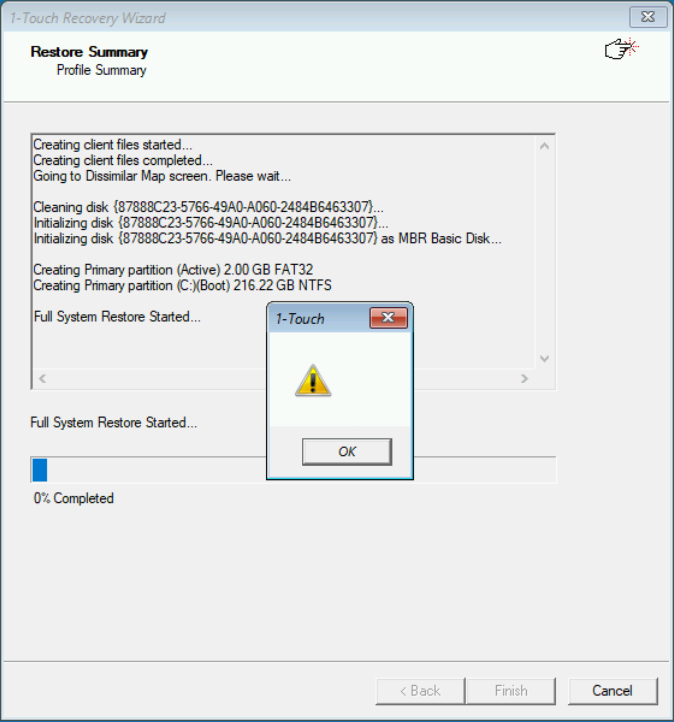
Can anyone help me to sort out this problem?

Thank you in advance.

Best regards.

Best answer by Sebastien Merluzzi

HI @sauvegarde ,

Can you review the logs:

https://documentation.commvault.com/2023e/expert/1_touch_client_fails_to_start.html#step-2-check-clrestorelog

https://documentation.commvault.com/2023e/expert/1_touch_client_fails_to_start.html#step-3-verify-the-log-files-on-the-client

You should be able to see the Client in the Commcell Console and Send the Logs from there too.

Also, which version and ISO are you using?

Let me know

Best Regards,

Sebastien

2 replies

Forum|alt.badge.img+14

HI @sauvegarde ,

Can you review the logs:

https://documentation.commvault.com/2023e/expert/1_touch_client_fails_to_start.html#step-2-check-clrestorelog

https://documentation.commvault.com/2023e/expert/1_touch_client_fails_to_start.html#step-3-verify-the-log-files-on-the-client

You should be able to see the Client in the Commcell Console and Send the Logs from there too.

Also, which version and ISO are you using?

Let me know

Best Regards,

Sebastien


Forum|alt.badge.img+6
  • Author
  • Novice
  • March 14, 2024

Hi @Sebastien Merluzzi ,

Thank you for the tips. i am using ISO “1Touch_REL11_28_52_WinPE10_x64” as my Comcell version is 11.28.100.

As per my knowledge, i can’t find exact error from the log files. Anyhow, by turning of the souce machine i have managed to pass this step, now i am stuck with MSD driver missing error 😥. For which i have created another topic.

Best Regards,

