




Answer

2fa Could not add security key

  • January 21, 2022
  • 9 replies
  • 193 views

Robert Horowski
Community All Star
Forum|alt.badge.img+12

Hi!

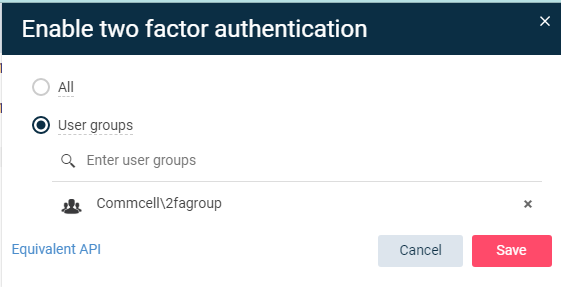
In my lab I’m trying to add a Yubikey compatible key as 2FA for a user. For this reason I’ve created a dedicated group, put a user in it and in Manage → Commcell, enabled 2FA for created group.
 

Now I am trying to add a key for a user but this won’t work. I go to a user details, click add security key,
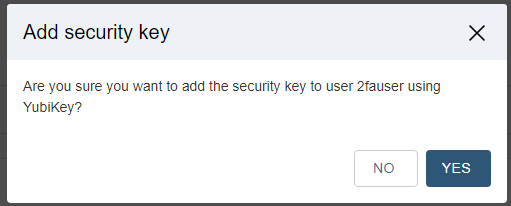
answer Yes when prompted and it fails there.

 

This happens even before I’m asked to put anything into my USB port.

Is there anything I’m missing here?

I’ve tested this on 11.25.14 and 11.26.3 and results are the same.

Any suggestions would be appreciated.


Regards,

Robert

 

Best answer by Robert Horowski

Hi @Mike Struening 


The case seems to be solved and the solution is trivial: you need to type hostname/domain name as url for your Command Center for this to work. Since this is my lab I was using IP address to type url to my Command Center and this way it won’t work.


(Example: https://customer.example.com/commandcenter/ )  and not an IP address (Example:  https://111.11.111.11/commandcenter/  )


Thanks!

If you have a question or comment, please create a topic

9 replies

Mike Struening
Vaulter
Forum|alt.badge.img+22

Hi @Robert Horowski , thanks for the thread!

I looked through our entire internal incident database and can’t find anything for this.

I’ll ask internally though I’m leaning towards getting a support case created.


Mike Struening
Vaulter
Forum|alt.badge.img+22

@Robert Horowski , heard back.  Definitely open up a case so we can look deeper.


Robert Horowski
Community All Star
Forum|alt.badge.img+12
  • Author
  • Community All Star
  • January 26, 2022

Hi @Mike Struening 

Just to let you know I am working with support on it. Hopefully this will only be a misconfiguration. I will let you know.


Mike Struening
Vaulter
Forum|alt.badge.img+22

Great, I’m definitely hoping it’s a quick and simple fix!

Can you share the case number with me for tracking/follow up purposes?

Thanks!!


Robert Horowski
Community All Star
Forum|alt.badge.img+12
  • Author
  • Community All Star
  • January 27, 2022

Sure, no problem, the incident number is 220122-151


Mike Struening
Vaulter
Forum|alt.badge.img+22

Thanks!  I’ll keep an eye on it.


Robert Horowski
Community All Star
Forum|alt.badge.img+12
  • Author
  • Community All Star
  • Answer
  • January 28, 2022

Hi @Mike Struening 


The case seems to be solved and the solution is trivial: you need to type hostname/domain name as url for your Command Center for this to work. Since this is my lab I was using IP address to type url to my Command Center and this way it won’t work.


(Example: https://customer.example.com/commandcenter/ )  and not an IP address (Example:  https://111.11.111.11/commandcenter/  )


Thanks!


Robert Horowski
Community All Star
Forum|alt.badge.img+12
  • Author
  • Community All Star
  • January 31, 2022

Also for the benefit of community: I’ve tested this on Yubikey and OnlyKey and both works.


Mike Struening
Vaulter
Forum|alt.badge.img+22

Thanks, @Robert Horowski !!


