Answer

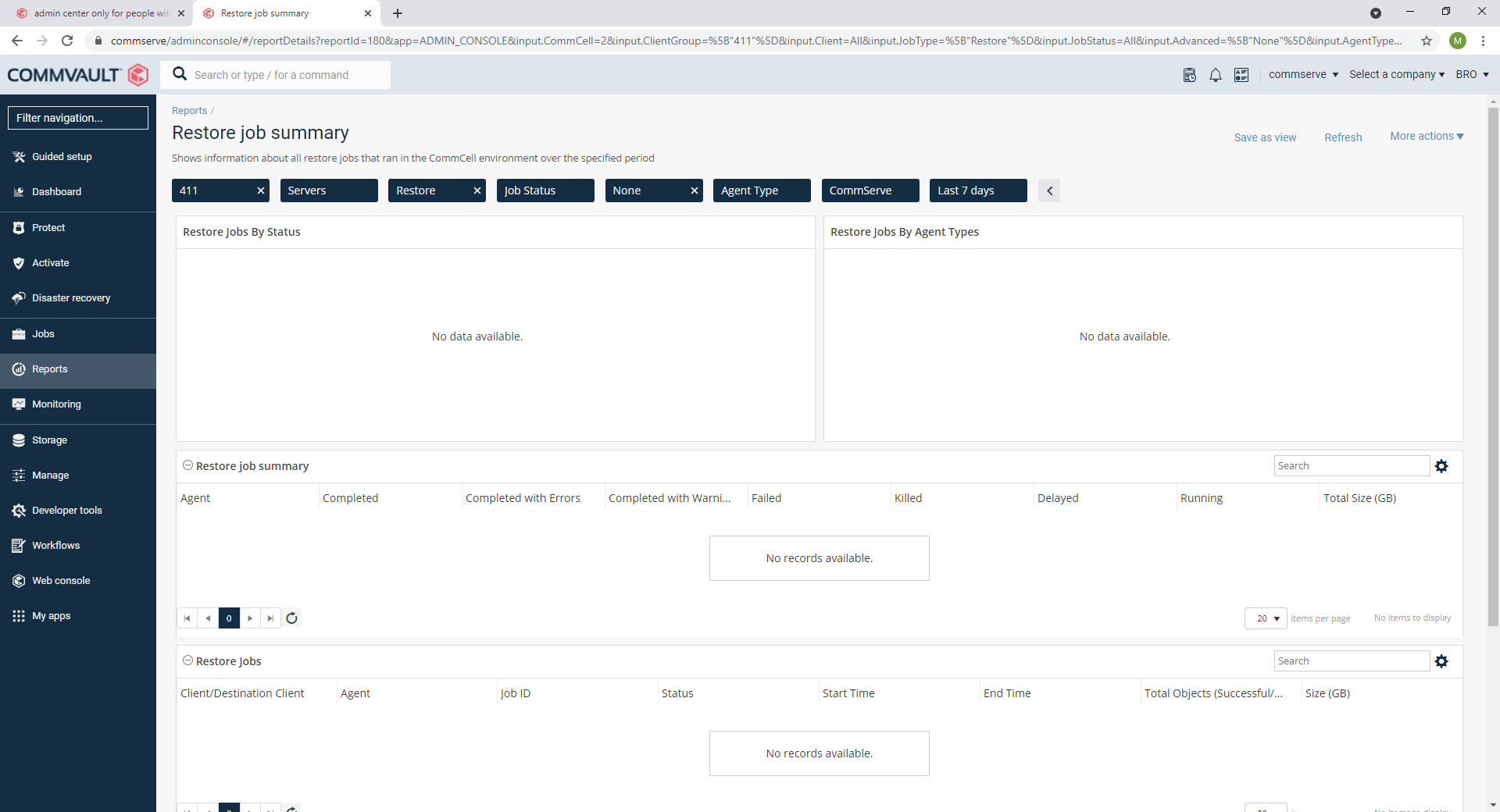
admin center only for people with a very good sight :)

  • May 26, 2021
  • 12 replies
  • 144 views

Bart
Novice
Forum|alt.badge.img+12

Since we run 11.22 , we have the following in the reports.
The report selection boxes are unreadable (white on light gray)...to be honest...I’m not young, but also not that old, so I think that’s a problem with Commvault admin center :)




Best answer by Mike Struening

Adding CMR number: 319964

12 replies

Forum|alt.badge.img+2

Bart,


Are there any customizations done on your setup ?


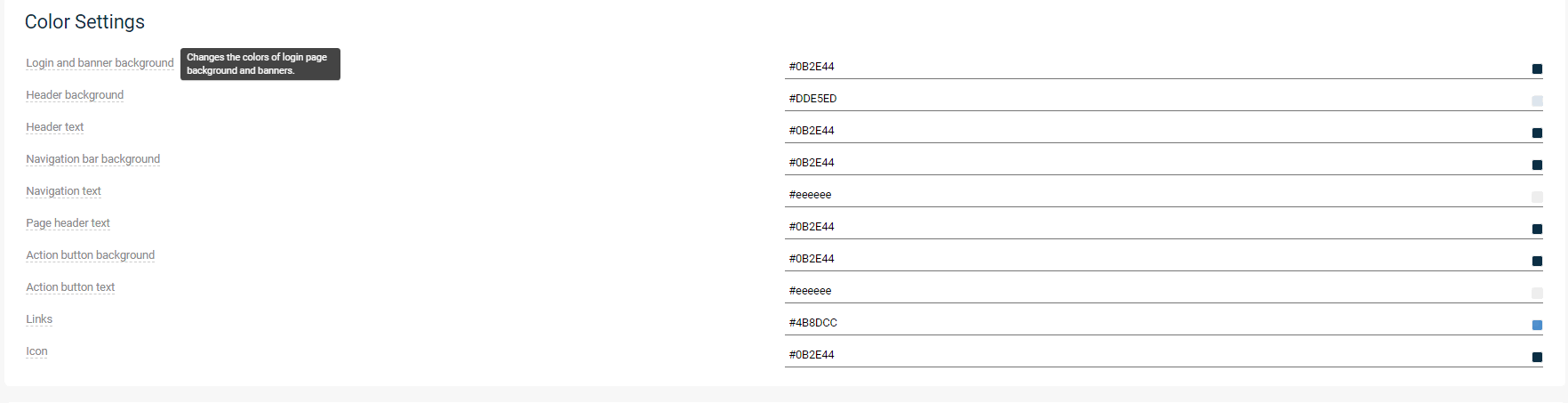
Can you please send a screen shot of your customizations section from the command centerso that we can reproduce this in house and provide a fix.


Bart
Novice
Forum|alt.badge.img+12
  • Author
  • Novice
  • May 26, 2021

No customisation on our end, only the logo has been modified.


MFasulo
Vaulter
Forum|alt.badge.img+11
  • Vaulter
  • May 26, 2021

what browser and minor release of 11.22 are you on?  It shouldnt show light grey:


Bart
Novice
Forum|alt.badge.img+12
  • Author
  • Novice
  • May 26, 2021

bowser:

  Chrome on Linux & Chrome on Windows, different systems. different webservers (admin centers)
cv version 11.22.25


This is the problem:


#reportArea #inputElements .no-value-selected {

background-color: #e4e7ea;

color: #2f4e66;

}


The customization is default:


color code e4e7ea is not mentioned there, so it must be “hardcoded”, and it cannot come from the customization. (anyway, months ago we didn’t have this issue)

I will override the css as workaround (as soon as the system works again, because I managed to crash the admin center by opening the default report), but it should be clearly visible by default of course.


Forum|alt.badge.img+2

Bart,


We are aware of an issue where a change made in customization is affecting the reports.

We have already provided the fix for this in form  2871 which is available in hot fix pack 11.22.26.


Thanks,

Jagadeesh.


Bart
Novice
Forum|alt.badge.img+12
  • Author
  • Novice
  • May 26, 2021

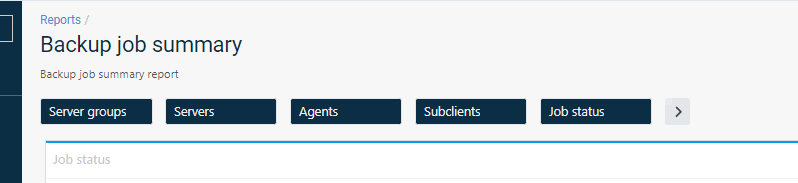
after the manual css override:


Bart
Novice
Forum|alt.badge.img+12
  • Author
  • Novice
  • May 27, 2021

@Jagadeesh Nuthakki does that 11.22.25 also have a problem with emailing attachments?

As we don’t get the attachmnents in the mail aymmore. (sigh)


Mike Struening
Vaulter
Forum|alt.badge.img+22

@Jagadeesh Nuthakki , before we close this off, can you confirm the fix addresses the email attachment issue @Bart is having?

Thanks!


Bart
Novice
Forum|alt.badge.img+12
  • Author
  • Novice
  • June 9, 2021

for me it was working already with my workaround. It was funny tho. Was attending a webinar last week, and they were giving a demo with the command center, and they had exactly the same issue.

Anyway, the update to 11.22.27 also seems to have helped, but no guarantee as my workaround is also still in place. (as it also created a memory leak 😛 )


Regarding the mail attachments, that’s a new bug in CV. If you create a report  , and you give it a name with a ‘:’ in it, then it will fail, because commvault tries to create a temporary file with ‘:’ in it, which is not allowed on windows. I did report that to CV, and I showed them what the problem is, but the response was: as you know what the workaround is, let’s close the ticket :)


Mike Struening
Vaulter
Forum|alt.badge.img+22

Hey @Bart , can you send me the case where they responded with that workaround?  I want to press for an actual fix to prevent this from being allowed.

I can split this off into another thread if needed.

Also, see if you can disable your workaround to confirm the email looks better with 11.22.27.


Mike Struening
Vaulter
Forum|alt.badge.img+22

Hey @Bart !  I see the incident is getting the traction deserved:

As per my next steps, I'm happy to raise a CMR to include validation on the "Custom Report Name" field to ensure the windows file naming convention is not violated.

I'll proceed with that CMR now and advise once complete.

Incidentally, if you strictly require the appearance of a colon within your file name, you may use the unicode character "Modifier Letter Colon". This has a code point of U+A789 and looks like this ""

I’ll hold this open until we have a CMR number.


Mike Struening
Vaulter
Forum|alt.badge.img+22

Adding CMR number: 319964