
Arlie won't go away

  • April 25, 2026
  • 5 replies
  • 70 views

SoundTheDreadAlarm
Novice
Forum|alt.badge.img+1

Every time we install a Commvault patch it re-enables Arlie.  Commvault - stop trying to make Arlie happen.  It’s horrible, we want it disabled - it isn’t going to happen.

I have disabled Arlie in our two CommServes after every update, and yet it re-enables itself and causes annoyances such as:

2373079<SUP>* </SUP><BR>(F)

Workflow Management

04/25/2026 8:00:01

04/25/2026 8:05:02

0:05:01

<LI>Job Type: AI-JOB-FAILURE-INSIGHTS


I normally don’t comment like this but it really does suck.

Fix it.  Honestly, AI shouldn’t be a part of every platform - I think integrated into your software is a waste of time.


5 replies

Sougato Roy
Vaulter
Forum|alt.badge.img+11
  • Vaulter
  • April 27, 2026

Every time we install a Commvault patch it re-enables Arlie.  Commvault - stop trying to make Arlie happen.  It’s horrible, we want it disabled - it isn’t going to happen.

I have disabled Arlie in our two CommServes after every update, and yet it re-enables itself and causes annoyances such as:

2373079<SUP>* </SUP><BR>(F)

Workflow Management

04/25/2026 8:00:01

04/25/2026 8:05:02

0:05:01

<LI>Job Type: AI-JOB-FAILURE-INSIGHTS


I normally don’t comment like this but it really does suck.

Fix it.  Honestly, AI shouldn’t be a part of every platform - I think integrated into your software is a waste of time.



@SoundTheDreadAlarm Thank you for flagging this issue. We’ve reported it and will update you here as soon as we have more details. 


Hey ​@SoundTheDreadAlarm  ,

You’ve hit on a crucial point, AI doesn't belong in every corner of every platform. We really appreciate your perspective on this. Our goal with this integration is specifically to provide end-users with faster troubleshooting pointers to resolve job failures. We are currently exploring ways to make this feature optional based on user preference.

In the meantime, could you share more about the specific issues or observations you encountered?
Your firsthand experience would be incredibly valuable as we refine how our system handles job failure diagnostics.

Thanks for helping us make the platform better.


  • Novice
  • April 28, 2026

Hey ​@SoundTheDreadAlarm 

Could I ask where/how you disabled Arlie AI for this particular issue you encountered ?

I see the same annoying formatting in our HTML reports and would like it to return to normal.
Just upgraded MR only from 40.42 to 40.47
It’s the first time I see this behavior.


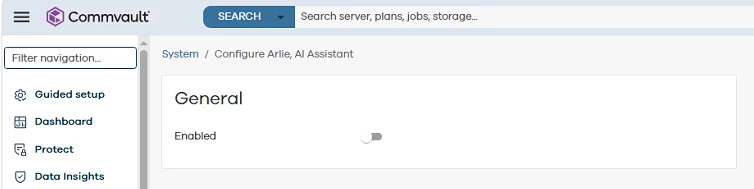
I had a look myself and Arlie already seems disabled under Command Center:

Manage > System > Configure Arlie AI Assistant


  • Novice
  • April 29, 2026

Got the following feedback via the Dev Team.

Proposed Action:
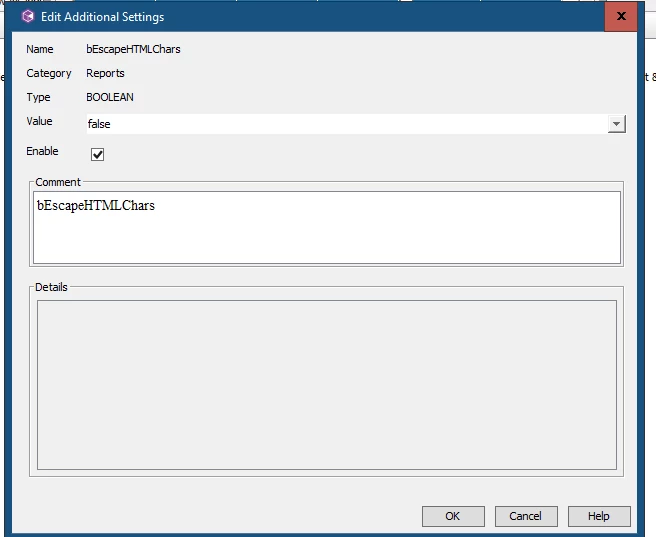
Please add the additional setting on the Commserve, 'bEscapeHTMLChars' with the value False and then re-test the CommCell console reports.

When set to False, HTML tags in the report output will be rendered correctly in the browser, resolving the display issue.


SoundTheDreadAlarm
Novice
Forum|alt.badge.img+1

Just make this toggle persistent through upgrades and have it shut off all AI and that report.  This is what happens when you disable it.  It just RE-ENABLES ITSELF.  Knock that function off!  That’s the point of the thread!  “Workarounds” for broken functionality re-enabling itself isn’t the point.