Question

Auto-start services when OS starts and LiveSync

  • March 12, 2026
  • 3 replies
  • 33 views

Forum|alt.badge.img+5

Hi,

In the CommServe LiveSync (11.40) environment on the active server, the “Auto-start services when OS starts” option is grayed out.
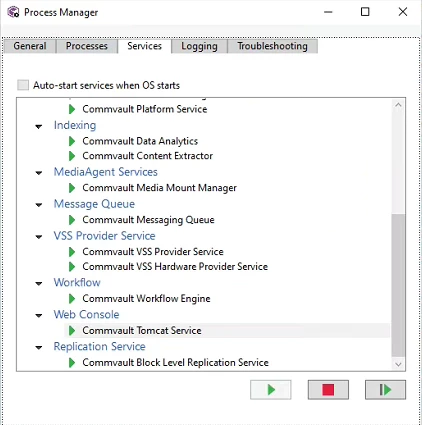
Only after entering the following commands can the checkbox be selected:


gxadmin.exe -consoleMode -enableautostartoption true

gxadmin.exe -consoleMode -setsvcstartmode Automatic


...but after some time the checkbox becomes inactive again.


The following article contains that this option is managed by failover.

https://documentation.commvault.com/11.40/software/enabling_or_disabling_commserve_livesync.html

“After you enable the CommServe LiveSync feature, the Auto-start services when OS starts option in process manager is disabled and controlled by the CSLiveSync feature.”


During failover, it disables all services on one Commserve and enables them on the other, then does the opposite during failback. It also reverses live sync replications and a few other things.

However, shouldn't this checkbox be checked in such a normal scenario? Shouldn't it be checked and grayed out (preventing manual changes)?

This description from the documentation refers more to the fact that this checkbox is “greyed out” - not whether it should be checked or unchecked.


Is this a bug or intentional behavior?


Regards,

Michał

3 replies

Forum|alt.badge.img+4
  • Vaulter
  • March 12, 2026

Hi Michal,


As you noted, per the article, when CSLiveSync is enabled the box is greyed out and then service management is handled by the CSLiveSync feature.


Checking this box in a normal configuration just sets the services in the Windows service control manager to start Automatically as opposed to manually. 


Therefore, I believe what you’re seeing makes sense for a LiveSync environment, as Commvault does not want Windows to make decisions about which services should and should not be started.


We need to ensure only one set of Commserve services are running as when the Commserve services are running on both nodes it can lead to undesired behaviour.


I believe that the second instance on both Commserves can be set to start automatically, as Instance002 is running the sync operation, Instance001 is the Commserve.


I hope this answers the question.


Regards,
David Dwyer


Forum|alt.badge.img+9

Hi ​Michal,

This behavior is intentional and not considered a defect.

When CommServe LiveSync is enabled, the “Auto-start services when OS starts” option in Process Manager becomes disabled (grayed out) and is managed entirely by the LiveSync functionality. As a result, users cannot manually enable or disable this setting.

LiveSync automatically controls service startup and shutdown during failover and failback operations. The checkbox may appear either selected or unselected, but it remains non-editable while LiveSync is active. Its actual state is determined by LiveSync based on whether the node is currently active or passive.

If the option is manually enabled through gxadmin.exe, the change may appear temporarily. However, LiveSync will eventually regain control and disable (gray out) the option again, which matches the behavior you observed.

This is documented here - Enabling or Disabling CommServe LiveSync


Regards,

Dheeraj


Forum|alt.badge.img+5
  • Author
  • March 20, 2026

Hi,

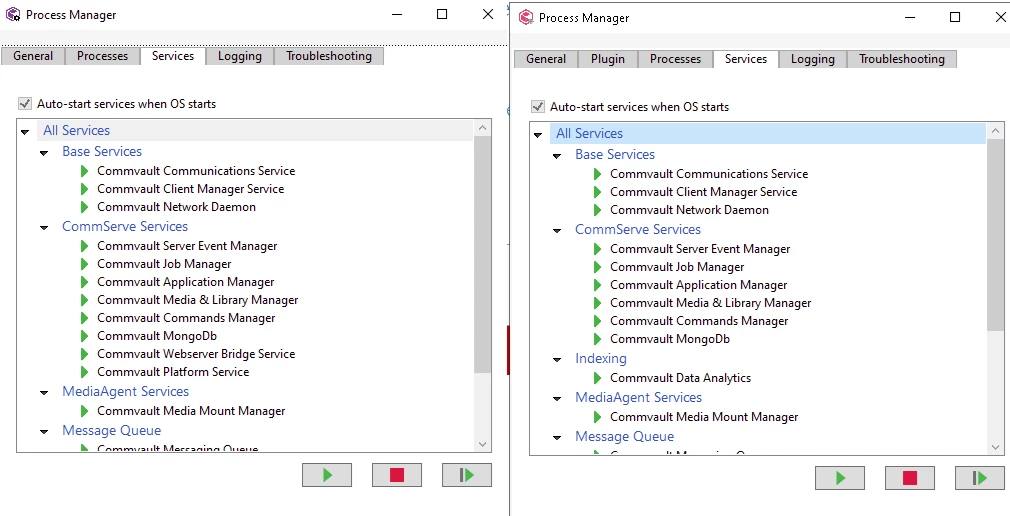
In any other environment, this checkbox is obviously “grayed out/disabled,” but underneath, the checkbox is marked:

This is a screenshot from two different CommServes on Windows systems at different clients. The first instances - the CommServe is active.

The problem isn’t that the checkbox is disabled/grayed out—it’s that underneath, the checkbox isn’t selected on the first instance of the active CommServe.

Because in practice, after the reboot during our work, the CommServe services on the first active instance started up. In services.msc, they’re also marked as automatic.

This raises the question of whether this might just be a visual bug.


Regards,

Michał