Question

Backing up TDE enabled SQL databases

  • November 25, 2025
  • 4 replies
  • 26 views

Forum|alt.badge.img+2

Hi all,

We encrypted our databases with TDE in a pilot project and figured that Commvault SQL module makes the backup 8 times larger compared database dump on the disk (SQL 2016, compression enabled).

What is recommended Commvault configuration so that we retain the size SQL Server can achieve? We moved from filesystem backup to native backup few years ago and currently it looks like we need to move back! 

Has anyone implemented this with good results, please? 

Thank you.

4 replies

Forum|alt.badge.img+11
  • Vaulter
  • November 25, 2025

@Ales Vrbas  - I would open a ticket with support on this. it could be that your still backing up the sql db natively which will cause CV to convert the backups to a full. 

the logs would help determine what is happening. normally TDE backups do not dedupe well at all because of the encryption.


Sunil
Vaulter
Forum|alt.badge.img+13
  • Vaulter
  • November 25, 2025

Hi ​@Ales Vrbas ,

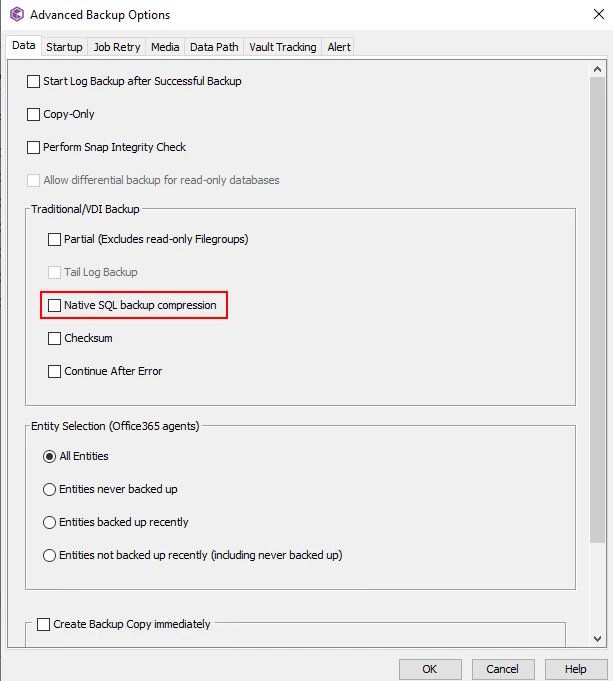
Did you enable SQL native compression for Commvault backups also? Instance level compression option does not affect CV backups as CV uses VDI interface.


Thanks,

Sunil


Forum|alt.badge.img+2
  • Author
  • Bit
  • November 25, 2025

Thank you both for your responses.

We were in touch with the CV support but they didn’t know at the point of our conversation. Took it offline and came with instructions a day later. We tested it and it works! 


Sunil
Vaulter
Forum|alt.badge.img+13
  • Vaulter
  • November 25, 2025

Thank you both for your responses.

We were in touch with the CV support but they didn’t know at the point of our conversation. Took it offline and came with instructions a day later. We tested it and it works! 


Yes, this is the option I was talking about.

Glad you have it resolved.


Thanks,

Sunil-