




Hello,
I'm trying to perform bare metal restore on a windows client to a different hardware and getting the following error
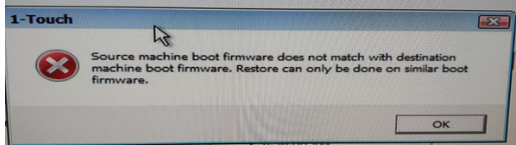
the option supposed to be available

what can cause the issue?
Best regards,
Hello,
I'm trying to perform bare metal restore on a windows client to a different hardware and getting the following error
the option supposed to be available
what can cause the issue?
Best regards,
Best answer by Sridhar Rangu
We need verify that machine booted into the right firmware or not. please follow the steps mentioned here and see if it showing correctly.
Verify that the Onetouch.log file is present in the following path.
X:\CVBMR\OneTouch\LogFiles
Tue Sep 24 16:42:34 2019 : SOneTouchFile::GetOneTouchInfoFileParsed - Error: Boot firmware does not match [source machine boot firmware = 1], [destination machine boot firmware = 0] (0=BIOS, 1=EFI, 2=UNKNOWN)
To confirm if the ISO got booted into the right firmware we can also run the following commands:
1. Press F6 to launch the command prompt. In the command prompt , type the below command and press Enter.
wpeutil UpdateBootInfo
Run the following command:
reg query HKLM\System\CurrentControlSet\Control /v PEFirmwareType
If the command returns 0x1, then the PC booted into BIOS mode. If the command returns 0x2, then the PC booted into UEFI mode.

Enter your E-mail address. We'll send you an e-mail with instructions to reset your password.



