Answer

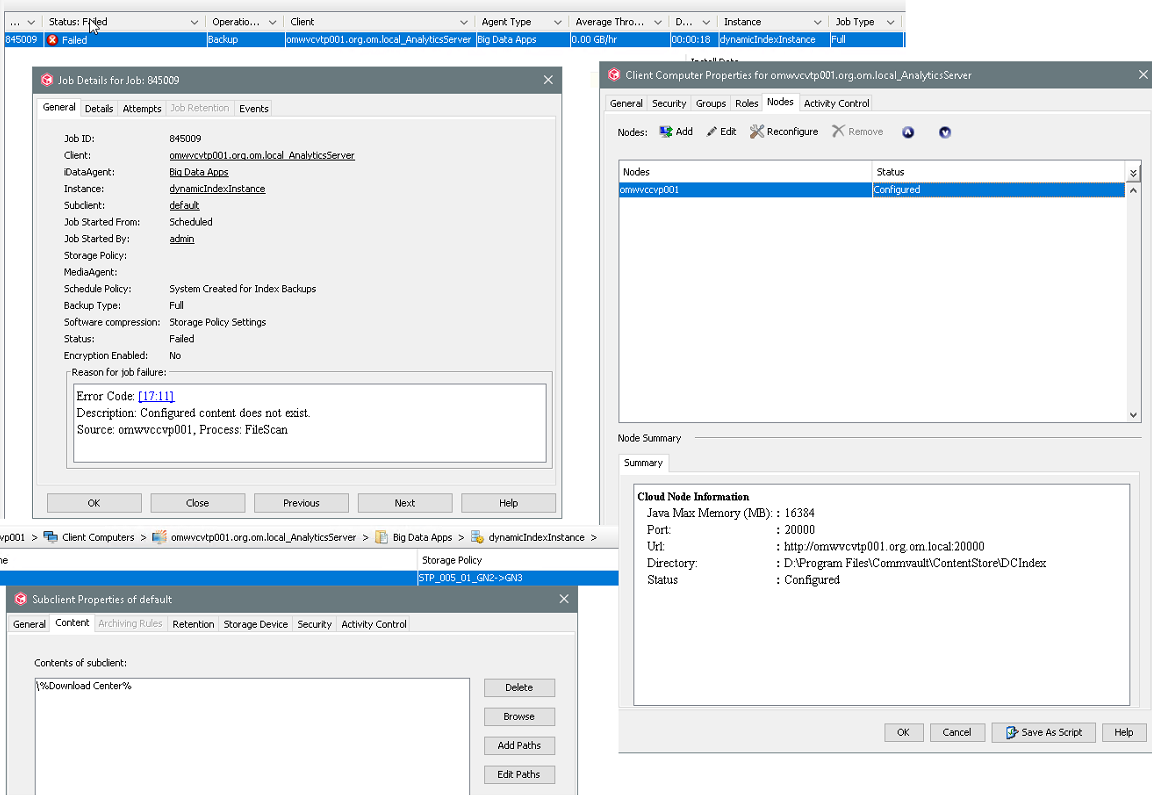
Big Data Apps - Analytics Server (Download Center) - Configured Content does not exist

  • July 26, 2023
  • 2 replies
  • 1013 views

Forum|alt.badge.img+1

After Commvault software update to version 11.28.68 backup job for Big Data Apps (_AnalyticsServer) with content \%Download Center% is failing. 
 

Best answer by Arunkumar P

@Emilian - This is the known issue and it got fixed with V11.28.72. 

Searches may fail on index server configured with IPV6 address.

4936


https://documentation.commvault.com/2022e/expert/assets/service_pack/updates/11_28_72.htm


Kindly upgrade your CS & access nodes to the latest maintenance release then re-run the index backup that should get completed successfully. 

2 replies

Arunkumar P
Vaulter
Forum|alt.badge.img+7
  • Vaulter
  • Answer
  • July 26, 2023

@Emilian - This is the known issue and it got fixed with V11.28.72. 

Searches may fail on index server configured with IPV6 address.

4936


https://documentation.commvault.com/2022e/expert/assets/service_pack/updates/11_28_72.htm


Kindly upgrade your CS & access nodes to the latest maintenance release then re-run the index backup that should get completed successfully. 


Forum|alt.badge.img+3

Hello to all of you

is this something that happens a lot after an upgrade, just upgraded to 11-36-35 (2024E) and I get the same error message…. get “no content” and I can’t seem to be able to change the location of the indexcache on the client. I do find those “big data apps” area a bit confusing and very badly documented…. 

Thx