Answer

Can't delete DR folder

  • June 27, 2025
  • 12 replies
  • 178 views

Forum|alt.badge.img+12

Hi,
we have updated to the newest version an creates DR backups.
But i can’t delete them. The folders and files are write protected.
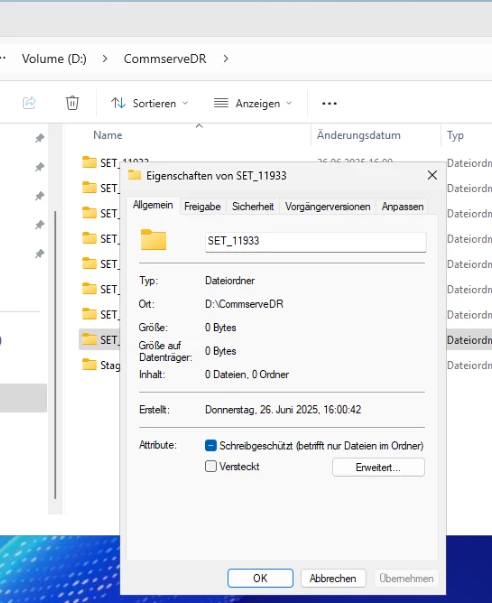
 

We tried to delete them with GUI, PS or cmd. But nothing. If we remove the write protection and open it again it is set.
Any idea how we can remove the DR folders?

Regards
Dennis

Best answer by Ledoesp

Dennis, use a network path from another Windows server to delete the DR sets; for instance \\servername\D$\CommServeDR.

From the CommServe session is not allowed the deletion, that is why you need to do it from another server accessing via CIFS to the location to perform the deletion.

If you have a question or comment, please create a topic

12 replies

sbhatia
Vaulter
Forum|alt.badge.img+9
  • Vaulter
  • June 27, 2025

You can try setting the following additional key on the CommServe:
AllowUnsetComplianceLockOnDRCopy set the value to 1, and that should let you delete the data.

Also, I noticed quite a few SET folders showing 0 bytes. Quick check — how many DR metadata copies have you configured? The default is 5. If the number of SET folders exceeds that, something’s off. Ideally, old SET folders should auto-delete, so if they're piling up, you might want to loop in Support to review it.


Forum|alt.badge.img+12
  • Author
  • Byte
  • June 27, 2025

Thanks for your answer.

I have set the key, but i can’t delete the folders. Seems that there is a protection?!

Yes, normaly 5. We have test something and have temp. set it to 10.


Rajiv
Vaulter
Forum|alt.badge.img+12
  • Vaulter
  • July 1, 2025

Hi ​@Dennis If they are not getting deleted, it would be good option to raise a support case, we might want to need to use a script to cleanup these old folders. 

Best,

Rajiv Singal


Forum|alt.badge.img+12
  • Vaulter
  • July 2, 2025

The folder will be protected for as long as it is used as a metadata destination.


Try moving the metadata folder to another location, then allow a day and try to delete the contents again


Forum|alt.badge.img+12
  • Author
  • Byte
  • July 2, 2025

Hi,
where can i find it?

Regards
Dennis


Forum|alt.badge.img+12
  • Vaulter
  • July 3, 2025

The option is under “Control Panel > DR Backup < Back up Metadata to this folder”


Forum|alt.badge.img+12
  • Author
  • Byte
  • July 3, 2025

Thanks, i have checked this. But this is another path.


Forum|alt.badge.img+12
  • Vaulter
  • July 3, 2025

Would you have any other CS using this location as the metadata one?


I would suggest to raise a case with support for further analysis.


Forum|alt.badge.img+12
  • Author
  • Byte
  • July 10, 2025

Hi, 
we will open a case.
I will send a update in this post.


Forum|alt.badge.img+15
  • Vaulter
  • Answer
  • July 11, 2025

Dennis, use a network path from another Windows server to delete the DR sets; for instance \\servername\D$\CommServeDR.

From the CommServe session is not allowed the deletion, that is why you need to do it from another server accessing via CIFS to the location to perform the deletion.


Forum|alt.badge.img+12
  • Author
  • Byte
  • July 11, 2025

Perfect, works for me :-)
Thank you.


Forum|alt.badge.img+15
  • Vaulter
  • July 11, 2025

Good to hear! I have worked with customers that had the DR in local path and ended filling the drive and CommServe stopped working.

Please change your DR path to a network path or CIFS share.