


Question

Can we do FSbased sed restore postgre 14 to 15

  • December 26, 2024
  • 6 replies
  • 47 views

Forum|alt.badge.img+5


Can we do FSbased  restore postgre 14 to 15  (out of place )


Commvault documents said 


Verify that you are restoring the File System backups of the same version of PostgreSQL and not from higher to lower or lower to higher.


other document said 


  • Verify that the PostgreSQL software version on the destination is the same version or higher than the version of source.


 release notes (Supported Feature )  said 
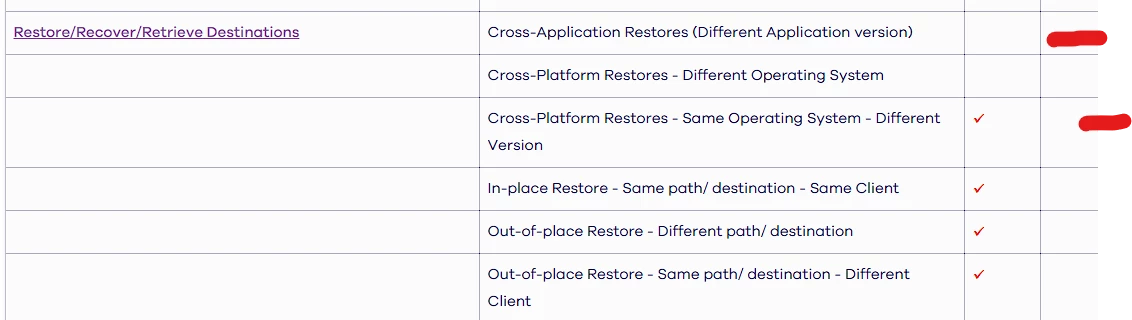


Which one is correct  Can we do or not 



6 replies

Onno van den Berg
Community All Star
Forum|alt.badge.img+22

@BillyBoo can you share the source of the two statements? I think you took this one "higher to lower” from an older version being FR20 as newer releases mention that it should be possible to restore to a newer version. As FR20 documentation was created at a time in where the PostgreSQL was also a much older version it could very well mean that this was a PostgreSQL limitations that was addressed in a newer version. So, just make sure you are on documentation of the version that you are running and I would advice you to test it out. I assume the action that you are taking is a planned action and not a DR recovery.


Forum|alt.badge.img+5
  • Author
  • Novice
  • December 27, 2024

@Onno van den Berg 

Source is 11.36 

https://documentation.commvault.com/2024e/expert/restoring_postgresql_instance_to_different_host_cross_machine_restore.html


Before You Begin

Check whether you meet the following requirements:

  • The source and destination clients have the same major version of PostgreSQL Server.


Onno van den Berg
Community All Star
Forum|alt.badge.img+22

Are you using block-level backups as this documentation page is based on a specific setup that uses that instead of the default protection method. 


Forum|alt.badge.img+5
  • Author
  • Novice
  • December 27, 2024

Hi


it says the same thing even if there is no block-level backup 


https://documentation.commvault.com/2024e/expert/performing_redirect_restore_operation.html


Before You Begin

  • Verify that you have a PostgreSQL instance on the CommCell Console both at the source server and the destination server.

  • The versions of PostgreSQL on both the source server and the destination server must be the same.


Onno van den Berg
Community All Star
Forum|alt.badge.img+22

Again this is a specific e.g. advanced restore option. However, the documentation page for a regular recovery states the same as where the essential documentation differs. I think the expert documentation is incorrect.

Essential: Verify that the PostgreSQL software version on the destination is the same version or higher than the version of source.

https://documentation.commvault.com/2024e/essential/restoring_one_or_more_postgresql_databases.html

Expert: Verify that you are restoring the File System backups of the same version of PostgreSQL and not from higher to lower or lower to higher.
https://documentation.commvault.com/2024e/expert/restore_11.html


Forum|alt.badge.img+5
  • Author
  • Novice
  • December 27, 2024

this explains very well why I am confused 😅

2 different information

