Solved

Check backup consistency

  • May 7, 2026
  • 3 replies
  • 27 views

Forum|alt.badge.img+13

Hi,
is it possible to create a report where i can see that my backups are consistent?
In Nagios, we already check the jobs for success or failure.

Regards
Dennis

Best answer by Paul G

Hi ​@Dennis,

You can download a Data Verification Failed Jobs report on cloud.commvault.com that lists the jobs that have failed the data verification.    https://cloud.commvault.com/commandcenter/#/softwareStore/20657


Commvault verifies jobs via data verification jobs. You can perform these on the global deduplication policy for deduplicated data (DDB data verification) and on storage policy for non-dedup data (data verification). There are probably already system created data verification schedules present in your environment.


Data verification usually only runs as incremental so only new jobs will be verified but you can run these for all jobs as well. Be aware that a full data verification may take a long while so these can better be scheduled quarterly or even less often.

For DDB verification, the verification jobs usually just checks the existence of needed blocks but you also have the option to run more extensive verification that also checks the data blocks. This of course increases runtime significantly.


Jobs that fail data verification via either of these verification jobs are marked as having failed the data verification in any of the job overviews in the CommCell console (add the column data verification status). I am not sure where you can easily view this but the report should work for you.


Kind regards,

Paul

3 replies

Paul G
Explorer
Forum|alt.badge.img+1
  • Explorer
  • Answer
  • May 7, 2026

Hi ​@Dennis,

You can download a Data Verification Failed Jobs report on cloud.commvault.com that lists the jobs that have failed the data verification.    https://cloud.commvault.com/commandcenter/#/softwareStore/20657


Commvault verifies jobs via data verification jobs. You can perform these on the global deduplication policy for deduplicated data (DDB data verification) and on storage policy for non-dedup data (data verification). There are probably already system created data verification schedules present in your environment.


Data verification usually only runs as incremental so only new jobs will be verified but you can run these for all jobs as well. Be aware that a full data verification may take a long while so these can better be scheduled quarterly or even less often.

For DDB verification, the verification jobs usually just checks the existence of needed blocks but you also have the option to run more extensive verification that also checks the data blocks. This of course increases runtime significantly.


Jobs that fail data verification via either of these verification jobs are marked as having failed the data verification in any of the job overviews in the CommCell console (add the column data verification status). I am not sure where you can easily view this but the report should work for you.


Kind regards,

Paul


Forum|alt.badge.img+13
  • Author
  • Explorer
  • May 7, 2026

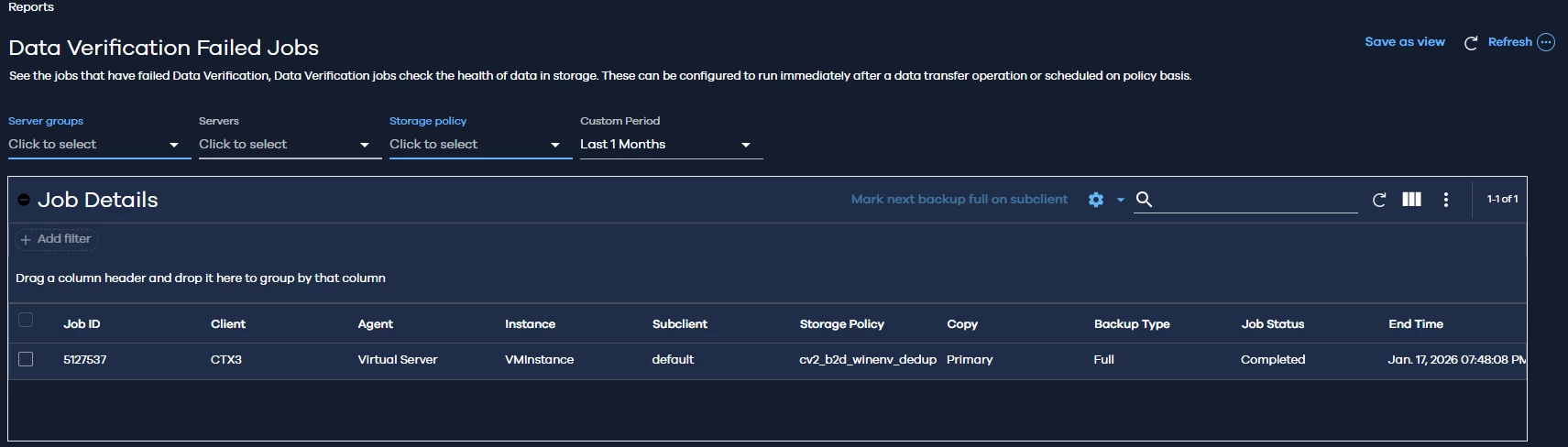
Hi have installed the report an i see this
 

But this is not clear to me.


Paul G
Explorer
Forum|alt.badge.img+1
  • Explorer
  • May 7, 2026

Hi ​@Dennis,

Are you running regular data verification jobs where this report can report on?

I have not used this report before and I cannot import it at the moment so I cannot test how it exactly works.

When looking at your screenshot, I would think that only job 5127537 has failed data verification in copy cv2_b2d_winenv_dedup\Primary in the last month. You can look at this job in the CommCell console in the storage policy copy or in the deduplication database and add the column data verification status to your view to see if this indeed the case.

Kind regards,

Paul