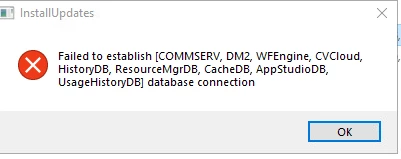
I just update the MR from 11.36.41 to 11.36.49 by this flow:
prod CS - instance 1
prod CS - instance 2
DR CS - instance 2
and while I ran the update for DR CS instance 1 I’m getting the error: “Failed to established [COMMSERVE, DM2, WFEngine, CVCloud, HistoryDB, ...] database connection
I have full access to CS DB and the user sqladmin_cv configure as sysadmin
any solution?
Thanks
Best answer by Pradeep
Hi @shay.itah,
When the system is configured with Live Sync, instance 002 of the DR machine must be upgraded using Push Install. This process will automatically trigger the upgrade of instance 001 as well.
Since the DB on DR machine is in restoring mode. For now navigate to the setup folder and run the following command from CMD to upgrade instance 1: Setup.exe -DoNotPatchDB -NoStartSVC instance001
When the system is configured with Live Sync, instance 002 of the DR machine must be upgraded using Push Install. This process will automatically trigger the upgrade of instance 001 as well.
Since the DB on DR machine is in restoring mode. For now navigate to the setup folder and run the following command from CMD to upgrade instance 1: Setup.exe -DoNotPatchDB -NoStartSVC instance001