Question

Commvault V11.40 roles missing

  • June 24, 2025
  • 18 replies
  • 526 views

Forum|alt.badge.img+14

Good day all

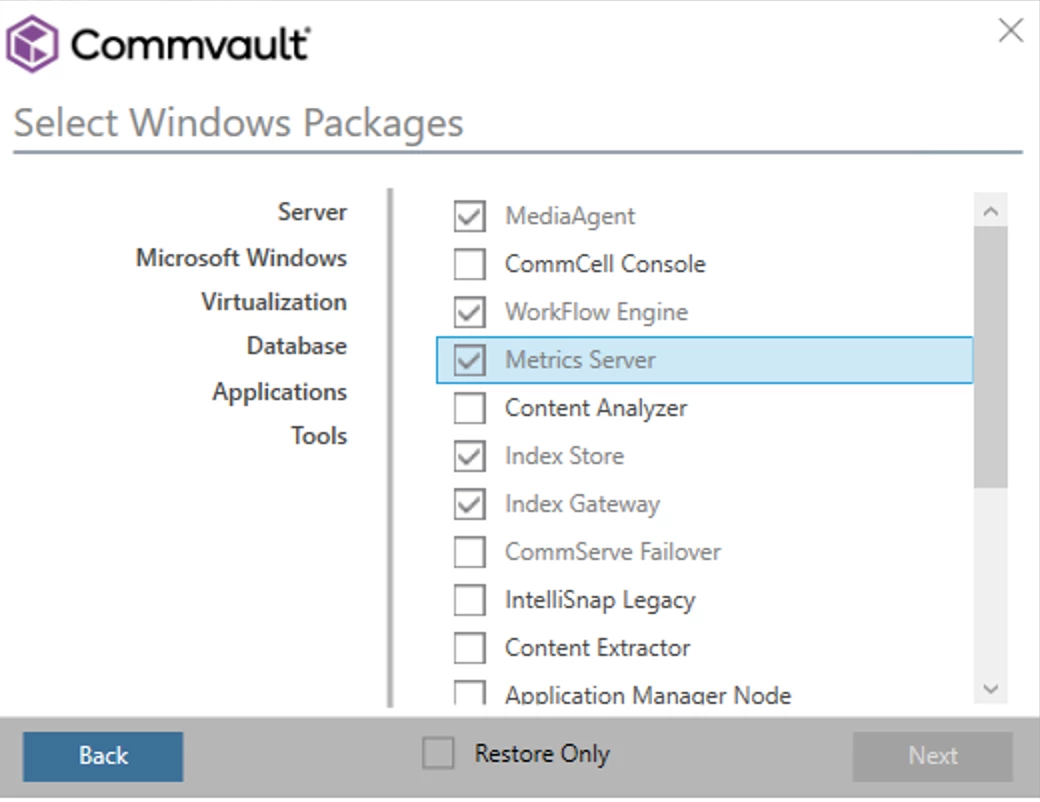
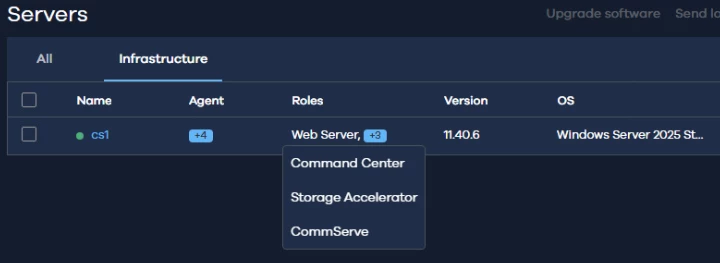
I was trialling the V11.40 SDK today, but notice that the Commserve Role doesn’t appear to be part of the Media Kit yet. Has anyone else experienced this?


I also notice that V11.40 is not yet available on the Store.

18 replies

Damian Andre
Vaulter
Forum|alt.badge.img+23

Hi ​@Mauro,

Two things:

  1. Download

When accessing store.commvault.com - hit the login button and login with your Commvault credentials and let me know if you see the LTS 11.40 release then?

Workaround: download from the support portal: https://support.commvault.com/ESD?fv=11.0

  1. CommServe - There was discussion about deprecating NEW Windows-based CommServe deployments in 11.40 to encourage the inherently more secure Linux platform. I don’t see it documented, so let me double check if this occurred.

    Update: The above is true - docs in the process of being updated to reflect the change.


Forum|alt.badge.img+14
  • Author
  • Byte
  • June 26, 2025

Hi ​@Mauro,

Two things:

  1. Download

When accessing store.commvault.com - hit the login button and login with your Commvault credentials and let me know if you see the LTS 11.40 release then?

Workaround: download from the support portal: https://support.commvault.com/ESD?fv=11.0

  1. CommServe - There was discussion about deprecating NEW Windows-based CommServe deployments in 11.40 to encourage the inherently more secure Linux platform. I don’t see it documented, so let me double check if this occurred.

    Update: The above is true - docs in the process of being updated to reflect the change.


Thanks very much for this update. So with CV looking to move away from the Windows platform, it appears that you can’t deploy a new instance of a Commserve on Windows. You need to install the previous version and then run the upgrade. Even doing it this way does not show you the Commserve Component as being available. I am testing the upgrade and will provide some updates soon.


Forum|alt.badge.img+14
  • Author
  • Byte
  • June 26, 2025

So it seems you cannot use this package to upgrade a Commserve instance on a Windows OS. 
It seems to uninstall the Commserve Components and doesn’t re-add them.

The Commvault services fail to start too. 


Installing V11.40 on a Linux server has all the Commserve components.

I could be wrong here, but I think this may be a premature feature release with no documentation. If a customer decided to upgrade this without the documentation being updated, they will sit with a broken Commserve. I also am curious if the limitations of a Commserve on Linux have been addressed with this new release.


Scott Moseman
Vaulter
Forum|alt.badge.img+19

I do not have an FR36, but I did upgrade a Windows FR38 to FR40 without issue.


Thanks,
Scott


Forum|alt.badge.img+14
  • Author
  • Byte
  • June 26, 2025

I do not have an FR36, but I did upgrade a Windows FR38 to FR40 without issue.


Thanks,
Scott
 

V11.36 to V11.40 doesn’t seem happy. I’ll try V11.38 to V11.40 and report back.


Forum|alt.badge.img+14
  • Author
  • Byte
  • July 3, 2025

Hi all


So I’ve done a bit of testing and can confirm the below.

V11.38 will upgrade to V11.40 with full functionality.

V11.36 will not upgrade to V11.38 or to V11.40. The audit service fails to install and the installation breaks.


I need to do a bit more reading, but it’s safe to say that V11.40 the replacement for V11.38 and all it’s features.

So my two observations are as follows:

  1. As a new install, V11.40 does not include the Commserve components for a Windows hosted Commserve.
  1. It doesn’t seem to be compatible as an as an upgrade route from V11.36.


I’ll do a bit more research and hopefully a little more info is shared soon on this.


Thanks,

Mauro


Forum|alt.badge.img+2
  • Vaulter
  • July 4, 2025

Starting with Commvault version 11.40, new installations of Windows-based CommServe (and potentially WebServer) components are no longer supported. However, existing installations on Windows can still be upgraded to version 11.40 without any issues.


Erase4ndReuseMedia
Byte
Forum|alt.badge.img+14

What happens when I need to perform a hardware refresh?


Forum|alt.badge.img+14
  • Author
  • Byte
  • July 8, 2025

What happens when I need to perform a hardware refresh?

This is where I envision some potential issues. It seems that you either switch to a Linux OS or install an older version of Commvault and then upgrade to V11.40.

It seems that going forward you’re forced to change host OS platforms, but let’s see if any further info comes though from Commvault.


Forum|alt.badge.img+2

Hi,

I have a Standalone Commserve 11.40 on Windows and now a customer wants to convert the standalone installation to a Live Sync commserve. Can I do this with two Windows Instances or do have the standby Commserve to be a linux Commserve?


Kind Regards


Forum|alt.badge.img+14
  • Author
  • Byte
  • September 18, 2025

Hi,

I have a Standalone Commserve 11.40 on Windows and now a customer wants to convert the standalone installation to a Live Sync commserve. Can I do this with two Windows Instances or do have the standby Commserve to be a linux Commserve?


Kind Regards

That’s an interesting scenario. I’ll need to test it and revert. You could make the secondary instance Linux easily, but to get Windows and 11.40 may need some workarounds. Give me a week to test and revert.


Forum|alt.badge.img+2

Hi, 

thanks for your effort!

Is it possible that I have my Windows Commserve and add a Linux Commserve as the standby?


Forum|alt.badge.img+14
  • Author
  • Byte
  • September 25, 2025

Hi, 

thanks for your effort!

Is it possible that I have my Windows Commserve and add a Linux Commserve as the standby?

So I’ve managed to test this upgrade scenario and it works as follows.

Install the Secondary CS using V11.36 on Windows following the same instructions:
https://documentation.commvault.com/2024e/commcell-console/installing_standby_commserve_host.html

When complete, do not try to failover as it won’t work (I tested this). Bring the Standby CS up to V11.40 or later, in line with your Production CS. They both seem to require a reboot once they’re synced up before testing failover.


Regarding your second question, you can have a Production Windows CS and a Linux Secondary CS. 

https://documentation.commvault.com/v11/commcell-console/performing_cross_platform_failovers.html


Hope this helps.


Jos Meijer
Commvault Certified Expert
Forum|alt.badge.img+17
  • Commvault Certified Expert
  • September 30, 2025

I have upgraded a CS Livesync setup from 11.36.68 to 11.40.16 without any issue.
Did not use the media kit though, I downloaded to the software cache and performed a software upgrade on all the clients within the Livesync folder (CS + Livesync nodes).


As for the Commserve Livesync question, having one windows and one linux node is not supported.
Both operating systems and SQL versions are required to be identical.


Erase4ndReuseMedia
Byte
Forum|alt.badge.img+14

@Jos Meijer - Is there a process for CommServe Hardware Refresh maintaining Windows-based CommServe instances?


Jos Meijer
Commvault Certified Expert
Forum|alt.badge.img+17
  • Commvault Certified Expert
  • October 7, 2025

Hi ​@Erase4ndReuseMedia 

Yes there is 😀
Here is the link to the complete procedure: CommServe Hardware Refresh Overview


In a nutshell:

  • Install OS on new machine
  • Stop all backups etc on the old machine
  • Make a DR backup on old machine
  • Stop services on old machine
  • Transfer DR backup to new machine
  • Shutdown old machine
  • Install same or newer Commvault on new machine and import the DR backup during installation
  • Test operarions (backup/restore etc)
  • Resume regular operations

But please follow the complete procedure if you have additional components, other than commserve, installed due to some dependencies.

Also if you have configured a certificate for the webserver, don't forget to transfer the certificate and apache server.xml 🙂


Damian Andre
Vaulter
Forum|alt.badge.img+23

@Jos Meijer - Is there a process for CommServe Hardware Refresh maintaining Windows-based CommServe instances?

There is a link down the bottom here that will allow you to retain windows for a hardware refresh - although that might be prime opportunity to switch to Linux 😎


https://documentation.commvault.com/11.40/software/deprecation_notice_for_commvault_control_plane_on_windows.html


Erase4ndReuseMedia
Byte
Forum|alt.badge.img+14

Excellent. Thank you ​@Damian Andre