
Solved

Copy from disk or tape to different tape.

  • October 31, 2022
  • 9 replies
  • 1360 views

FeRox
Novice
Forum|alt.badge.img+7

Hello Good morning,

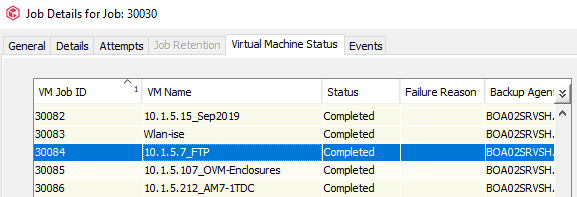
please help, I have a backup of a Hyper-V with Job Id 30030 which backs up about 100 Virtual machines, according to the images attached, I just need to copy the VM Job 30084 (only one machine of the 100), from disk or tape to another tape completely with a different retention this from the console and not from the command center, because according to customer requirements are not used plans.


this is the backup job of the hyper-v with the 100 machines 👇

 

and this is the VM job 30084 from the copy of the virtual machine that I need to send to a completely different tape  👇
 

Best answer by chrisknows

@Jordan ,

You are going to have to do some reading. You will have to create a selective copy

9 replies

Forum|alt.badge.img+10
  • Vaulter
  • November 1, 2022

When you view jobs on storage policy copy, you should be able to see the VM Job ID. Here you can create a one off copy using TL and pick this job to copy only. 


FeRox
Novice
Forum|alt.badge.img+7
  • Author
  • Novice
  • November 4, 2022

Hello Thank you very much for your help.
I am not clear how is the procedure using TL, could you please describe me the procedure. 🙏🏻


Forum|alt.badge.img+14
  • Vaulter
  • November 7, 2022

I think it means TimeLine. Basically the procedure to follow is that you create a secondary copy to Tape and select the job ID 30084 to be copied only, excluding the rest of jobs to be copied. You can even filter in the new copy the subclients associated to match only the FTP VM.


chrisknows
Novice
Forum|alt.badge.img+9
  • Novice
  • Answer
  • November 7, 2022

@Jordan ,

You are going to have to do some reading. You will have to create a selective copy


Forum|alt.badge.img+10
  • Vaulter
  • November 8, 2022

@chrisknows 

?? , yes selective will work, synchronous will also work with a few tweaks. Either way, OP needs a one off copy


FeRox
Novice
Forum|alt.badge.img+7
  • Author
  • Novice
  • November 17, 2022

Thank you all very much, you have really been an excellent help. I was able to solve this issue.


roc_tor
Novice
Forum|alt.badge.img+6
  • Novice
  • March 23, 2023

@Jordan ,

You are going to have to do some reading. You will have to create a selective copy

If I could thumbs down this answer, I would.  For the future, please simply HELP people to the instructions, such as “This will take a selective copy.  The instructions can be found here.


chrisknows
Novice
Forum|alt.badge.img+9
  • Novice
  • March 24, 2023

So you… posted the exact same link that I posted while for some reason being upset for what I don’t quite know exactly.


roc_tor
Novice
Forum|alt.badge.img+6
  • Novice
  • March 24, 2023