Hi Anandha,
I think we are mixing to different concepts here. Scheduling Backups (Schedule Policies) and Primary/Aux Copies (Storage policies).
All subclients (contents of a particular Client selected to be backed up) will be assigned to a particular Storage Policy, by default formed by a single Primary Copy (your first backup location).
This will not trigger backups unless you manually run them OR configure a Schedule Policy to run them.
When you create an Auxiliary Copy location within a Storage Policy, this is just a secondary place to move all, or a fraction of the jobs available within the Primary Copy to a different place. You will not schedule clients to run backups against an Auxiliary Copy.
What you do is select whether you want to copy all the contents of the Primary Copy in to this Aux Copy (Synchronous Copy), or just certain full backups (Selective Copy) - Further information available in documentation;
https://documentation.commvault.com/2022e/expert/13900_secondary_copies.html
Once again, jobs will not move automatically between your Primary Copy and Auxiliary Copy unless you run a manual Aux Copy job OR Schedule the Aux Copy job to run regularly
To answer your questions:
Is it will configure separate schedules for Weekly, monthly & Yearly?
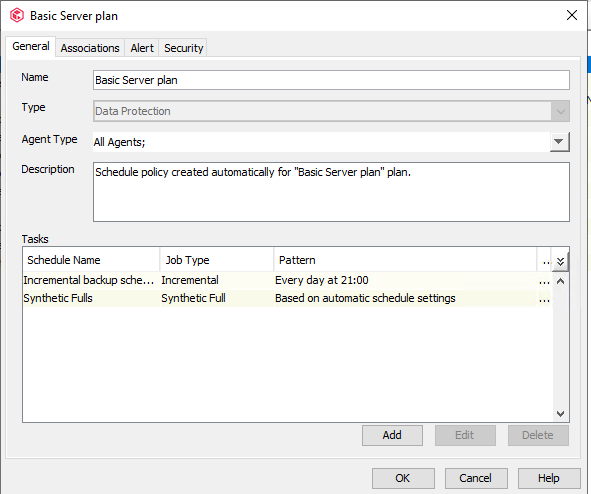
You will configure a Schedule Policy that you will assigned to the subclients. Within the Schedule Policy you will configure your require backups (Fulls, Incrementals...) and their pattern (daily, weekly, monthly...)
There are many, many options and over a myriad combinations depending on your needs, I would recommend you to check our documentation in Scheduling to get a better understanding of this feature and its capabilities;
https://documentation.commvault.com/2022e/expert/6630_scheduling_overview.html
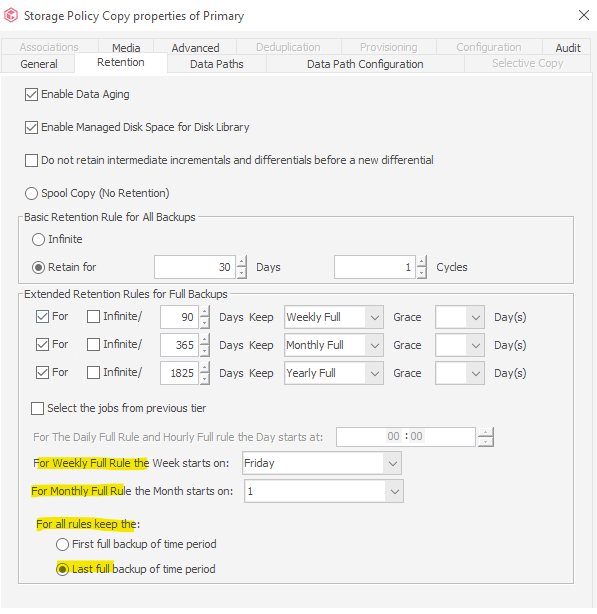
After retention of backup, the data will delete from disk without auxiliary copy (requirement2).
As Nutan has mentioned, we have a security mechanism that will not delete a job from the Primary Copy if the Application notices the job should have been moved to an Auxiliary Copy but the operation has not been completed yet.
You will need to be careful, since not regularly copying jobs to Aux Copy will not delete them from the Primary Location and be retained pass their configured retention, which may lead to Storage exhaustion in your Primary backup location.
Once the job is copied in the Aux Copy, it will be deleted from the Primary location once retention is reached.