Answer

Error message when trying to configure Microsoft AD backup

  • May 12, 2025
  • 3 replies
  • 94 views

Forum|alt.badge.img+6

Hello,

According to this KB:
https://documentation.commvault.com/2024e/essential/complete_guided_setup_for_active_directory.html
When I click on configure, I get the error message, “User does not have access to the page.” And then the command center stopped responding.

Configuring from the CommCell console is ok.

The version is 11.36.52. The user is the admin.
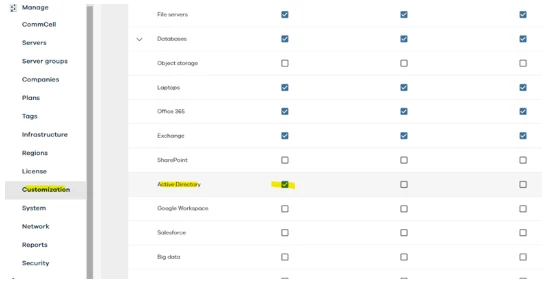


Best answer by sbhatia

Could you please enable Active Directory from the navigation preferences and try configuring again.


3 replies

sbhatia
Vaulter
Forum|alt.badge.img+9
  • Vaulter
  • Answer
  • May 12, 2025

Could you please enable Active Directory from the navigation preferences and try configuring again.


Forum|alt.badge.img+6
  • Author
  • Byte
  • May 12, 2025

Hello,

Thank you for your assistance. From the customisation page, it works.


sbhatia
Vaulter
Forum|alt.badge.img+9
  • Vaulter
  • May 12, 2025

Glad it worked!! :)