Question

Error message while trying to backup VM on VSAN

  • August 9, 2025
  • 5 replies
  • 58 views

Forum|alt.badge.img+6

Hello,

I have a VMware vSAN cluster. I configure a few VSA servers.

While I’m trying to start a backup, I get this error message on every VM:

[Object policy is not compatible with datastore space efficiency policy configured on the duster Snapshot creation attempt took [00:01]] Please check the virtual machine snapshot tree.
Object policy is not compatible with datastore space efficiency policy configured on the duster Snapshot creation attempt took [00:01]] Please check the virtual machine snapshot tree.
ks. 
[Object policy is not compatible with datastore space efficiency policy configured on the duster Snapshot creation attempt took [00:01]] Please check the virtual machine snapshot tree.
[Object policy is not compatible with datastore space efficiency policy configured on the duster Snapshot creation attempt took [00:02]] Please check the virtual machine snapshot tree.
[Object policy is not compatible with datastore space efficiency policy configured on the duster Snapshot creation attempt took [00:01]] Please check the virtual machine snapshot tree.
Object policy is not compatible with datastore space efficiency policy configured on the duster Snapshot creation attempt took [00:02]] Please check the virtual machine snapshot tree.
[Object policy is not compatible with datastore space efficiency policy configured on the duster Snapshot creation attempt took [00: 10]] Please check the virtual machine snapshot tree.

 

5 replies

Forum|alt.badge.img+8
  • Vaulter
  • August 10, 2025

Hi Jean-Paul,

The object policy message is new. I’ve never seen that previously.
However, given the error occurs during the snapshot process there are some things to do.

1) Pick a VM that failed and check its current snapshots, are there a lot of snapshots, forked snapshots, or even snapshots that look out of place?

2) From vSphere, try to trigger another snapshot. Use the same rules as defined within Commvault (quiesced or non-quiesced) and see if it works there.

If the snapshot fails, I would suggest contacting Broadcom support to investigate further.
If the snapshot succeeds, my recommendation would be to look at any policies defined in vSphere especially ones that might apply specifically to the vSAN datastore to see if a policy is having a collision with Commvault expectations.

​​​​​​​Regards,


Forum|alt.badge.img+6
  • Author
  • Byte
  • August 11, 2025

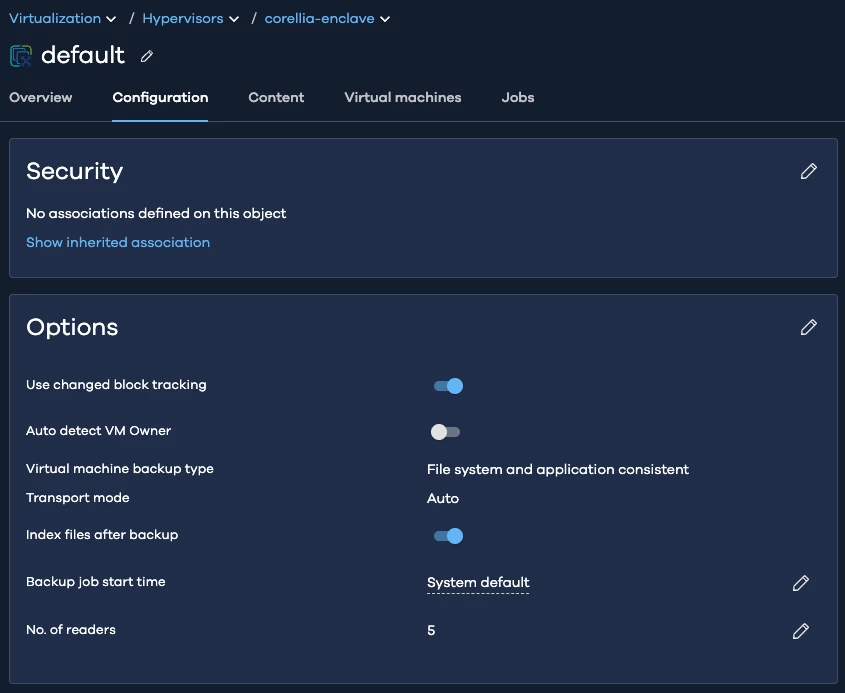
Thank you for your reply; the issue is not with the snapshots. The snapshots are created; the error is when connecting the snapshots to the VSA proxy. I want to try NBD backup temporarily instead of HotAdd. Where can I change the transport mode in version 36?


Forum|alt.badge.img+8
  • Vaulter
  • August 11, 2025

Hi Jean-Paul,

Interesting, the error shown is during the snap creation period.

As a little clarification, Commvault doesn’t mount VMware snapshots (unless there are multiple for the VM). Once a snapshot is created Commvault will mount the read only source disk to read (and any snapshot deltas between the source disk and backup snapshot).

As for changing transport mode, in Command Center, go to Protect > Virtualization > Hypervisors > VMware client > VM Groups > VM Group > Configuration and it will be in the “options” tile under “Virtual Machine backup type”


Forum|alt.badge.img+6
  • Author
  • Byte
  • September 9, 2025

Hello,


Thank you for your assistance. the issue was locked vm’s.


Forum|alt.badge.img+8
  • Vaulter
  • September 9, 2025

Hello,


Thank you for your assistance. the issue was locked vm’s.

Thank you for clarifying and I’m glad you found the cause.