



Answer

Error - The medium is already reserved by some other job on VSA restore

  • October 28, 2024
  • 8 replies
  • 590 views

Forum|alt.badge.img+5

Hello,

I am trying to recover a backup of a client VSA virtual machine from a secondary copy that was copied to tape approximately 5 years ago.

The index version of the VSA client is V1 (I plan to migrate this VSA client to V2 next month. It’s the last client I have left to migrate). The Commvault version is 11.36.24

The restoration I am performing is for the entire virtual machine.

When attempting to restore, I get the following error message: "The medium is already reserved by some other job. 
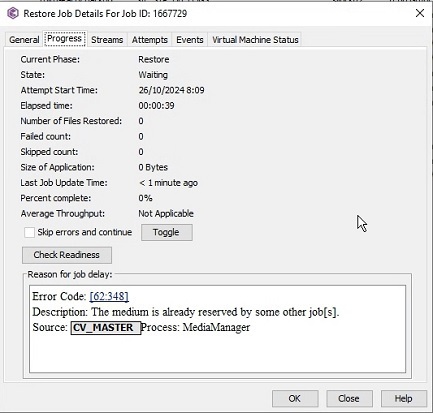
We rarely perform tape recoveries, and what surprised me while researching is that this type of error seems usually appears in multi-stream database recoveries, but there’s no mention of VSA clients.

You can see information here:
https://kb.commvault.com/article/53924
https://documentation.commvault.com/11.20/combining_source_data_streams.html

Before open the case (#241023-299), I tested different restorations. Also checked that no other job is using this media. We even restarted the library and the media to clear any possible SCSI reservations before run the restore again.

When reviewing logs, I see the following: 
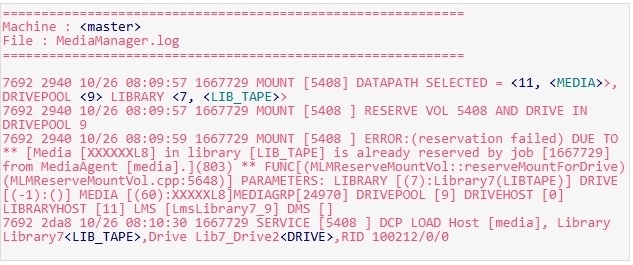
Also:

The first engineer who reviewed the issue mentioned that the error "62:348 - The medium is already reserved" is technically not an error, and in part, he is “correct” because the job doesn’t remain in a “Pending” state; it stays in “Waiting”. However, the restore doesn’t complete, likely due to reservation and waiting errors, as seen in the logs.

The case is still open. 

Has anyone else encountered this issue when restoring a VSA client job from a tape copy?"

===========================================================================

Additionally, I want to provide details about my infrastructure to align with the information in this KB: https://kb.commvault.com/article/53924

My tape library has 4 drives. The configuration I have for the secondary copy is as follows (I believe that 5 years ago, the multiplexing value was set to 25, now is 9, but we have always had 4 drive tapes).
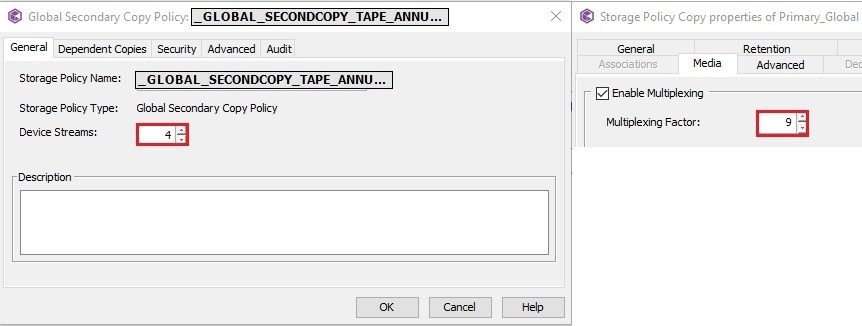
 

Storage policies usually have the following copies:

- The Primary copy is a combination of IntelliSnap for VMware + BackupCopy.
- Primary is stored in the disk library at the HQ site.
- Then, that first copy is copied via aux-copy to the DRP site.
- On the weekend, selective copies (week, month, annual) are written to tape (if they are eligible).



This is a Storage Policy for VMware, but I use the same pattern for other Storage Policies like HANA, DB, etc; when multiplexing and launching aux-copies against the same secondary copy (according to retention), the tapes often contain a mix of different types jobs: VMware, HANA, DB, etc.

===========================================================================

Tomorrow, I will provide more information about the different restore tests I have performed and their results.

Best answer by NunoS

In SP36, Commvault enabled an advanced feature for faster VM restores that allows multi-stream restore of a single VM. The challenge is that when restoring from tape, it attempts to grab another stream but cannot, as a single tape can only have one reader.


**Update to 11.36.66** - This includes 2 hotfixes, 11205 and 11214, that detect the tape restore and revert to single stream and will help resolve the problem. 

8 replies

Forum|alt.badge.img+5
  • Author
  • Byte
  • October 31, 2024

The support engineers are still analyzing the logs. These are the restores I have been testing on my own.


Forum|alt.badge.img+5
  • Author
  • Byte
  • December 27, 2024

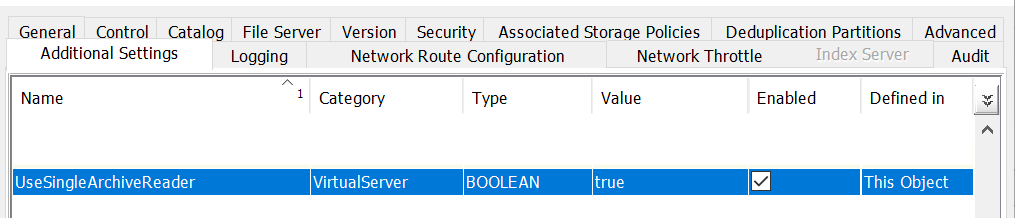
Update:  Set the AdditionalKey “UseSingleArchiveReader” on VSA Access Node. The restore (slow, obviously) was successful.


Still working with Commvault Support...


Forum|alt.badge.img+2
  • April 17, 2025

@jla Hi,

any update in that case? I have the same issue


Thanks


Forum|alt.badge.img+5
  • Author
  • Byte
  • April 17, 2025

Hi ​@shay.itah 

As I mentioned, I was able to restore from tape by adding the key UseSingleArchiveReader. When restore, use the Media/VSA where you set the parameter as a proxy server on restore options.

If you're experiencing the same issue, I recommend opening a support case and referencing mine: 241023-299. Alternatively, you can read this KB to copy jobs tape to disk and restore from there. https://kb.commvault.com/article/53924


Forum|alt.badge.img+4
  • Vaulter
  • Answer
  • August 28, 2025

In SP36, Commvault enabled an advanced feature for faster VM restores that allows multi-stream restore of a single VM. The challenge is that when restoring from tape, it attempts to grab another stream but cannot, as a single tape can only have one reader.


**Update to 11.36.66** - This includes 2 hotfixes, 11205 and 11214, that detect the tape restore and revert to single stream and will help resolve the problem. 


Forum|alt.badge.img+5
  • Author
  • Byte
  • August 28, 2025

I was on 36.22 when opened the case / Oct 24; Just read the changelog for 11.36.66. 
"Restore from tape media may fail with error "Media is already reserved" 11205, 11214"

Now on version 11.36.68. I'll run a test as soon as I can. Thanks NunoS


Aplynx
Vaulter
Forum|alt.badge.img+13
  • Vaulter
  • September 9, 2025

Hotfix 11205\11214 in FR36.66 and beyond. 

Maintenance Release 11.36.72 (Sep 02, 2025)

Restore from tape media may fail with error "Media is already reserved"

11205, 11214

Forum|alt.badge.img+5
  • Author
  • Byte
  • September 15, 2025

We ran several tests after updating to 11.36.72, and we didn’t need to add the parameter “UseSingleArchiveReader” to restore copies from tape. It seems to have improved with this new feature to allow multi-streams.



