Solved

excluding local accounts from SAML

  • July 23, 2026
  • 8 replies
  • 47 views

downhill
Explorer
Forum|alt.badge.img+11

11.40 code - I have ran into an issue where the local break glass account is unable to be used when SAML is enabled. This apparently is due to the fact that the email associated with the local account is in fact in the IdP and once it detects that, there’s no way to “cancel” the redirect. Is there no way to disable SAML for specific accounts regardless of whether the email account exists in the external IdP?

Since the email is a required field for all accounts and having a valid email for such an account makes sense BUT you have to have it syncing in order to actually authenticate and manage that mailbox, seems like a catch-22. Security prefers SSO. 

Plus if the external provider is unavailable for whatever reason, nobody, even the break glass account can login.

I do have a case open with this but so far we haven’t found a solution.

Best answer by Gergely (Sydney)

Check your shared mailbox’s proxy SMTP address, it will be something like smtp:...@<tenant>.onmicrosoft.com.

8 replies

Gergely (Sydney)
Vaulter
Forum|alt.badge.img+7

If you use Exchange Online the workaround I use is to set the ‘onmicrosoft.com’ email address on accounts I want to bypass SSO. 

*Updated*


downhill
Explorer
Forum|alt.badge.img+11
  • Author
  • Explorer
  • July 23, 2026

Hi, I don’t follow. The email address I’ve been using is valid - we want to receive email for those accounts to a shared mailbox. thanks


Gergely (Sydney)
Vaulter
Forum|alt.badge.img+7

Check your shared mailbox’s proxy SMTP address, it will be something like smtp:...@<tenant>.onmicrosoft.com.


Scott Moseman
Vaulter
Forum|alt.badge.img+23

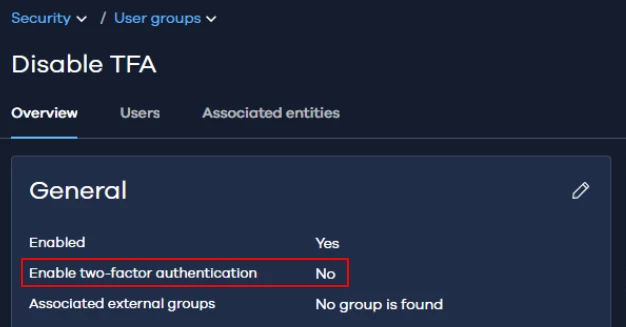
How about putting the local break glass account in group with TFA disabled?


Thanks,
Scott


downhill
Explorer
Forum|alt.badge.img+11
  • Author
  • Explorer
  • July 27, 2026

Hi guys,

So, the onmicrosoft.com is not a valid address for the mailbox. I’ve asked our support team to take a look but nothing as of yet. 

IMO I’d think most folks would want 2FA for critical accounts. That said, maybe it is acceptible if pw bit strength is enormous? Sure, that would probably take care of the problem. Although 2FA is not the same as SAML or is it according to Commvault? Basically 2FA doesn’t appear to be the problem, it’s the inconsistent handling of the Cancel redirect option when facing the login. If the cancel button is there, hit it, but if not there is no way to stop it.

thanks


Scott Moseman
Vaulter
Forum|alt.badge.img+23

OK, yes, I was mixing up 2FA and SAML.  The local break glass account does not necessarily require a valid email address, although it would be recommended in case you ever need to perform a “lost password” request.  Maybe a good request for Commvault Support to see if there’s a solution for this scenario.

Thanks,
Scott


downhill
Explorer
Forum|alt.badge.img+11
  • Author
  • Explorer
  • July 27, 2026

I am perplexed to say the least: as I didn’t see anything obviously different accross the CommCell configs, I decided to disable the SAML provider, verify logins and MFA worked, then re-enabled it. Now, for whatever reason - it doesn’t redirect the exact same local accounts it was doing prior. Makes zero sense. I have one Cell yet to try to fix and am waiting for support to see if they want logs before and after.


downhill
Explorer
Forum|alt.badge.img+11
  • Author
  • Explorer
  • July 27, 2026

🙃Well after some time elapsed, the problem re-appeared. I did find out finally what the proper syntax was for the onmicrosoft.com variant email and this does appear to fix it. Thanks ​@Gergely (Sydney) for that tip!