Question

Filesystem Agent for Centos 6.6

  • December 3, 2025
  • 4 replies
  • 36 views

Forum|alt.badge.img+8

Hi together,

we are currently running the Commserve on 11.36.65 and are using several clients with Centos 6.5 and 6.7. These clients had been upgraded from previous versions and are running with 11.28 and 11.36.

Now we want to install a new Centos 6.6 (Intel, not Power). We are trying to use 11.20.40 and 11.28 and 11.32 but everytime we get the error:


SIM install requirement failed. Please check the log files.


The logfile contains exactly this message.


Do you have an idea?


Best regards.

Michael

 

4 replies

dude
Byte
Forum|alt.badge.img+16
  • Byte
  • December 3, 2025

Error is kind vague, but considering this is a new client, have you tried some basic communication testing between client and CS?

Can you ping cs and vice versa ? Can you resolve name? Are you pushing the install from your Commserve? can you increase debug on the install.log to 3 and attempt one more time to see if it adds more info to the logs in order to help with troubleshooting? 


Forum|alt.badge.img+8

Hi ​@dude,

yes we did some tests :-) … all ports are free, ping and name resoultion is ok, no firewall.

The installation is done locally on the client (complete media kit is available on the client).  

The Installation of Commvault on a Centos 6.6 client fails. This is true for 11.20.40, 11.28 and 11.32. There are several Centos 6 clients running with different Commvault versions in this environment (Commcell 11.36.65, clients 11.20, 11.28 and 11.32, some Centos 6 with 11.36 but this is not supported) … but they have been installed in the past and were updated … so they are no fresh installations.

Even the creation of a custom package does not help; the package will be installeded … and then the communication to the Commserve fails.

We can see in the logs that the initial communication between client and Commserve is successful but somethings breaks down later.


One question: How can I increase the debug level during the installation? 

 Best regards.

Michael


dude
Byte
Forum|alt.badge.img+16
  • Byte
  • December 3, 2025

@Michael Seickert 

From the client itself you can try the following

sudo ./cvpkgadd -nDebugLevel 3

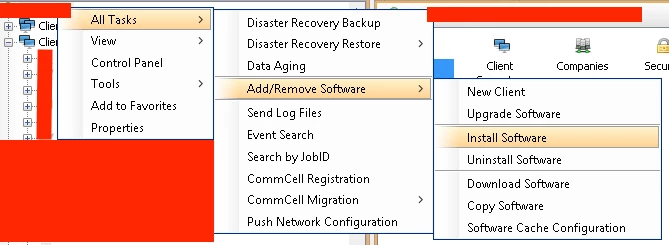
it looks like you are having errors trying to run the install directly from the client itself. Before running the above, can you try running the install from the commserve? Follow the screen and enter your info.


Forum|alt.badge.img+8

HI ​@dude ,

I will check this and keep you updated :-)

Thank you.

Michael