Answer

Force failure on backups not progressing

  • February 22, 2022
  • 4 replies
  • 1191 views

Forum|alt.badge.img+4

Hi,


I found one of my colleagues destroyed one of the server we backed up via File System agent without previously de-configuring it in Commvault. That ended up in a backup job stuck in pending status on “scan” phase during days.

Is there any way to force a backup to be killed if it is stuck in a specific task and it has no progress after some time, possibly without using workflows?

Thanks!

 

Best answer by Hyder

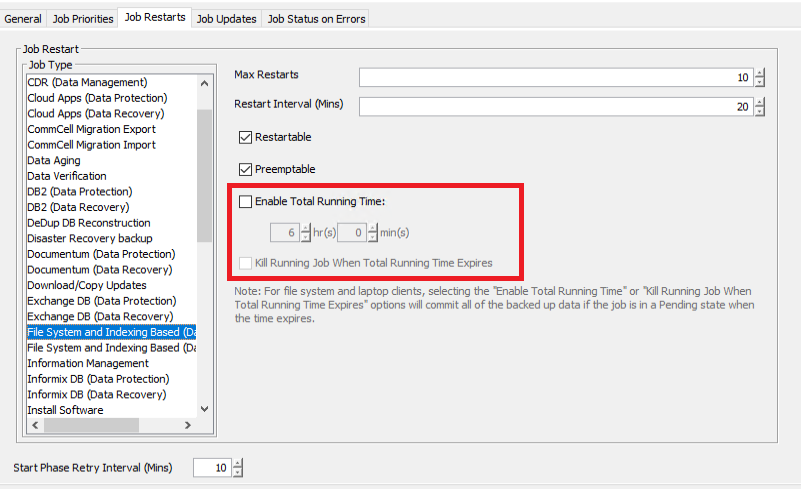
Woops my bad, I completely skipped over that part! The built in option kills it after 24hrs automatically. In Control Panel → Data → Job Management you can control to some level a global parameter for the behavior.

If you have a question or comment, please create a topic

4 replies

Hyder
Vaulter
Forum|alt.badge.img+8
  • Vaulter
  • February 22, 2022

Are you not able to just right click and Kill the job? Eventually, after some retries the job should auto-clear itself too.


Forum|alt.badge.img+4
  • Author
  • Novice
  • February 22, 2022

Thanks Hyder,

Obviously I was looking for a method that doesn’t imply human actions but I didn’t specify that, my fault :).


Hyder
Vaulter
Forum|alt.badge.img+8
  • Vaulter
  • Answer
  • February 22, 2022

Woops my bad, I completely skipped over that part! The built in option kills it after 24hrs automatically. In Control Panel → Data → Job Management you can control to some level a global parameter for the behavior.


Forum|alt.badge.img+4
  • Author
  • Novice
  • February 22, 2022

Thanks!

That looks promising!