




Solved

Help with them customization

  • August 18, 2026
  • 2 replies
  • 42 views

Unique display name
Novice
Forum|alt.badge.img+1

I am trying to fix our Command Center login page.
I am not sure which values to change for this particular page.

The login page looks like this:

You can see that we are missing the username after “signing in as”
and we are missing the “Stay logged in” text and button.
They are actually there, but the text is white.
White text against white background.. not easy to read.
I can mark the text with the mouse pointer, so I know it is there.

This is the current theme:
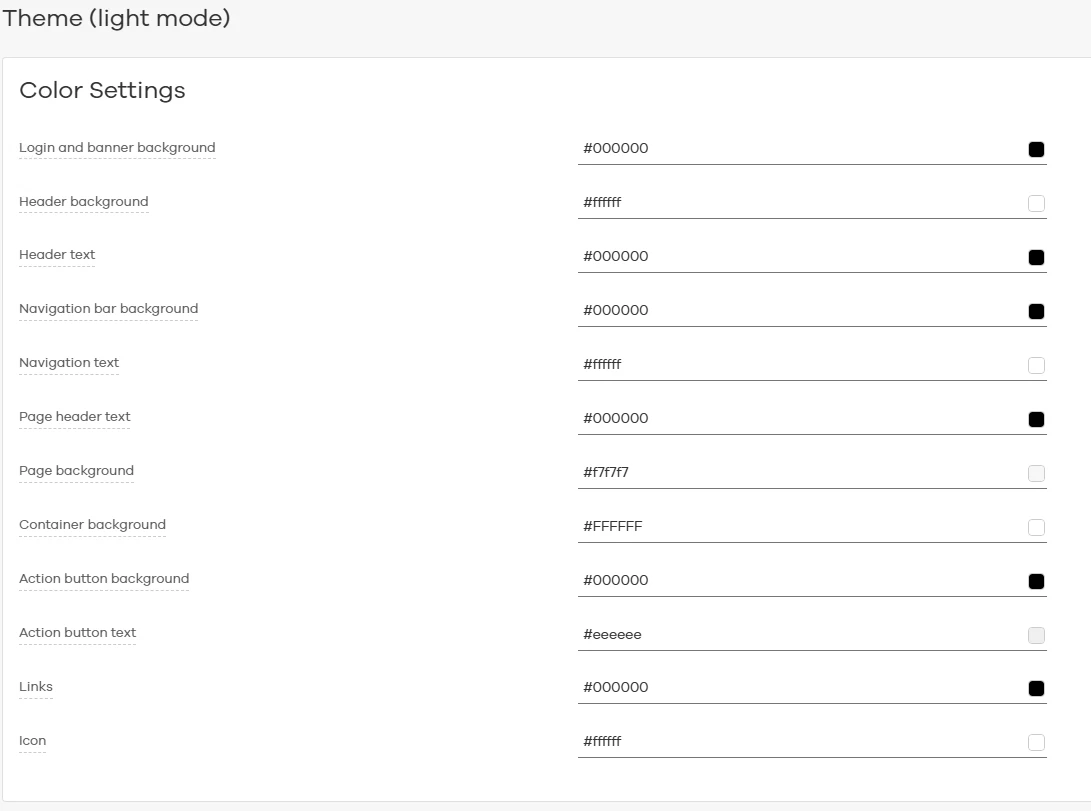
 

I can change any of the “background” values, like page background or container background,
but it seems to only change in the command center, not the login page. Maybe login page must be edited elsewhere?


Best answer by Unique display name

It was the “icon” value.. The hidden text on the login page was using the color in the “ICON” setting…...

2 replies

Forum|alt.badge.img+10

Hi ​@Unique display name ,

Issue appears to be related to the login page styling rather than the configured theme colors. Could you please confirm the SP you are currently at?

Please perform the below steps and keep us posted on the outcome. 

1. Navigate to Manage > Customization > Theme. Select Reset to Default. Save the changes and verify whether the hidden text becomes visible on the login page.

Check browser developer tools by Open the login page and press F12. Navigate to the Network tab and refresh the page.
Verify that the fonts.css file is being loaded successfully. Confirm that the Content-Type is reported as text/css and not text/html

Test the Command center login page in an Incognito/InPrivate browser session. This will help rule out any browser cache-related issues.

If custom branding is being used, Remove and reapply the logo and background image one component at a time. Verify whether the issue occurs after adding a specific customization.

Regards,
Dheeraj


Unique display name
Novice
Forum|alt.badge.img+1

It was the “icon” value.. The hidden text on the login page was using the color in the “ICON” setting…...
