Answer

How do I enable transport encryption for existing clients?

  • March 9, 2022
  • 14 replies
  • 221 views

Forum|alt.badge.img+14

Hello, 

Is there a possibility to enable transport encryption for existing clients and if so where ?
I could not find the item so far.

Kind Regards

Thomas

Best answer by Mike Struening

Yes, you can!

https://documentation.commvault.com/11.24/expert/143327_enforcing_and_encrypting_automatic_tunneling.html

There’s a few ways to enable different protocols and security, though you’re correct, that’s the way!

If you have a question or comment, please create a topic

14 replies

Mike Struening
Vaulter
Forum|alt.badge.img+22

@thomas.S , I believe you are asking about setting software encryption which is detailed here:

https://documentation.commvault.com/11.24/expert/7764_software_encryption.html

There’s multiple levels you can enable, so some review of the docs is a good start.

Let me know if you have any questions about the documentation :nerd:


Forum|alt.badge.img+14
  • Author
  • Novice
  • March 10, 2022

Hello @Mike Struening

I found another article yesterday which says that we can also enable the nCLNT_FORCE_TUNNEL function through the Client Computer Group via the Additional Settings. 
Is this also a way to enable the Tansport encryption ? 

Kind Regards

Thomas


Mike Struening
Vaulter
Forum|alt.badge.img+22

Yes, you can!

https://documentation.commvault.com/11.24/expert/143327_enforcing_and_encrypting_automatic_tunneling.html

There’s a few ways to enable different protocols and security, though you’re correct, that’s the way!


Forum|alt.badge.img+14
  • Author
  • Novice
  • March 11, 2022

Hello @Mike Struening

Thanks for the feedback. We will test the encryption next Monday on individual clients and if the jobs run without problems until Tuesday, we would enable transport encryption globally.


Forum|alt.badge.img+14
  • Author
  • Novice
  • March 16, 2022

Hello @Mike Struening

unfortunately the test to enable transport encryption did not bring success, because it does not work via this way:
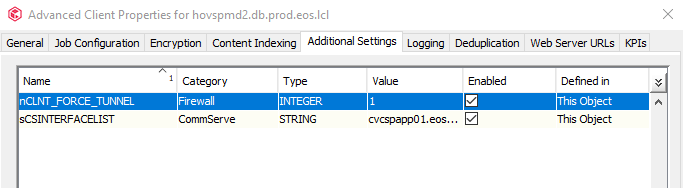
 I enabled transport encryption for a client via Additional Settings via nCLNT_FORCE_TUNNEL, but still the error occurs. An analysis of the traffic via Wireshark
showed that everything is still transmitted in clear text. 
I have also attached a screenshot (2022-03-16 09_25_39-Window.png) with the setting on the one client (hovspmd2). 


Forum|alt.badge.img+5
  • Vaulter
  • March 16, 2022

Great discussion. @thomas.S  did you also enable the key nAUTO_TUNNEL_PROTO in the step 2 in the article mentioned by Mike?

Thank you


Forum|alt.badge.img+14
  • Author
  • Novice
  • March 16, 2022

Hello @tph

No, I had overlooked that in the many topics that I currently have. I've added it now and we'll make another recording of the traffic.
Thank you for the tip. 


Mike Struening
Vaulter
Forum|alt.badge.img+22

@tph / @dude is still a legend!

Keep us posted @thomas.S !!


Forum|alt.badge.img+14
  • Author
  • Novice
  • March 17, 2022

Hello @tph
 

it seems that the transport encryption is not working. 
Is there a way to check the transport encryption via Commvault ? 

Kind Regards

Thomas


Forum|alt.badge.img+5
  • Vaulter
  • March 17, 2022

To check the in transit traffic you would have to use something like WireShark to capture the packets. 


Forum|alt.badge.img+14
  • Author
  • Novice
  • March 21, 2022

Hello, 

We are planning to enable transport encryption globally next week to comply with our company policy and to see if there is a general problem with transport encryption as it does not seem to work on the selected clients.
From what I have read, enabling it will have no effect on the service. If there are any problems, we can simply uncheck it. Is that correct ? 


Mike Struening
Vaulter
Forum|alt.badge.img+22

That’s correct; you can always uncheck it.


Forum|alt.badge.img+14
  • Author
  • Novice
  • March 22, 2022

Hello @Mike Struening

ok thank you very much for the information. 
Since we have scheduled the activation globally on March 31, this topic can be marked as done for now. 

Kind Regards

Thomas


Mike Struening
Vaulter
Forum|alt.badge.img+22

Sounds good.  If anything comes up, update the thread and we’ll keep working on this!