
Question

How to enable the "File Activity Anomaly alert"?

  • March 7, 2025
  • 5 replies
  • 499 views

Ken_H
Apprentice
Forum|alt.badge.img+14

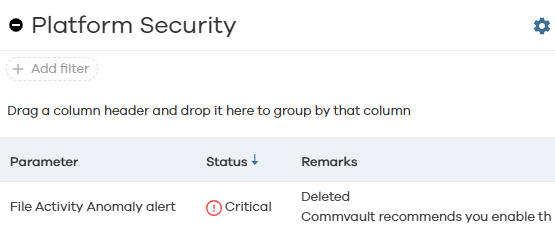
The Security Assessment > Platform security page identifies a critical issue with the “File Activity Anomaly alert” not being enabled. Unfortunately, when I go into the Java GUI Console > Alerts > Configure Alerts, “File Activity Anomaly alert” doesn’t appear as one of the options. 
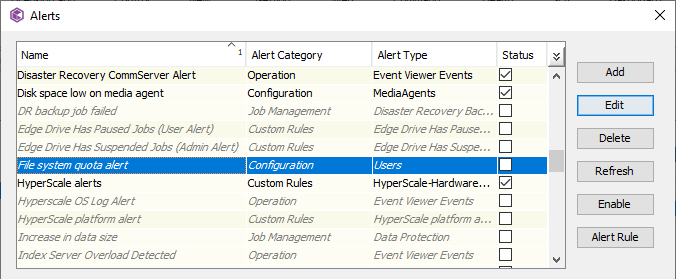
 

I’ve searched the documentation but don’t see any steps on how to load this alert. Does anyone know how to load a missing alert? (The File Activity Anomaly alert specifically.)

Thanks in advance for any help.

Ken

5 replies

Forum|alt.badge.img+12
  • Vaulter
  • March 8, 2025

Hi ​@Ken_H ,

Kindly share the service pack version installed on the Commserv. And refer below steps to enable alert on security posture.

https://documentation.commvault.com/2024/essential/enabling_alerts_for_security_iq_dashboard.html


  1. From the navigation pane, go to Monitoring > Security IQ.

    The Security IQ dashboard page appears.

  2. In the upper-right area of the page, click alert icon alert me button , and then enable any of the following alerts:
    • Anomalous conditions: Notifies you of anomalous events that are indicated by a change in data or activity.

    • Security posture score: Notifies you of changes in the security posture score.

    • Unusual file activity: Notifies you of anomalous file system activity in the endpoint servers or file servers.


Ken_H
Apprentice
Forum|alt.badge.img+14
  • Author
  • Apprentice
  • March 10, 2025

Hello ​@Pradeep,

I am running 2024E, 11.36.28 to be specific.

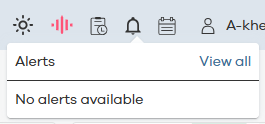
I tried to follow your recommended steps but they do not match what appears in Command Center. Going to Monitoring > Security IQ > Alert icon (in the upper right) simply shows No alerts available.


If I click on View All, I’m taken to the Monitoring > Alerts > Triggered alerts screen which shows No Data available. Again, I’m asking about the "File Activity Anomaly alert" as shown in the Security Assessment screen withing Command Center:


If I go into Monitoring > Alerts > Alert definitions, I see Anomalous condition alerting is already enabled.


Likewise, Security posture score is already enabled:


Finally, there is no entry for Unusual file activity so I’m not able to make any changes for that setting.

I don’t mean to sound ungrateful but what you’ve provided doesn’t help resolve my issue.

Ken


downhill
Novice
Forum|alt.badge.img+9
  • Novice
  • September 10, 2025

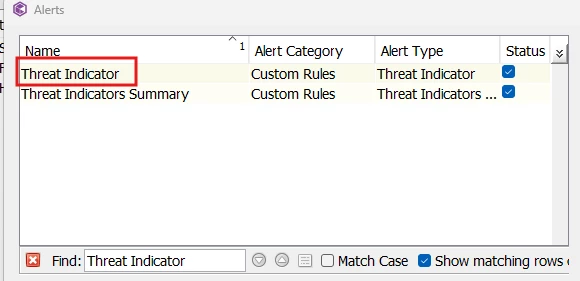
I agree, this seems to be more confusing than it need be. Don’t recommend enabling something which doesn’t by default exist. 11.36.67 still acts the same way - If someone knows how to really solve this please post the link to the doc which explains it. Nowhere in the online docs is there a predefined alert definition the posture assessement says needs enabling. And, the threat indicator one can’t even be “edited” with any sort of destination or expression. 


Forum|alt.badge.img
  • Novice
  • September 13, 2025

Use Command center to CommCell to enable Threat indicator and this should take care of the health score and the security assessment for the File Activity Anomaly alert.

Commvault 11.36.65 and 11.36.72


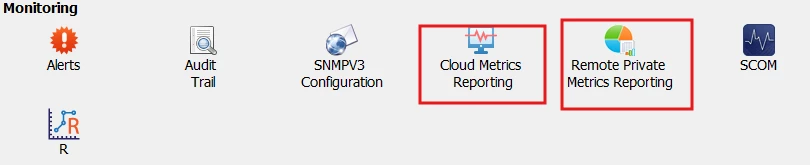
Note: you have to force running the the metrics to detect the change and reflect in the health report or wait to 24hrs


downhill
Novice
Forum|alt.badge.img+9
  • Novice
  • September 18, 2025

Oh great, that’s what I was thinking was what it meant. It would be nice if the health check was updated to reflect that info and not lead to searching for it (impossibly).

thanks ​@Tarek