Hello, I hope you are doing well. I need your valuable help.
What should I do so that commvault only backs up the files in the root directory of a linux machine (HP-UX)? Example: in other backup software when using "/" it only recognizes that it is only for backing up the root directory, in commvault it backs up the whole machine, including files that are not necessary.
thank you very much. :)
Best answer by SparshGupta
Hi @CARLOS PADILLA
Customers in general want to protect their entire clients including all ext3, ext4, xfs volumes on Linux. When content is set as root “/”, we follow the applicable mount points and protect all the data.
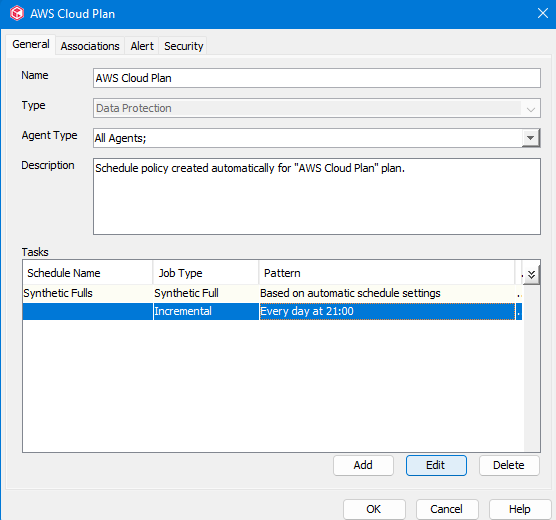
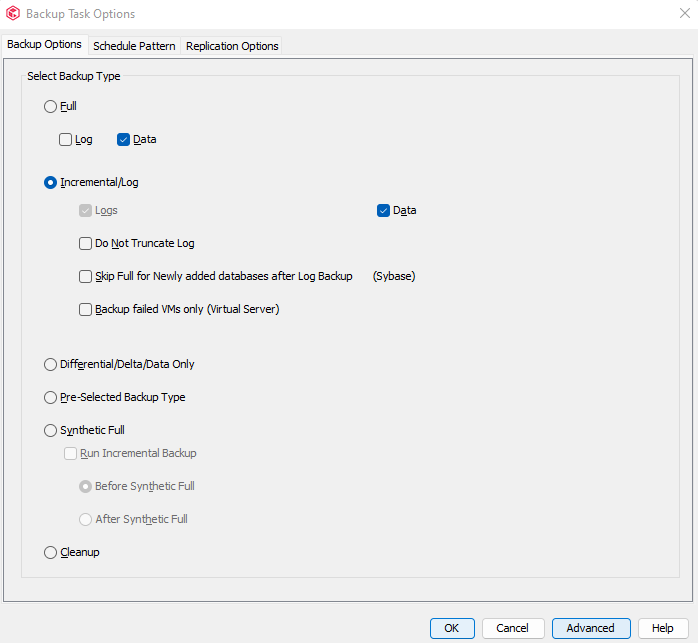
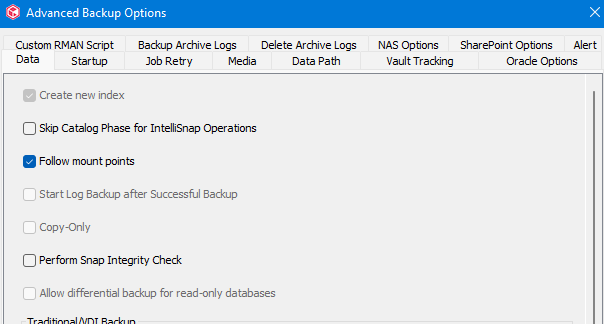
If backups are run using schedules, go to the schedule policy properties → select Full or Incremental schedules → Click on Edit → Under Backup Task Options, click on Advanced → Deselect Follow Mount Points option → Save
Customers in general want to protect their entire clients including all ext3, ext4, xfs volumes on Linux. When content is set as root “/”, we follow the applicable mount points and protect all the data.
If backups are run using schedules, go to the schedule policy properties → select Full or Incremental schedules → Click on Edit → Under Backup Task Options, click on Advanced → Deselect Follow Mount Points option → Save