Solved

HP-UX root directory backup

  • August 22, 2022
  • 3 replies
  • 134 views

Forum|alt.badge.img

Hello, I hope you are doing well.
I need your valuable help.

What should I do so that commvault only backs up the files in the root directory of a linux machine (HP-UX)?
Example: in other backup software when using "/" it only recognizes that it is only for backing up the root directory, in commvault it backs up the whole machine, including files that are not necessary.


thank you very much. :)

Best answer by SparshGupta

Hi @CARLOS PADILLA 


Customers in general want to protect their entire clients including all ext3, ext4, xfs volumes on Linux. When content is set as root “/”, we follow the applicable mount points and protect all the data.

https://documentation.commvault.com/2022e/expert/61608_advanced_backup_options_data.html


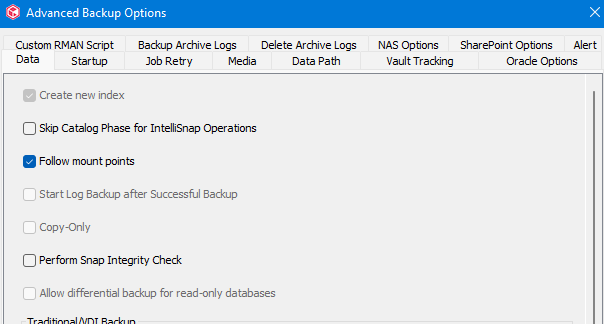
If you don’t want to backup anything outside of “/”, then can you try disabling “Follow Mount Point” option and see if it resolves your concern?

----------------------------------------------------------------------------------------------------------------

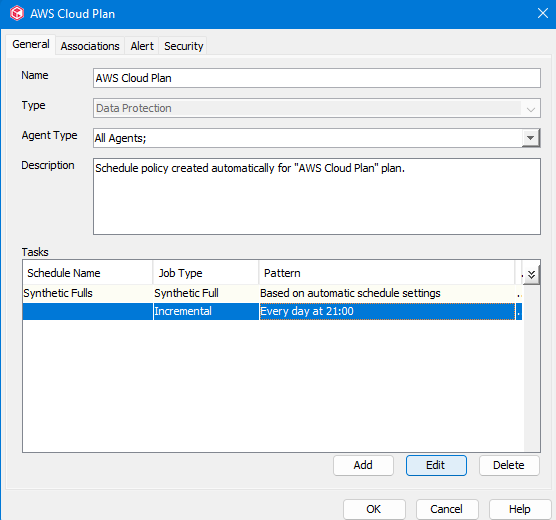
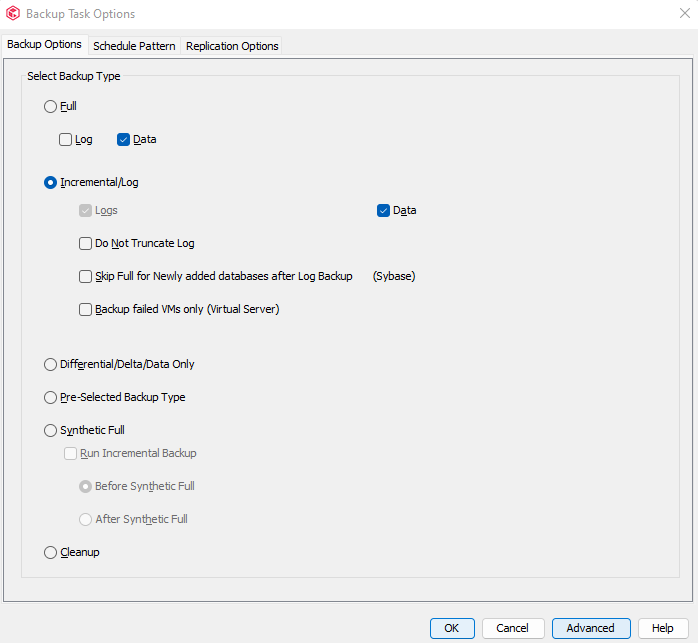
If backups are run using schedules, go to the schedule policy properties → select Full or Incremental schedules → Click on Edit → Under Backup Task Options, click on Advanced → Deselect Follow Mount Points option → Save



Thanks,

Sparsh

3 replies

Mike Struening
Vaulter
Forum|alt.badge.img+22

@CARLOS PADILLA , by default, ‘/’ backs up everything.  You van filter out the subsequent folders using defined filters:

https://documentation.commvault.com/2022e/expert/11829_content_filters_and_regular_expressions_backup.html#unix-filters

Let me know if you have questions about that doc!


SparshGupta
Vaulter
Forum|alt.badge.img+10
  • Vaulter
  • Answer
  • August 23, 2022

Hi @CARLOS PADILLA 


Customers in general want to protect their entire clients including all ext3, ext4, xfs volumes on Linux. When content is set as root “/”, we follow the applicable mount points and protect all the data.

https://documentation.commvault.com/2022e/expert/61608_advanced_backup_options_data.html


If you don’t want to backup anything outside of “/”, then can you try disabling “Follow Mount Point” option and see if it resolves your concern?

----------------------------------------------------------------------------------------------------------------

If backups are run using schedules, go to the schedule policy properties → select Full or Incremental schedules → Click on Edit → Under Backup Task Options, click on Advanced → Deselect Follow Mount Points option → Save



Thanks,

Sparsh


Forum|alt.badge.img

Thank you very much for your help. The backup is now working.