Solved

Index v2 virtual server subclient collect files

  • February 28, 2023
  • 8 replies
  • 313 views

Forum|alt.badge.img

hi all.

i got fresh commvault install 11.28 (2022e)

by default i see that i have index v2 for everything.

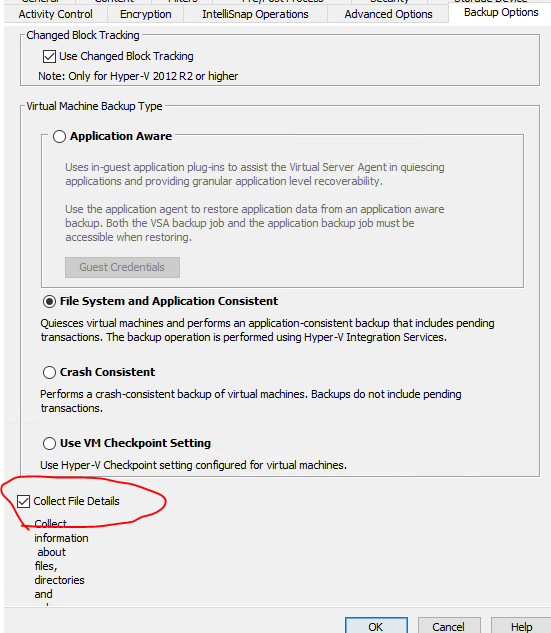
setup hyper-v client and i cannot see option to “collect file details” in subclient properties of virtual server in comcell console.

found option “Index files after backup” in web command center “Protect” → ‘Virtualization” → “VM Groups”. where VM groups = subclient in comcell console.

is this the new and the only way to enable this in command center? no more option in comcell? 

 

Best answer by MarkusBaumhardt

Yes it is true. The MediaAgent binaries are installed, trust me. They are just hidden in previous releases.

The process for collecting file details with Indexing v1 is a completely different process and is done on the fly. This is not supported with Indexing v2, so we need to utilize LiveBrowse.


8 replies

Forum|alt.badge.img
  • Author
  • Novice
  • February 28, 2023

also i found that after i enable “index files after backup” it installed media agent and storage accelerator features into hyper-v node. and start to index files directly on hyper-v host after backup using separate process and virtual disk mount.

why?


Forum|alt.badge.img+13

Hi satsugaer,

this is expected behaviour because VSA v2 doesn’t support creating the catalog (Index) of files during the VSA backup itself, but instead requires LiveBrowse. That’s why it is a separate process. So, its not related to version 11.28 but to Indexing v2 for VSA in general, regardless of the Commvault release.


Forum|alt.badge.img
  • Author
  • Novice
  • March 1, 2023

but why it do live browse directly on host ? can it be changed to index on media agent after backup?

currently to do this, it install media agent role into hyper-v host.


Forum|alt.badge.img+13

It needs the VSA Proxy to read from the backups for index creation, and with Hyper-V it is always one of the cluster nodes. That’s how VSA for Hyper-V works. It cannot be done on a machine outside of the Hyper-V cluster.


Forum|alt.badge.img
  • Author
  • Novice
  • March 1, 2023

so the only way to get rid of media agent role on hyper-v host is to use index v1 ? 


Forum|alt.badge.img+13

No, even in that case the MediaAgent binaries will be needed on the Hyper-V host that has the role of a VSA Proxy in the Hyper-V cluster because the VSA agent needs those binaries, and they will automatically be installed along with the VSA agent. However, that was always the case, also in previous releases.


Forum|alt.badge.img
  • Author
  • Novice
  • March 1, 2023

that is not true.

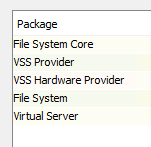
on old installation i have hyper-v with only this packages and index v1. indexing guest files works well and don’t use hyper-v host for it.

and i also use this option


Forum|alt.badge.img+13

Yes it is true. The MediaAgent binaries are installed, trust me. They are just hidden in previous releases.

The process for collecting file details with Indexing v1 is a completely different process and is done on the fly. This is not supported with Indexing v2, so we need to utilize LiveBrowse.