


Answer

Is it possible to enable 1Touch for all in Unix Clients at once?

  • October 21, 2024
  • 7 replies
  • 117 views

Forum|alt.badge.img+6

Hi All,

We have multiple Unix clients in a Commserve, I need to enable 1Touch for all the clients.

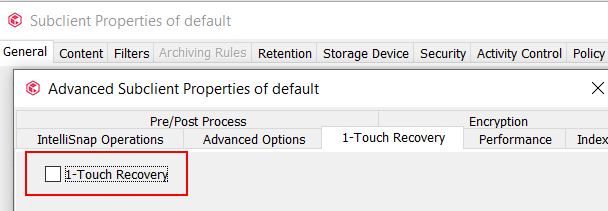
Is it possible to enable 1Touch for all in Unix Clients at once? Any workflow or Command/Script?


Regards,

Sravan Kondeti

Best answer by Vignesh S

Hi @backup 


Please find the attached custom workflow I created.

  1. Create a client group and place the Linux/Unix clients
  2. Execute the workflow by selecting the created Client Group as the input.
  3. You can verify the One-Touch option by running ‘Bare Metal Recovery’ report under ‘1-Touch Recovery Option Status by Clients’ Table. (you can download Bare Metal Recovery report from store.commvault.com if its not already imported)

A note of caution : You can test for single client and verify initially in your environment before running for Mass number of clients. 

7 replies

Forum|alt.badge.img
  • Vaulter
  • October 21, 2024

Script/Workflow for enabling 1-Touch for all Linux clients in a CommCell is being worked on. We will share further information when this is ready for customer consumption.


Forum|alt.badge.img+6
  • Author
  • Byte
  • October 22, 2024

Thank you for the update @rcr. Any ETA for this?


Forum|alt.badge.img
  • Vaulter
  • October 22, 2024

Will share the ETA when it’s closer to a state where it can be consumed by the customers. Please be assured that we are pursuing this very actively.


Forum|alt.badge.img+2
  • Byte
  • Answer
  • October 22, 2024

Hi @backup 


Please find the attached custom workflow I created.

  1. Create a client group and place the Linux/Unix clients
  2. Execute the workflow by selecting the created Client Group as the input.
  3. You can verify the One-Touch option by running ‘Bare Metal Recovery’ report under ‘1-Touch Recovery Option Status by Clients’ Table. (you can download Bare Metal Recovery report from store.commvault.com if its not already imported)

A note of caution : You can test for single client and verify initially in your environment before running for Mass number of clients. 


Forum|alt.badge.img+6
  • Author
  • Byte
  • October 22, 2024

Thank you @Vignesh S .

We haven’t deployed any System Created Workflow previously, could you please help us to know how to deploy and execute it.


Forum|alt.badge.img+2
  • Byte
  • October 22, 2024

Console → Workflows → All Tasks → Import Definitions : Map the downloaded workflow file and click Import

After imported : Right Click the Workflow → All Tasks → Deploy

After Deployed : Right Click the Workflow → All Tasks → Execute


Forum|alt.badge.img+3
  • Byte
  • November 14, 2024

Hi Vignesh,

thanks for the workflow, do we have a qoperation command to do that ? if yes please provide me i found update of subclient properties which involes all the options but i need only to enable the Onetouch option.

https://documentation.commvault.com/11.20/command_line_configuration_unix_linux_file_systems_03.html#examples

Regards,

Sasanka Lv
