Question

Is there a way to check the currently logged in qlogin user?

  • September 27, 2023
  • 4 replies
  • 1095 views

Forum|alt.badge.img+1

So we utilize qlogin to execute various scripts, but at times members of our backup team run into an issue where they see this error message if someone is currently logged in: Error 0x23f: Another user to the same commserver has already logged in, please logout from that and then retry. 

Instead of running a qlogout -all command, is there an easy way to verify who the currently logged in user is?


4 replies

Forum|alt.badge.img+10

@Rehan Bari 

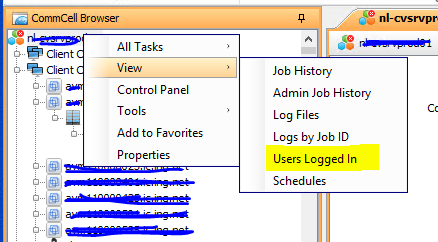
You can go to Commcell console > Commcell > right click> view logged in users this will tell you the logged in users.


Forum|alt.badge.img+10

@Rehan Bari 

Adding the screenshot as well to address the above:


Forum|alt.badge.img+14

@Rehan Bari 
Note this might also be helpful. You can modify the timeout to automatically logout users from qlogin.

https://documentation.commvault.com/additionalsetting/details?name=QSDKSessionTimeout


christopherlecky
Explorer
Forum|alt.badge.img+16

I dont really understand what is being asked here. Each id is unique are you users sharing logins or is the script itself using a fixed id?