Question

mount error Error Code: [19:1131] Description: Unable to reach the client

  • September 14, 2022
  • 9 replies
  • 2105 views

Forum|alt.badge.img+1

hi,

we are using Commvault backup solution last 4year, but few days we have some trouble of backup mount error, error showing as given below 


Error Code: [19:1131]
Description: Unable to reach the client [svtgulp01]. Please confirm the server is up and running, then check Network connectivity between Commserve and remote computer.
Source: svtgcmp00.team.com.bd, Process: JobManager

9 replies

Sunil Turakani
Vaulter
Forum|alt.badge.img+2
  1. Do check on the network connectivity (ping) between the hosts - Commserve and Client, Client and media agent host.
  2. Firewall settings
  3. Anti-virus settings

Forum|alt.badge.img+1
  • Author
  • Novice
  • September 14, 2022


Forum|alt.badge.img+1
  • Author
  • Novice
  • September 14, 2022


Forum|alt.badge.img+1
  • Author
  • Novice
  • September 14, 2022

@sbt32  


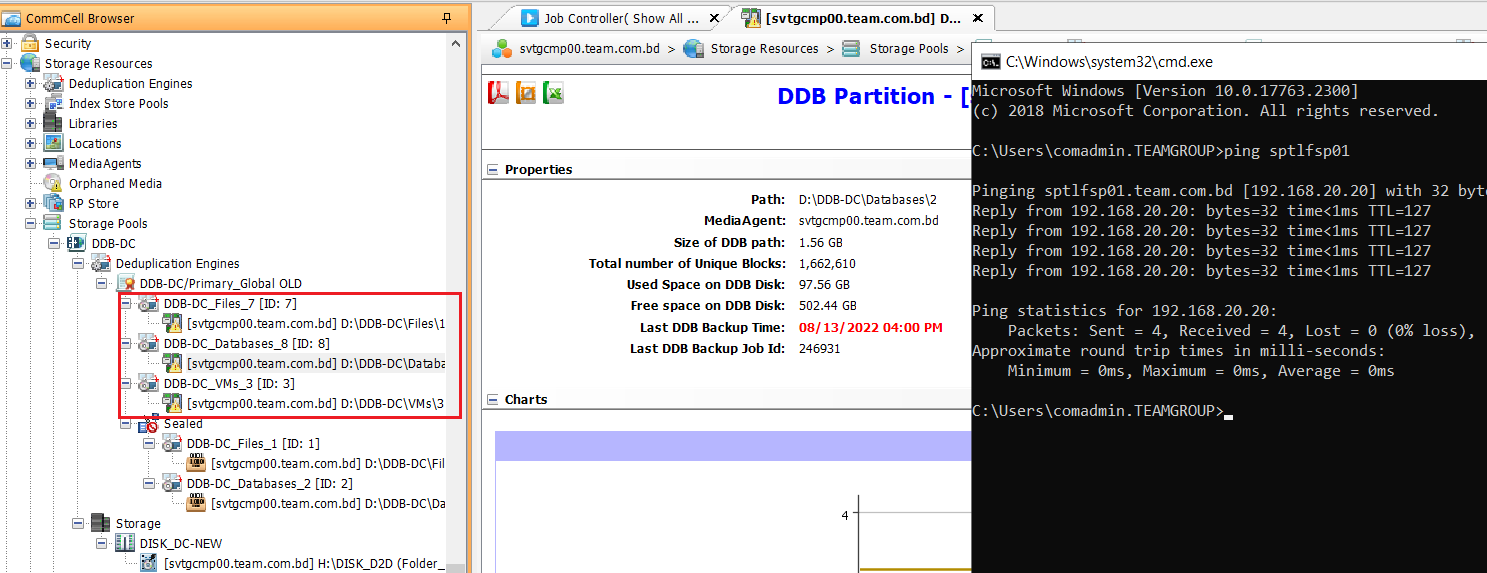
i have checked your mentioned point,


ping reachability is ok

firewall off


i have shown snapshot as attached 


Forum|alt.badge.img+1
  • Author
  • Novice
  • September 14, 2022

@sbt32  it possible to connect with us direct remotely, and we will pay on call 


Mike Struening
Vaulter
Forum|alt.badge.img+22

@Jabad Hossain , if you call into Customer Support and don’t have a contract, they will assist in setting up a per incident fee.


Forum|alt.badge.img+1
  • Author
  • Novice
  • September 14, 2022

Error Code: [62:308]
Description: Failed to mount the disk media in library [DISK_DC-NEW] with mount path [H:\DISK_D2D] on MediaAgent [svtgcmp00.team.com.bd]. The media side mounted is write-protected. Please use another media.
Source: svtgcmp00.team.com.bd, Process: MediaManager


Jos Meijer
Community All Star
Forum|alt.badge.img+16
  • Community All Star
  • September 14, 2022

Assuming this is not a server internal disk.

Please check the following:

- is there a read only lun allocation from storage perspective?

- is there a disk read only attribute on OS level?

OS read only attribute example:

C:\Users\Administrator> diskpart

Microsoft DiskPart version 6.0.6002 Copyright (C) 1999-2007 Microsoft Corporation. On computer: COMPUTERNAME

DISKPART> list disk

Disk ### Status Size Free Dyn Gpt -------- ---------- ------- ------- --- --- Disk 0 Online 64 GB 0 B Disk 1 Online 78 GB 2048 KB

DISKPART> select disk 1

Disk 1 is now the selected disk.

DISKPART> detail disk

Disk Device Disk ID: 02872505 Type : iSCSI Bus : 0 Target : 0 LUN ID : 0 Read-only : Yes <--- Make sure of read-only mode Boot Disk : No Pagefile Disk : No Hibernation File Disk : No Crashdump Disk : No

There are no volumes.

DISKPART> attribute disk clear readonly

Disk attributes cleared successfully.


Forum|alt.badge.img+1
  • Author
  • Novice
  • September 15, 2022


@Jos Meijer current disk status as following 


DISKPART> detail disk

MSFT Virtual HD SCSI Disk Device
Disk ID: {16BE6A5F-4B6E-490E-8FED-626B08B882C5}
Type   : iSCSI
Status : Online
Path   : 0
Target : 0
LUN ID : 0
Location Path : UNAVAILABLE
Current Read-only State : No
Read-only  : No
Boot Disk  : No
Pagefile Disk  : No
Hibernation File Disk  : No
Crashdump Disk  : No
Clustered Disk  : No

  Volume ###  Ltr  Label        Fs     Type        Size     Status     Info
  ----------  ---  -----------  -----  ----------  -------  ---------  --------
  Volume 0     H   New Volume   NTFS   Simple        29 TB  Healthy


please help