


Solved

Need to review VMware vCenter unprotected VMs

  • Feb 7, 2024 10:24 AM UTC
  • 4 replies
  • 248 views

Forum|alt.badge.img+5

Hi,

Is there a way in 11.32.38 we can check what all VMs from the vCenter client are not yet protected/backed up by any subclient to our cloud library?

Best answer by Pradeep

@Jass Gill 

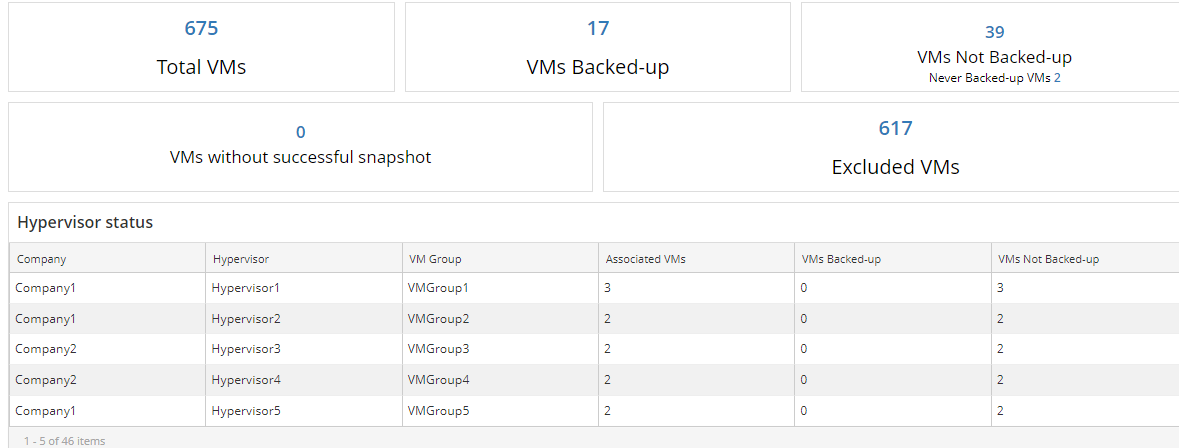
Kindly import the below report and refer to the VMs not backed up column to know if its protected or not.
https://store.commvault.com/webconsole/softwarestore/store.do#!/135/728/21419



View original

4 replies

Forum|alt.badge.img+17
  • Vaulter
  • Answer
  • Feb 7, 2024 11:39 AM UTC

@Jass Gill 

Kindly import the below report and refer to the VMs not backed up column to know if its protected or not.
https://store.commvault.com/webconsole/softwarestore/store.do#!/135/728/21419


Forum|alt.badge.img+5
  • Author
  • Apprentice
  • Feb 7, 2024 12:08 PM UTC

Thank you for the update @Pradeep . I was able to install the report and review the VMs.


Forum|alt.badge.img+5
  • Author
  • Apprentice
  • Feb 7, 2024 5:18 PM UTC

One last question @Pradeep , I am able to see the VMs which are a part of some subclient/VM group. Will commvault not pull in all the VMs present inside vCenter client (inside its ESXi Hosts) to see what all are yet to be backed up and what have been backed up ?


Forum|alt.badge.img+17
  • Vaulter
  • Feb 8, 2024 2:27 AM UTC

@Jass Gill 

The same report provides the details of the VM However you may also refer below subclient configuration report to know when was last full and incremental ran against those VM subclient.

https://store.commvault.com/webconsole/softwarestore/store.do#!/135/663/13916

