Solved

Proxmox (11.36.83)

  • January 6, 2026
  • 3 replies
  • 78 views

Forum|alt.badge.img+1

I’m working with a customer to test Proxmox backups and am a bit confused.  When I go to the Proxmox config page I don’t have an access node which is expected since we haven’t set it up yet.  When I click on the link to download it, I get an VSA_x64.exe, which is a Windows executable.  

From documentation I understand we have to install it on at least one of the cluster nodes which are a flavor of linux.  Is the idea to download the CV linux binaries using the VSA_x64 executable?  If so, what would be the proper package(s)? 

Also, it is a little confusing with the documentation as I’m reading it; do we need VSA installed on all the nodes in the cluster or just a single node to act as the access node?

Thanks in advance!
Best answer by Sureshkumar S

Hi ​@djustis ,

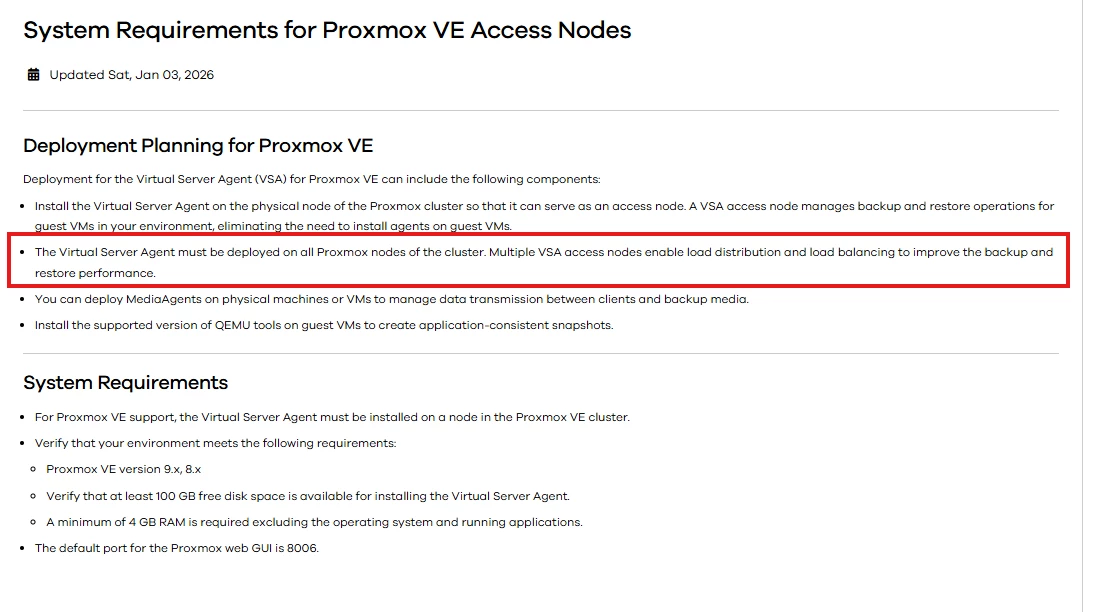
This has been added in the documentation 


Ref : https://documentation.commvault.com/11.40/software/system_requirements_for_proxmox_ve_access_nodes.html


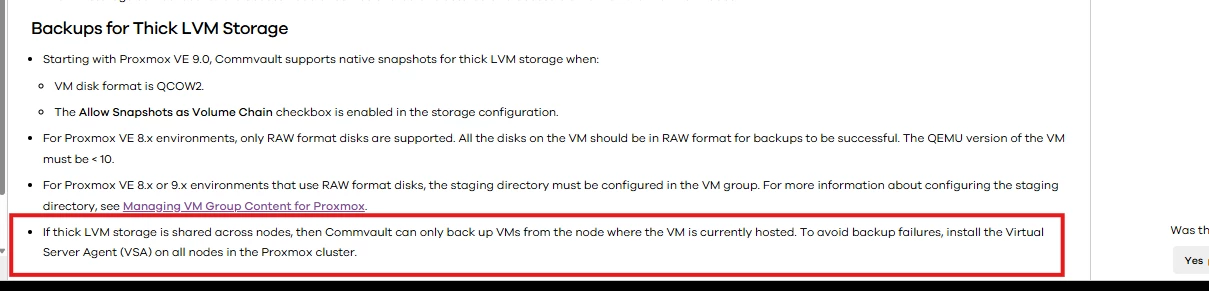
Installing only on one node will increase the load and some known issues

https://documentation.commvault.com/11.40/software/backups_for_proxmox_vms.html


Hope this answers your question. so its always best to install VSA in all nodes


Regards,

Sureshkumar S

3 replies

Forum|alt.badge.img+12

Hi ​@djustis ,

Good day!

You can download the Linux package using bootsrapper (Have FS+FScore+Virtual server)

https://cloud.commvault.com/commandcenter/#/softwareStore?cloudCompanyId=37660

Its better to install VSA in all nodes | Promox is similar to Hyper-v

Regards,

Sureshkumar S


Forum|alt.badge.img+1
  • Author
  • Novice
  • January 7, 2026

Thank you for the reply ​@Sureshkumar S!  

I’ll get the package downloaded manually.

If the customer only wants to begin with one host, what would be the limitations of not having the VSA on all of them?  I wish the documentation had more details.


Forum|alt.badge.img+12
  • Vaulter
  • Answer
  • January 8, 2026

Hi ​@djustis ,

This has been added in the documentation 


Ref : https://documentation.commvault.com/11.40/software/system_requirements_for_proxmox_ve_access_nodes.html


Installing only on one node will increase the load and some known issues

https://documentation.commvault.com/11.40/software/backups_for_proxmox_vms.html


Hope this answers your question. so its always best to install VSA in all nodes


Regards,

Sureshkumar S