Answer

remove cache directory path for hybrid file store

  • May 19, 2022
  • 4 replies
  • 81 views

Forum|alt.badge.img+6

accidentally, 
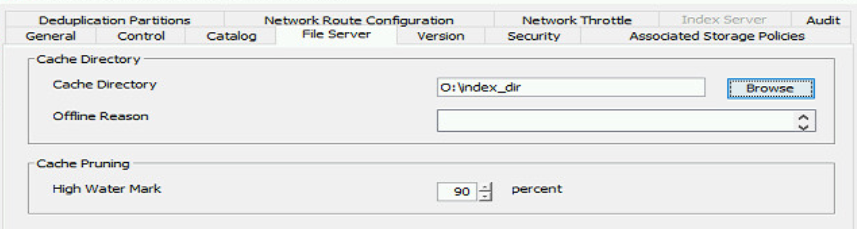
A path for hybrid file store cache directory is configured.
I suspect that this path affect my jobs, I want to remove it.
when I just delete the path text, I get error to enter valid cache directory
 

Best answer by Bill Katcher

@Mostafa Amin @Mike Struening 

As I’ve replied in the other thread: That path won’t affect your jobs and won’t be used for anything until you create an HFS client. There is no need to erase the setting.

4 replies

Mike Struening
Vaulter
Forum|alt.badge.img+22

@Mostafa Amin , you’ll have to move it...you can’t remove it because there is valid index data there.

Is there a drive you can move it to?

To rewind a bit, why do you think it will affect your jobs?

Thanks!


Forum|alt.badge.img+6
  • Author
  • Novice
  • May 21, 2022

@Mike Struening 
I don’t use “hybrid file store” so I don’t need the path.
I have file system backup jobs fails in archive phase using this media agent … databases backup jobs on the same media agent are done successfully.


Mike Struening
Vaulter
Forum|alt.badge.img+22

@Bill Katcher , is this something you can advise on?


Bill Katcher
Vaulter
Forum|alt.badge.img+3
  • Vaulter
  • Answer
  • May 24, 2022

@Mostafa Amin @Mike Struening 

As I’ve replied in the other thread: That path won’t affect your jobs and won’t be used for anything until you create an HFS client. There is no need to erase the setting.