Question

Report showing o,, which side the encryption is happening

  • November 21, 2024
  • 7 replies
  • 61 views

Forum|alt.badge.img+6

Hi all,

i have activated media agent side encryption but management wants to see a report that the encryption is happening on the media agent side and not the agent side.

Is there any report where we can see this?

like:

I active an encryption job on media agent side and confirm with a report.

Again an encryption job on media+agent side and confirm with a report.


Thank you

7 replies

Mohamed Ramadan
Novice
Forum|alt.badge.img+10

hello ​@sauvegarde 
Hope this email finds you well
 

This report provides a complete overview of the encryption settings.

https://cloud.commvault.com/webconsole/softwarestore/store.do#!/147/701/18096
 

Please let me know if you have any questions or require further assistance.
Best Regards,
Mohamed Ramadan
Data Protection Specialist


Mohamed Ramadan
Novice
Forum|alt.badge.img+10

hello ​@sauvegarde 
Hope this finds you well


This report provides a complete overview of the encryption settings.
https://cloud.commvault.com/webconsole/softwarestore/store.do#!/147/701/18096

Best Regards,
Mohamed Ramadan
Data Protection Specialist


Forum|alt.badge.img+14

@sauvegarde  Not directly related to your query (the report noted by Mohamed would be your best option) however there is encryption setting in control panel that you can force and prevent changes.
more info on encryption and views
https://documentation.commvault.com/2024e/essential/client_encryption_information.html

Might be something that helps given your requirements here.

https://documentation.commvault.com/2024e/expert/configuring_global_level_software_encryption_settings.html

As well as option to modify the settings across SP
https://documentation.commvault.com/2024e/expert/modifying_software_encryption_properties_of_storage_policy_copy_or_storage_pool_using_command_line_interface.html


Forum|alt.badge.img+6
  • Author
  • Novice
  • November 21, 2024

hello ​@sauvegarde 
Hope this finds you well


This report provides a complete overview of the encryption settings.
https://cloud.commvault.com/webconsole/softwarestore/store.do#!/147/701/18096

Best Regards,
Mohamed Ramadan
Data Protection Specialist

thank ou ​@Mohamed Ramadan  for the answer but i have already checked this report. It shows the option which we choose for encryption.

A little precision, i want to know on which client/media agent with hostname where the encryption happened in a job.


Forum|alt.badge.img+6
  • Author
  • Novice
  • November 21, 2024

@sauvegarde  Not directly related to your query (the report noted by Mohamed would be your best option) however there is encryption setting in control panel that you can force and prevent changes.
more info on encryption and views
https://documentation.commvault.com/2024e/essential/client_encryption_information.html

Might be something that helps given your requirements here.

https://documentation.commvault.com/2024e/expert/configuring_global_level_software_encryption_settings.html

As well as option to modify the settings across SP
https://documentation.commvault.com/2024e/expert/modifying_software_encryption_properties_of_storage_policy_copy_or_storage_pool_using_command_line_interface.html
 

Thank you for the additional information ​@Scott Reynolds :)


Forum|alt.badge.img+6
  • Author
  • Novice
  • November 25, 2024

no answer for my question so?


Forum|alt.badge.img+12
  • Vaulter
  • November 26, 2024

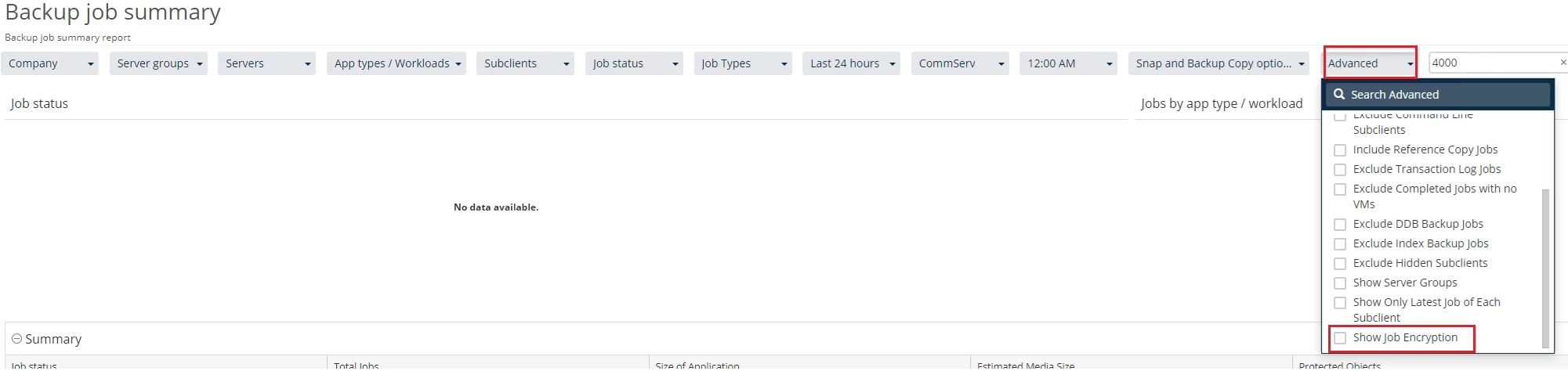
The Backup Job Summary should allow you to check on the Job Encryption of each Job