
Question

Restore directly to Synology NAS

  • April 11, 2023
  • 8 replies
  • 478 views

Nikos.Kyrm
Community All Star
Forum|alt.badge.img+16

Hello community, a quick question!

Is it possible to proceed a restore directly to a Synology NAS ?

A guest file restore for example, from a VM → out-off-place restore directly to a NAS device!
 

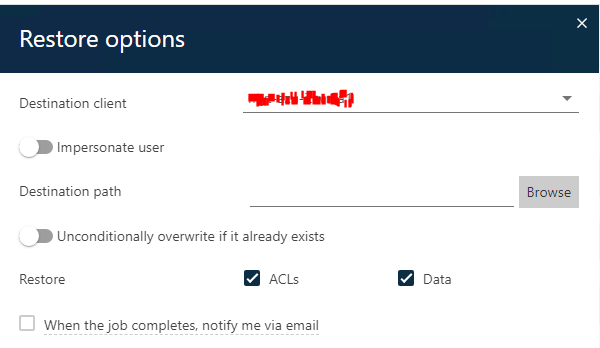
From Command Center, for out-off-place restore, I can see only MediaAgent, and other VM’s as a destination and not a NAS device.

8 replies

Hyder
Vaulter
Forum|alt.badge.img+8
  • Vaulter
  • April 11, 2023

Have you tried it as a UNC path from the Restore options?


Nikos.Kyrm
Community All Star
Forum|alt.badge.img+16
  • Author
  • Community All Star
  • April 12, 2023

Hello @Hyder 

Thanks for your reply!

You mean to add/map the NAS path in a VM and restore it there?

I cannot see a UNC path option in Restore options, only destination clients:


Forum|alt.badge.img+14

Hi @Nikos.Kyrm ,

That’s right the best way would be to map a network drive.

Best Regards,

Sebastien


Nikos.Kyrm
Community All Star
Forum|alt.badge.img+16
  • Author
  • Community All Star
  • April 12, 2023

OK, so @Hyder ,  

There is no alternative way, maybe through an agent installation in Synology ?


Hyder
Vaulter
Forum|alt.badge.img+8
  • Vaulter
  • April 12, 2023

There’s no agent you can put directly on the Synology, if it a shot like @Sebastien Merluzzi said also, let us know how you make out


Nikos.Kyrm
Community All Star
Forum|alt.badge.img+16
  • Author
  • Community All Star
  • May 24, 2023

Hi @Nikos.Kyrm ,

That’s right the best way would be to map a network drive.

Best Regards,

Sebastien


Hello again,

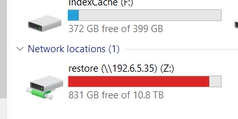
I mapped a NAS path to MediaAgent, but when browse the MediaAgent, Im not able to see the network map drive letter in order to proceed with the restore in this path!


Forum|alt.badge.img+14

Hi @Nikos.Kyrm ,

Can you copy/paste the path, i.e Z:\Restore?

Best Regards,

Sebastien


Nikos.Kyrm
Community All Star
Forum|alt.badge.img+16
  • Author
  • Community All Star
  • May 25, 2023

Hi @Nikos.Kyrm ,

Can you copy/paste the path, i.e Z:\Restore?

Best Regards,

Sebastien


Hey @Sebastien Merluzzi !

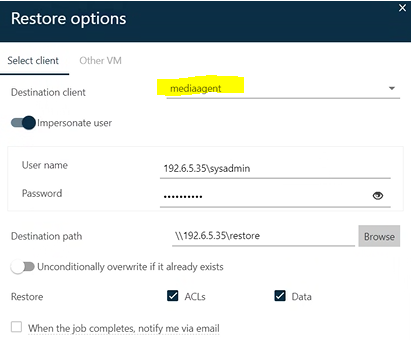
Your suggestion was correct to edit the path.

For Linux NAS as destination, the user / credential format must be like below: