Solved

restore old DR backup to extract report

  • October 27, 2022
  • 4 replies
  • 71 views

Forum|alt.badge.img+6

Hello,


Is is possible to restore old DR backup from tape to a staging location and then use those backup files to extract some job reports through sql queries without going through another installation?


Thanks

Sandeep


Best answer by Hyder

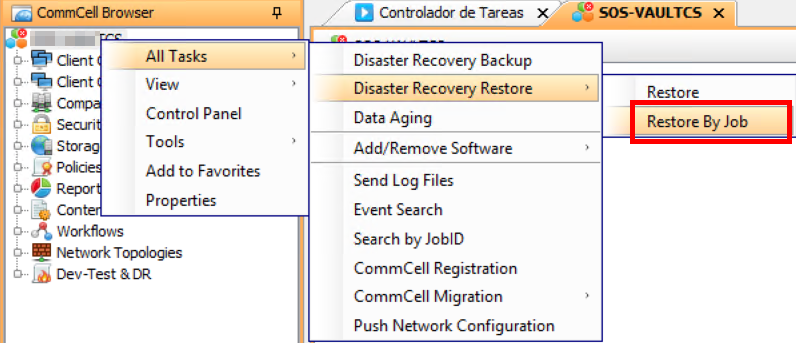
Do it like this, then dump the job any where in the CommCell, then move it over and install CV like you would on any machine and pick the CS options, during install you will be asked to import DR file


4 replies

Hyder
Vaulter
Forum|alt.badge.img+8
  • Vaulter
  • October 27, 2022

Hey Sandy, in the long run...in my opinion...better to sand up a machine in an isolated environment and import the DR

This will make producing reports and command line reports also much much easier and meaningful. Without a deep understanding of CV tables its gonna be a rabbit hole I would avoid


Forum|alt.badge.img+6
  • Author
  • Novice
  • October 27, 2022

Thanks. How do i restore old DR backup from tape to a staging folder so that i can copy it to new machine?

 I am not seeing a browse and restore option on the job.


Hyder
Vaulter
Forum|alt.badge.img+8
  • Vaulter
  • Answer
  • October 27, 2022

Do it like this, then dump the job any where in the CommCell, then move it over and install CV like you would on any machine and pick the CS options, during install you will be asked to import DR file



Forum|alt.badge.img+6
  • Author
  • Novice
  • October 31, 2022

Thanks. That worked