Solved

Retain until question.

  • August 31, 2022
  • 4 replies
  • 341 views

Forum|alt.badge.img+7

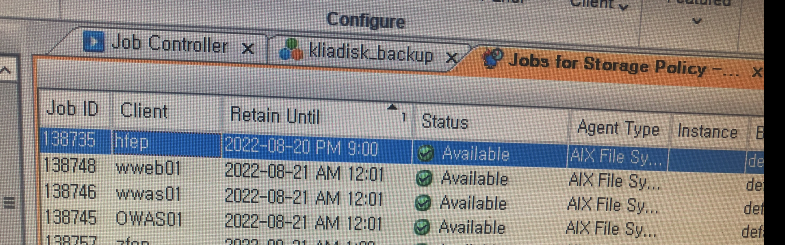
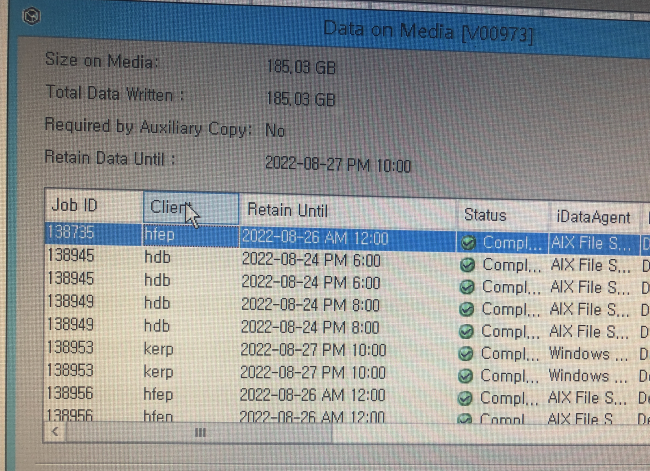
Why is the 'retain until' date different?


Best answer by Damian Andre

Thank you. 

The data cannot be automatically deleted even after the retain unit has passed
Is it because the cycle is not satisfied?


That’s exactly right - that’s why the data forecast and retention report is the best to determine why a job may not be aging - it has a column that displays the exact reason.

Here’s an ‘old but gold video’ that may be helpful!

 

https://youtu.be/99TbjQTKpb0


4 replies

Damian Andre
Vaulter
Forum|alt.badge.img+24

Do you have multiple copies for this job? the ‘retain until’ is based upon days retention only (not cycles) - it may be different on different copies. If you use the data forecast and retention report, you can get a specific estimated age date as well as what is keeping it in retention (days, cycles, required for auxcopy etc.)

The media view looks like tape media but in your other screenshot I see reference to a disk library, so that would explain it (retention difference between copies).


Forum|alt.badge.img+7
  • Author
  • Novice
  • August 31, 2022

Thank you. 

The data cannot be automatically deleted even after the retain unit has passed
Is it because the cycle is not satisfied?


Damian Andre
Vaulter
Forum|alt.badge.img+24
  • Vaulter
  • Answer
  • August 31, 2022

Thank you. 

The data cannot be automatically deleted even after the retain unit has passed
Is it because the cycle is not satisfied?


That’s exactly right - that’s why the data forecast and retention report is the best to determine why a job may not be aging - it has a column that displays the exact reason.

Here’s an ‘old but gold video’ that may be helpful!


https://youtu.be/99TbjQTKpb0


Forum|alt.badge.img+7
  • Author
  • Novice
  • August 31, 2022

Thank you for you advise.