Answer

Rule - alert if no backup than X hours

  • December 29, 2021
  • 3 replies
  • 298 views

Bart
Novice
Forum|alt.badge.img+12

Hi,


Currently you can send alerts when there is no backup for more than X days. Great.
But is it also possible to have an alert based on X hours? Reason: systems with SLA /RPO of X hours.

 

Best answer by Stuart Painter

Hi @Bart 

Development have pointed out a template we have available on Commvault Cloud Store:

Clients not backed up for X minutes

Steps to import the alert rule: Alerts and Notifications - Exporting or Importing an Alert Rule

To create custom alert using the imported alert rule: Alerts and Notifications - Creating Alerts Using Alert Rules

Please let me know if that fits with your requirements.

Thanks,

Stuart

3 replies

Forum|alt.badge.img+15

Hi @Bart 

As you say, the granularity for “No Job in X…” alerts is in days, we don’t appear to have options for specifying in hours.

Let me check internally on this and get back to you:

  1. If we have any workarounds to alert in hours
  2. If not, are there any future plans to add this capability

Thanks,

Stuart


Forum|alt.badge.img+15

Hi @Bart 

I have researched this internally and I can’t find anything that really applies to this request, so I am following up with Development to check this for you.

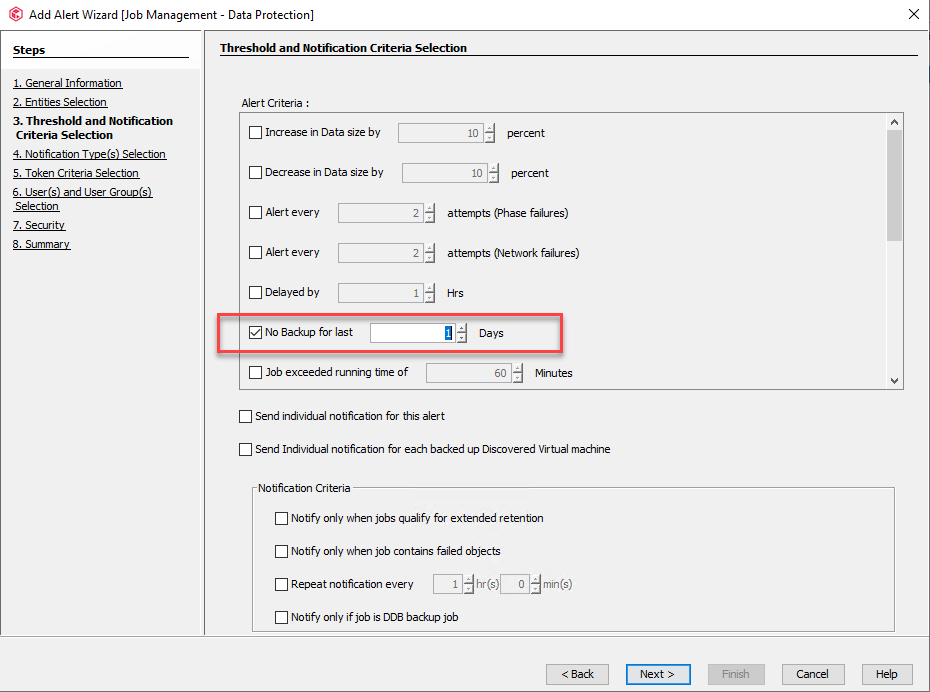
For context and benefit of the whole Community, sharing the current Alert configuration option here that is limited to Days only:

Thanks,

Stuart


Forum|alt.badge.img+15

Hi @Bart 

Development have pointed out a template we have available on Commvault Cloud Store:

Clients not backed up for X minutes

Steps to import the alert rule: Alerts and Notifications - Exporting or Importing an Alert Rule

To create custom alert using the imported alert rule: Alerts and Notifications - Creating Alerts Using Alert Rules

Please let me know if that fits with your requirements.

Thanks,

Stuart