Solved

SAP Archive link install, port 8080 in use

  • August 11, 2022
  • 1 reply
  • 123 views

Forum|alt.badge.img+3

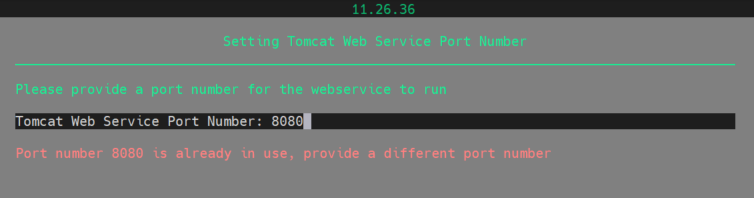
When installing SAP Archive Link on a newly installed Sles15 Server, it says the Tomcat Web Service Port is already in use. Tried port 80 and 8088, but all are in use.


ss -lnp | grep 8080 gives nothing.
 

If I use port 9099 it is going further with the installation. 
Anyone any idea?

thanks in advance.
Marcel

Best answer by Jos Meijer

Could be in use by an other web related service.

Documentation quote:

"By default, the Tomcat Web Service uses port number 8080. If the port number is used by other applications, you must select another port number."


Source:

https://documentation.commvault.com/11.24/expert/1918_preinstallation_checklist_for_sap_archive_link_agent_on_unix.html

Depending on your environment/firewall you can use any other port.

1 reply

Jos Meijer
Community All Star
Forum|alt.badge.img+16
  • Community All Star
  • Answer
  • August 11, 2022

Could be in use by an other web related service.

Documentation quote:

"By default, the Tomcat Web Service uses port number 8080. If the port number is used by other applications, you must select another port number."

Source:

https://documentation.commvault.com/11.24/expert/1918_preinstallation_checklist_for_sap_archive_link_agent_on_unix.html

Depending on your environment/firewall you can use any other port.