Thanks for the feedback, Skarra!
The PDF multi-select feature that you describe in your post is something we are actually working on as a feature improvement for the documentation site. We should have this feature added to the Commvault documentation site very soon. But in the meantime, if you want to preview how the PDF multi-select feature works, you can try it out the Metallic documentation site (https://docs.metallic.io):
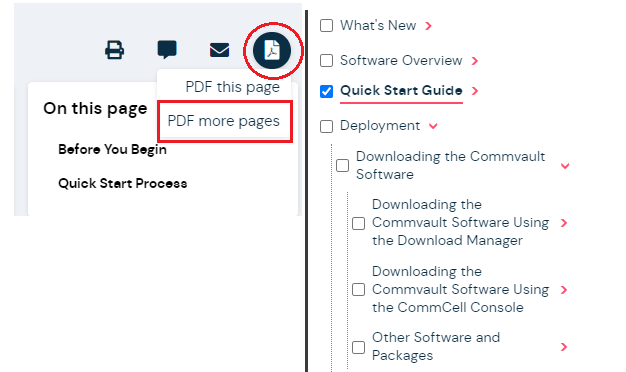
- Click the PDF icon, and then click PDF more pages.
- In the left navigation, select only the top-level pages that you want to add to the PDF.
- Click Create PDF and wait until your custom PDF is downloaded to your browser.
The PDF should include the pages that you selected as well as any child pages that appear underneath your selected pages in the navigation.
The new PDF generation backend should also be faster and includes a hierarchical outline of the pages in order with respect to how they are ordered in the documentation site navigation.
If you get a chance to check out how the feature works on the Metallic site, we’d love to hear what you think.
Again, thanks for your feedback!