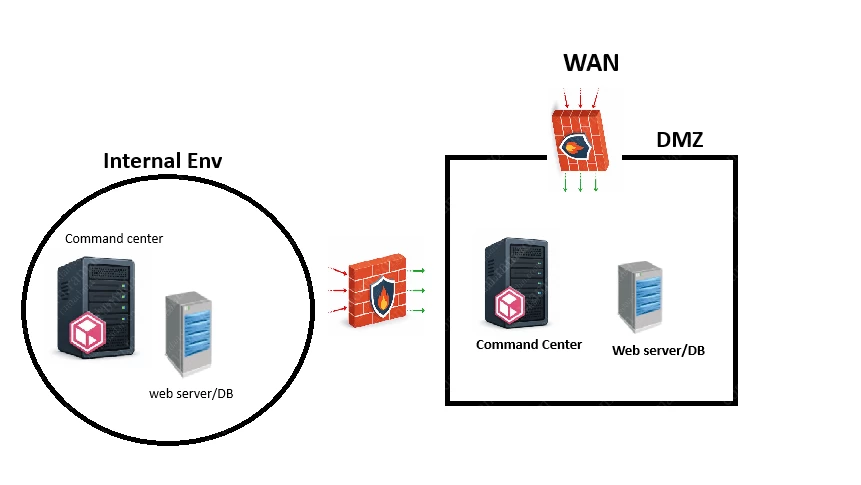
We currently have an Exchange On-Premises user mailbox archiving solution implemented within our environment using Commvault. All components of our CommCell infrastructure (CommServe, MediaAgents, Web Server, etc.) are hosted within the internal network, and the solution is operating as expected. End-users connected internally are able to seamlessly access and retrieve their archived emails (Recall functionality) without any issues.
However, we now have a requirement to provide external access to this archived email content for a subset of users. These users connect through a VPN, which places them within the DMZ network segment rather than the internal network.
We understand that it is possible to deploy a dedicated Command Center instance within the DMZ to handle external access use cases. That said, we are unclear about the complete architecture and configuration required to make this setup fully functional.
Specifically, we would like clarification on the following points:
How should the Command Center deployed in the DMZ be integrated with the existing Web Server used for Recall operations located in the internal network?
Is there a need to configure any specific URL mappings, reverse proxy rules, or redirection mechanisms between the DMZ and internal components?
Are there any additional settings, network requirements (ports, firewall rules), or security considerations that must be addressed to enable this communication securely?
Does this setup require a dedicated Web Server in the DMZ, or can the internal Web Server be reused via appropriate network configuration? From my understanding, there is no need for Web Server in the DMZ, the Command Center is sufficient and will be linked with the internal one.
Despite reviewing the available documentation, we have not found clear guidance on this particular architecture or implementation scenario.
Any detailed explanation, best practices, or reference architecture would be greatly appreciated.
Kind regards,
Best answer by Paul G
Hi @Sys Engineer,
I had to verify this but Arlie confirms my thoughts about this.
There is no way to relay the recall as the recall URL points to your internal webserver. The recall URL needs to be updated on all stubs to point to the DMZ webserver. The DMZ webserver relays the request to necessary internal servers.
Network configuration needs to be added where the internal servers connect to the DMZ server to setup the tunnel connection for future recall requests but the DMZ webserver is not allowed to connect to the internal servers (one-way connection or via proxies).
Below the explanation written by Arlie. It does specify file recalls but that does not differ with mail recalls.
To enable recall operations (such as file recalls from stubs) via a DMZ web server in a Commvault environment, you must ensure proper network routing and firewall configuration between the external (DMZ) web server and the internal components that manage the recall process. Here are the key considerations and steps:
1. Network and Firewall Configuration
The DMZ web server must be able to communicate with the MediaAgent and file server where the data resides.
Required ports (such as 443 for HTTPS and any custom ports for recall operations) must be open between the DMZ web server and internal resources.
If using NAT or PAT, ensure that external traffic on port 443 is forwarded to port 443 on the DMZ web server. Incorrect mapping (e.g., forwarding 443 to 80) can cause redirect errors and failed recalls.
2. Web Server and URL Access
The recall operation is typically initiated from the Command Center or Web Console, accessed via the DMZ web server's public URL (e.g., https://dmz.example.com/commandcenter/).
The DMZ web server must be configured as a trusted proxy and be able to relay recall requests to the internal environment.
3. Recall Operation Flow
Users access the recall feature via the DMZ web server's public URL.
The DMZ web server forwards the recall request to the internal MediaAgent or file server.
The recalled file is then made available for download through the DMZ web server.
Because the URL is pointing to the external DMZ webserver URL, users that are inside your network will also connect to the outside DMZ webserver URL just like when they are outside your network so make sure they are able to do so.
I completed it quickly this is what you can expect to see ofcourse it depends on the sizing and number of machines but this is just an example.
How should the Command Center deployed in the DMZ be integrated with the existing Web Server used for Recall operations located in the internal network?
Are there any additional settings, network requirements (ports, firewall rules), or security considerations that must be addressed to enable this communication securely?
Both questions have the same answer just ensure the required ports are allowed and its will work fine Port Requirements for Commvault
Is there a need to configure any specific URL mappings, reverse proxy rules, or redirection mechanisms between the DMZ and internal components?
It’s optional if you need a machine to act as a proxy network between the DMZ (where Command Center/Web Console and Web Server reside) and the internal network (where CommServe, MediaAgent, Command Center/Web Console and Web etc. reside) the firewall configuration focuses on allowing secure tunneled communication through the proxy (highly recommend) Setting Up the Commvault Network Gateway
Does this setup require a dedicated Web Server in the DMZ, or can the internal Web Server be reused via appropriate network configuration? From my understanding, there is no need for Web Server in the DMZ, the Command Center is sufficient and will be linked with the internal one.
Its recommended to have a web server in the DMZ but it is not mandatory if your network configuration already allows secure and reliable communication between the DMZ Command Center and the internal Web Server However if the connection is blocked for any reason end users accessing the Command Center in the DMZ (web-based application) will not be able to authenticate or log in cuz of this i recommend to have a one in DMZ (if you have ress limitation you can config both role in same machine)
Please let me know if any clarification is required I have tried to make it as simple as i can
I completed it quickly this is what you can expect to see ofcourse it depends on the sizing and number of machines but this is just an example.
How should the Command Center deployed in the DMZ be integrated with the existing Web Server used for Recall operations located in the internal network?
Are there any additional settings, network requirements (ports, firewall rules), or security considerations that must be addressed to enable this communication securely?
Both questions have the same answer just ensure the required ports are allowed and its will work fine Port Requirements for Commvault
Is there a need to configure any specific URL mappings, reverse proxy rules, or redirection mechanisms between the DMZ and internal components?
It’s optional if you need a machine to act as a proxy network between the DMZ (where Command Center/Web Console and Web Server reside) and the internal network (where CommServe, MediaAgent, Command Center/Web Console and Web etc. reside) the firewall configuration focuses on allowing secure tunneled communication through the proxy (highly recommend) Setting Up the Commvault Network Gateway
Does this setup require a dedicated Web Server in the DMZ, or can the internal Web Server be reused via appropriate network configuration? From my understanding, there is no need for Web Server in the DMZ, the Command Center is sufficient and will be linked with the internal one.
Its recommended to have a web server in the DMZ but it is not mandatory if your network configuration already allows secure and reliable communication between the DMZ Command Center and the internal Web Server However if the connection is blocked for any reason end users accessing the Command Center in the DMZ (web-based application) will not be able to authenticate or log in cuz of this i recommend to have a one in DMZ (if you have ress limitation you can config both role in same machine)
Please let me know if any clarification is required I have tried to make it as simple as i can
Thanks and Regards, Mohammed Ramadan
Hi @Mohammed Ramadan,
Thank you so much for your prompt feedback.
If we deploy an additional Web Server in the DMZ (even in an All-in-One configuration), how can we ensure that Command Center uses this DMZ Web Server instead of the internal one?
Is there any kind of mapping mechanism or configuration that allows us to control which Web Server is used? For example, is there a setting within Command Center where we can explicitly define the Web Server URL to be used for end-user access or Recall operations?
Our objective is to keep the architecture as simple as possible, with minimal configuration overhead, while still allowing end-users to access their archived emails from outside the internal network.
For this reason, our initial approach was to deploy a single Command Center instance in the DMZ, and have it communicate with the existing internal components (CommServe, MediaAgents, and the Web Server currently used for Exchange Archiving Recall operations).
P.S.: We are already aware of the requirement to deploy a network proxy in the DMZ, and this aspect is already taken into consideration.
Thank you again for your support and for taking the time to provide detailed guidance, it is greatly appreciated.
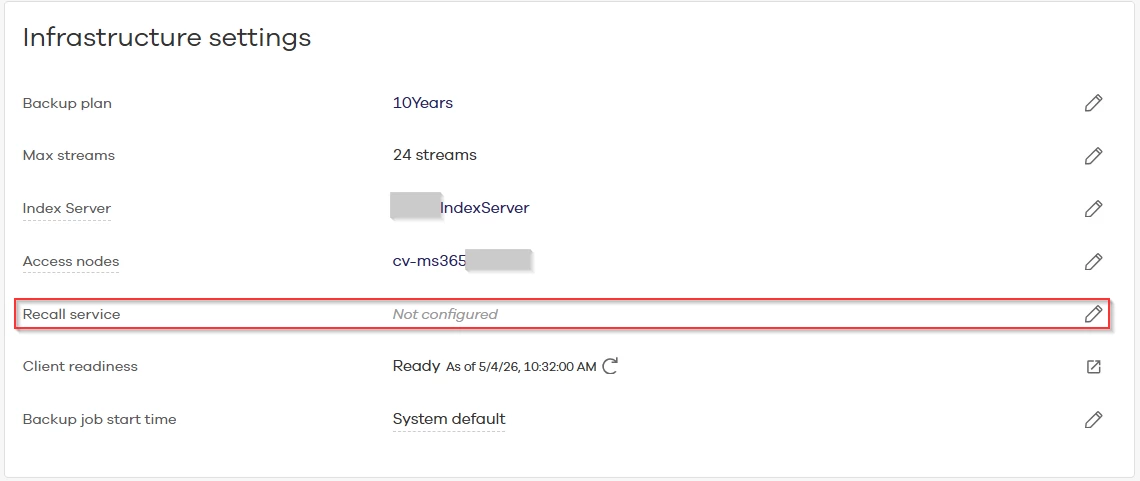
You can configure the recall URL in the Exchange mailbox application configuration (either office 365 or the older agent for on-prem/hybrid environments). This URL is stored in the stubs that replace archived mails.
If you already have this set to your current Command Center, changing this URL to your new server will not change the URL in the stubs that are already present in a user mailbox.
If you have an internet-facing Command Center/webserver, make sure you monitor the Commvault security advisory page Commvault Cloud Security Advisories as the web servers are usually the servers that have the most vulnerabilities.
You can configure the recall URL in the Exchange mailbox application configuration (either office 365 or the older agent for on-prem/hybrid environments). This URL is stored in the stubs that replace archived mails.
If you already have this set to your current Command Center, changing this URL to your new server will not change the URL in the stubs that are already present in a user mailbox.
If you have an internet-facing Command Center/webserver, make sure you monitor the Commvault security advisory page Commvault Cloud Security Advisories as the web servers are usually the servers that have the most vulnerabilities.
Kind regards,
Paul
Hi Paul,
Thanks a lot for your feedback.
Actually the recall URL is already configured and to use the internal WebServer and everything is workinf fine.
My concern is that now we need to access this URL from the outside network (Internet/VPN), for this we are deploying a CommandCenter in the DMZ network, how can we link this new DMZ CommandCenter with the URL (Internal WebServer) to allow end-users to access their archived emails ? I mean how the communication would be established from the CommandCenter if an end-user triggers an archived mail recall operation.
I had to verify this but Arlie confirms my thoughts about this.
There is no way to relay the recall as the recall URL points to your internal webserver. The recall URL needs to be updated on all stubs to point to the DMZ webserver. The DMZ webserver relays the request to necessary internal servers.
Network configuration needs to be added where the internal servers connect to the DMZ server to setup the tunnel connection for future recall requests but the DMZ webserver is not allowed to connect to the internal servers (one-way connection or via proxies).
Below the explanation written by Arlie. It does specify file recalls but that does not differ with mail recalls.
To enable recall operations (such as file recalls from stubs) via a DMZ web server in a Commvault environment, you must ensure proper network routing and firewall configuration between the external (DMZ) web server and the internal components that manage the recall process. Here are the key considerations and steps:
1. Network and Firewall Configuration
The DMZ web server must be able to communicate with the MediaAgent and file server where the data resides.
Required ports (such as 443 for HTTPS and any custom ports for recall operations) must be open between the DMZ web server and internal resources.
If using NAT or PAT, ensure that external traffic on port 443 is forwarded to port 443 on the DMZ web server. Incorrect mapping (e.g., forwarding 443 to 80) can cause redirect errors and failed recalls.
2. Web Server and URL Access
The recall operation is typically initiated from the Command Center or Web Console, accessed via the DMZ web server's public URL (e.g., https://dmz.example.com/commandcenter/).
The DMZ web server must be configured as a trusted proxy and be able to relay recall requests to the internal environment.
3. Recall Operation Flow
Users access the recall feature via the DMZ web server's public URL.
The DMZ web server forwards the recall request to the internal MediaAgent or file server.
The recalled file is then made available for download through the DMZ web server.
Because the URL is pointing to the external DMZ webserver URL, users that are inside your network will also connect to the outside DMZ webserver URL just like when they are outside your network so make sure they are able to do so.