



Question

Specifing Association for User Group

  • February 11, 2026
  • 3 replies
  • 12 views

Forum|alt.badge.img

I need a user which has the permission to enable/disable scheduler and kill/suspend jobs in the job controller. 

My problem is that I can’t select only the commserve as Association in the user group. The user shouldn’t be able to see more than the commserve object.

I can only select every entity, see in the following screenshot: 
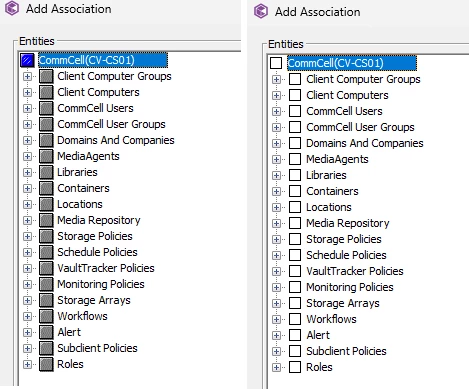
I added the following permissions:

Does anyone has a solution for thsi issue?

3 replies

Forum|alt.badge.img+15
  • Vaulter
  • February 12, 2026

Hi ​@euenal ,

These user may need some explicitly permission.

For some advanced operations related job controller permissions at the CommCell refer below document and try to map the security roles.

https://documentation.commvault.com/11.40/commcell-console/user_security_permissions_by_feature.html


Forum|alt.badge.img
  • Author
  • Novice
  • February 12, 2026

@Pradeep hey that doesnt help me. This user only should have permission to enable/disable scheduler and kill/suspend jobs in the job controller. Nothing more than that as it is required only to stop the commserve so the backup servers can be shut down without any problems.


Forum|alt.badge.img+15
  • Vaulter
  • February 14, 2026

Hi ​@euenal ,

Kindly create new role with required permission by following below options and assign the role to the user.

  1. Create a Role with Job Management Permission

    • Go to Manage > Security > Roles
    • Click Add Role
    • Name the role (e.g., "Job Controller Operator")
    • Select Job Management permission
  2. Assign Role to User

    • Go to Manage > Security > Users
    • Select the user
    • Assign the "Job Controller Operator" role
  3. https://documentation.commvault.com/11.40/software/managing_roles.html

