


SQL Log Backup – Log Commit default behavior

  • May 16, 2026 2:03 AM UTC
  • 3 replies
  • 73 views

Nikos.Kyrm
Community All Star
Forum|alt.badge.img+17

Hi all,


I’m looking into the default configuration for SQL transaction log backups in Commvault and noticed that log backup with caching (Log Commit) is enabled by default.


From what I understand, the log backups are first cached on the MediaAgent and then committed in batches to the CommServe based on a defined interval. I also see that even if log backups run frequently, they don’t appear as individual recovery points in the timeline, but are still used for point-in-time restores.

What I’m trying to understand is how useful this setup is in practice. Since log backups are not visible as recovery points in the timeline, does this approach actually help you in real scenarios?

Is anyone actively using this default behavior and finding it beneficial, even though you don’t see those recovery points directly?

Would be interested to hear your experience.


Best regards, 
Nikos

3 replies

Paul G
Explorer
Forum|alt.badge.img+2
  • Explorer
  • May 18, 2026 12:47 PM UTC

Hi ​@Nikos.Kyrm,

I must admit I have disabled all these log caching rules on our main MSP platform. But based on documentation, this feature will allow you to reduce load on the Commserve (less jobs = less load) while still having backups run during CommServe outage or outside backup windows.

Configurations for RPO

For point-in-time restores, the restore points do not matter as Commvault allows you to pick the exact time to restore to using the custom time field under the restore points bar. During restore, Commvault will replay all transactions up to the restore time to allow the database to be restored to a specific time that is not restricted by restore points.

Restoring a SQL Database In-Place

I think the choice to make this option default is a sensible one to ensure database logs are as protected as possible.

Hope this explanation makes the reason why this is enabled more clear.

Kind regards,

Paul


Nikos.Kyrm
Community All Star
Forum|alt.badge.img+17
  • Author
  • Community All Star
  • May 18, 2026 1:17 PM UTC

Hello ​@Paul G,

Thanks for your reply! Yes, I agree that in the documentation "Log Commit" is recommended, but still, how many backup admins are actually keep this option enabled?

Best regards,
Nikos


Lukas3D
Explorer
Forum|alt.badge.img+13
  • Explorer
  • Nov 2, 2026 11:26 AM UTC

Dump

Hello ​@Paul G,

Thanks for your reply! Yes, I agree that in the documentation "Log Commit" is recommended, but still, how many backup admins are actually keep this option enabled?

Best regards,
Nikos

I assume that majority still uses the old, more controllable setup. 


Bumping this question up, as still some clarification is required.


Based on Paul’s screenshot, it doesn’t seem possible to select the individual recovery points that should exist according to the log commit configuration. Currently, users can only select committed jobs from the timeline or job history, even though there should be additional recovery points available.

This makes the solution seem less granular than a standard t-log backup job, additionally database monitoring tools are not seeing these commits as actual t-log backups, so additional alerts are being triggered. 


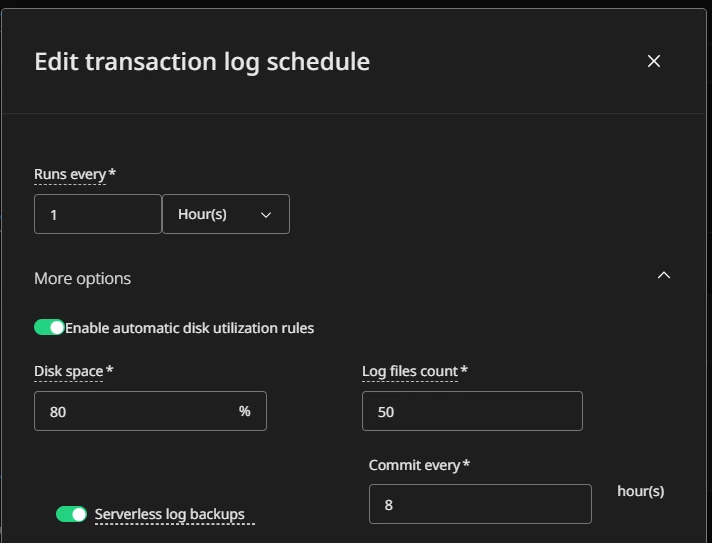
With the configuration below, I would expect the following behavior:

  • A t-log backup task is triggered every hour and the data is saved to backup storage directly by the commit task.
  • Based on the automatic disk utilization rules, the commit task periodically processes the accumulated data as a backup job.
  • Users should still be able to see and select all individual t-log recovery points from the timeline, not only the committed backup jobs.


Configuration screenshot for the reference